Geekee G350

Manuel d'utilisation des écouteurs sans fil Geekee G350

Modèle : G350

1. Introduction

The Geekee G350 True Wireless Earbuds offer a high-fidelity audio experience with advanced Bluetooth 5.0 technology. Designed for comfort and versatility, these in-ear headphones feature deep bass, crystal clear treble, and noise-cancelling capabilities. They are sweatproof with an IPX5 rating, making them suitable for sports and active use. The earbuds provide a stable connection, instant pairing, and extended battery life with their portable charging case.

Geekee G350 True Wireless Earbuds in charging case

Image 1: Geekee G350 True Wireless Earbuds in their charging case.

2. Contenu du colis

Veuillez vérifier que tous les articles sont présents dans votre colis :

  • Geekee G350 Earphone x 2 (Left and Right Earbuds)
  • Étui de chargement x 1
  • Regular Ear Tips (Sizes S, M, L, XL) x 4 Pairs
  • Rubber Ear Pieces x 2 Pairs
  • Câble de chargement x 1
  • Manuel d'utilisation x 1
Contents of the Geekee G350 Earbuds package

Image 2: All items included in the Geekee G350 package.

3. Installation

3.1 Appariement initial

For the first-time use, follow these steps to pair your Geekee G350 earbuds:

  1. Retirez le film protecteur : Before charging or first use, remove the plastic protective film from the charging contact points located on the bottom of each earbud.
  2. Écouteurs de charge : Place both earbuds back into the charging case and allow them to charge for a short period.
  3. Automatic Power On & Pairing Mode: Retirez les deux écouteurs de l'étui de chargement. Ils s'allumeront automatiquement et passeront en mode appairage.
  4. Connectez-vous via Bluetooth : On your smartphone or Bluetooth-enabled device, go to the Bluetooth settings menu and select "Geekee G350" to connect.

After the initial connection, the earbuds will automatically turn on and connect to your smartphone when removed from the case, and automatically turn off and charge when placed back in the case.

Steps for instant pairing of Geekee G350 earbuds

Image 3: Visual guide for initial pairing of the earbuds.

3.2 Chargement

The earbuds and charging case have separate battery capacities and charging times:

  • Capacité de la batterie des écouteurs : 50mAh/3.7V per earbud.
  • Temps de charge des écouteurs: Environ 1.5 heures pour une charge complète.
  • Capacité de la batterie du boîtier de charge: 500 mAh / 3.7 V.
  • Temps de charge du boîtier de charge : Environ 2.5 heures pour une charge complète.

The charging case provides additional power, extending the total playtime. A fully charged case can boost the earbuds' playtime from 3-3.5 hours to 15 hours. In mono mode, using one earbud while the other charges, playtime can be extended up to 28 hours.

Battery life and charging times for Geekee G350 earbuds

Image 4 : Terminéview of battery life and charging specifications.

4. Mode d'emploi

4.1 Commandes des écouteurs

Each earbud features a multi-function button and an LED indicator. Refer to the diagram below for control functions:

Geekee G350 earbud function button and LED indicator guide

Image 5: Detailed functions of the earbud button and LED indicator.

  • Lecture/Pause : Appuyez une fois sur le bouton de fonction.
  • Piste suivante : Press the function button for 2 seconds (Right earbud).
  • Piste précédente: Press the function button for 2 seconds (Left earbud).
  • Activer l'assistant vocal (Siri) : Appuyez deux fois sur le bouton de fonction.
  • Répondre/Terminer l'appel : Appuyez une fois sur le bouton de fonction.
  • Rejeter l'appel : Appuyez sur le bouton de fonction pendant 2 secondes.

The LED indicator displays charging status and Bluetooth connection status.

4.2 Modes d'écoute

The Geekee G350 earbuds support two listening modes:

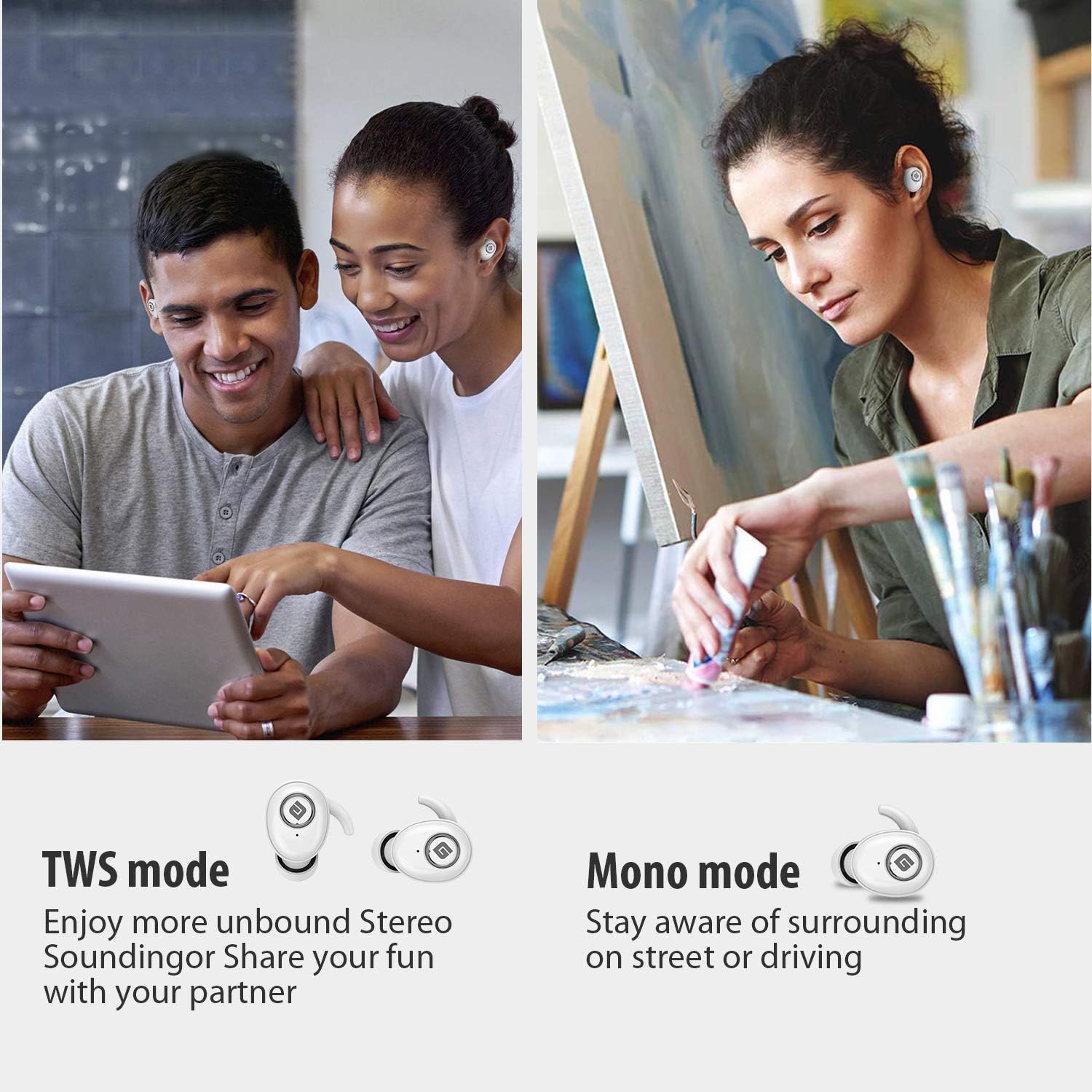
  • Mode TWS (véritable stéréo sans fil) : Use both earbuds simultaneously for a full stereo sound experience. This mode is ideal for immersive audio.
  • Mode mono: Use a single earbud (only the Right earbud supports mono mode) to stay aware of your surroundings, such as when driving or walking in public.
Illustration of TWS and Mono listening modes for earbuds

Image 6: Comparison of TWS and Mono listening modes.

5. Entretien

  • Entretien de la batterie: Keep your headphones charged when the battery life is low to ensure optimal Bluetooth connection and protect the battery's longevity.
  • Sélection des embouts auriculaires : Choose suitable ear tips and wear your headphones snugly, especially during physical activities like running or cycling. This helps reduce wind noise and ensures a secure fit.
  • Nettoyage: Regularly clean the earbuds and charging case with a soft, dry cloth to prevent dust and debris buildup. Avoid using harsh chemicals or abrasive materials.
  • Stockage: Lorsqu'ils ne sont pas utilisés, rangez les écouteurs dans leur étui de chargement pour les protéger et maintenir leur charge. Conservez-les dans un endroit frais et sec, à l'abri des températures extrêmes.
  • Résistance à l'eau : The earbuds are IPX5 sweatproof, meaning they can resist a sustained, low-pressure water jet spray. They are not designed for submersion in water.

6. Dépannage

If you encounter issues with your Geekee G350 earbuds, please refer to the following common solutions:

  • Les écouteurs ne chargent pas :
    • Ensure the plastic protective film has been removed from the charging contacts on the earbuds.
    • Vérifiez que le câble de chargement est bien connecté à la fois au boîtier et à une source d'alimentation.
    • Vérifiez si le boîtier de charge lui-même dispose d'une charge de batterie suffisante.
  • Les écouteurs ne s'appairent pas/ne se connectent pas :
    • Assurez-vous que Bluetooth est activé sur votre appareil.
    • Ensure the earbuds are fully charged and out of the charging case.
    • Forget "Geekee G350" from your device's Bluetooth settings and attempt to pair again.
    • Essayez de redémarrer votre appareil et vos écouteurs.
  • Sound Issues (Low Volume, Distortion):
    • Réglez le volume à la fois sur votre appareil connecté et sur les écouteurs.
    • Ensure ear tips are correctly sized and provide a snug fit to optimize sound quality and noise isolation.
    • Nettoyez les haut-parleurs des écouteurs de tout débris.
  • Un seul écouteur fonctionne :
    • Assurez-vous que les deux écouteurs sont chargés.
    • Place both earbuds back into the charging case, close the lid, wait a few seconds, then take them out again to re-establish the stereo connection.
    • If the issue persists, try resetting the earbuds (refer to the full user manual for specific reset instructions if available).

7. Spécifications

Fonctionnalité Détail
Norme Bluetooth V5.0
Pro sans filfile HFP, HSP, A2DP, AVRCP
Plage de fonctionnement 10 m (33 pieds)
Vol de chargetage CC 5 V 1 A
Temps de veille 160 heures
Talk / Playing Time 2~3 hours (single charge), up to 15 hours with charging case, up to 28 hours in mono mode
Temps de charge (casque) 1.5 heures
Temps de charge (boîtier de charge) 2.5 heures
Capacité de la batterie (casque) 50mAh/3.7V
Capacité de la batterie (boîtier de chargement) 500mAh/3.7V
Poids de l'article 1.76 onces (environ 50 g)
Dimensions du produit 0.8 x 0.4 x 0.4 inches (per earbud)
Résistance à l'eau IPX5 résistant à la transpiration
Contrôle du bruit Annulation active du bruit
Microphone Compris

8. Garantie et assistance

Geekee is committed to providing high-quality service and professional support for its products. For any technical assistance or inquiries, please contact our support team.

  • Support technique : Lifetime technical help is available.
  • Temps de réponse : Les demandes de renseignements reçoivent généralement une réponse dans un délai de 24 heures.
  • Courriel de contact : support@getgeekee.com
Geekee customer support contact information

Image 7: Geekee customer support details.

Vidéo officielle du produit

Vidéo 1 : Un officiel surview of the Geekee G350 True Wireless Earbuds, highlighting key features and design.