
Homtime C1
Homtime C1 Digital Alarm Clock User Manual
Modèle: C1
1. Introduction
Merci pour votre achatasing the Homtime C1 Digital Alarm Clock. This device combines a digital alarm clock with dual USB charging ports, offering convenience and functionality for your bedside or office. Its user-friendly design, featuring a rotary button and dimmable LCD screen, ensures ease of use for all ages. Please read this manual thoroughly before operation to ensure proper use and maintenance.

Image: The Homtime C1 Digital Alarm Clock, turquoise in color, displayed on a wooden surface with a succulent plant in the background. The clock shows the time 20:08 and an alarm set for 15:00.
2. Consignes de sécurité
Pour garantir un fonctionnement sûr et éviter tout dommage, veuillez respecter les précautions suivantes :
- N’exposez pas l’appareil à l’eau ou à une humidité excessive.
- Évitez de placer l'appareil à proximité de sources de chaleur telles que des radiateurs, des bouches de chauffage, des poêles ou d'autres appareils (y compris amp(échangeurs thermiques) qui produisent de la chaleur.
- Use only the power adapter and charging cable provided or recommended by Homtime.
- N’essayez pas de démonter, de réparer ou de modifier l’appareil vous-même. Confiez toute intervention à un technicien qualifié.
- Gardez l'appareil à l'écart des champs magnétiques puissants.
- Nettoyer uniquement avec un chiffon sec.
3. Contenu du colis
Veuillez vérifier que le colis contient les éléments suivants :
- Homtime C1 Digital Alarm Clock
- Adaptateur secteur
- Charging Cable (Multi-connector for various mobile phones)
- Manuel d'utilisation

Image: A gold-colored multi-connector charging cable with USB-A, Micro USB, Lightning, and USB-C connectors, indicating its versatility for various mobile devices.
4. Produit terminéview
Familiarize yourself with the different parts of your Homtime C1 alarm clock:
- Devant: Large LCD display for time and alarm.
- Haut: Rotary button for setting time/alarm, snooze/dimmer button, alarm ON/OFF button.
- Dos: Port d'entrée d'alimentation.
- Côté (droit) : Deux ports de charge USB.

Image: A composite image showing various angles of the Homtime C1 Digital Alarm Clock, including front, top, side, and bottom views, highlighting its compact design and port locations.
5. Installation
- Connecter l'alimentation : Plug the provided power adapter into the DC input port on the back of the alarm clock, then plug the adapter into a standard wall outlet. The display will light up.
- Réglage initial de l'heure : The clock will typically display a default time. To set the correct time, proceed to the 'Setting Time' section under Operating Instructions.
6. Mode d'emploi
6.1 Réglage du temps
- Press and hold the rotary button on top of the clock until the hour digits start blinking.
- Rotate the button clockwise or counter-clockwise to adjust the hour.
- Press the rotary button once to switch to minute adjustment.
- Rotate the button to adjust the minutes.
- Press the rotary button again to confirm the time and exit time setting mode.
6.2 Réglage de l'alarme
- Press and hold the alarm setting button (bell icon) on top of the clock until the alarm hour digits start blinking.
- Rotate the rotary button to adjust the alarm hour.
- Press the alarm setting button once to switch to alarm minute adjustment.
- Rotate the rotary button to adjust the alarm minutes.
- Press the alarm setting button again to confirm the alarm time.
- To activate or deactivate the alarm, press the alarm ON/OFF button (next to the rotary button). An alarm icon will appear on the display when activated.

Image: A person's hand with green nail polish is shown pressing the large circular button on top of a white Homtime C1 alarm clock, demonstrating the interaction for setting time or alarm.
6.3 Fonction de répétition
When the alarm sounds, press the large rotary button on top of the clock to activate the snooze function. The alarm will pause for a few minutes (default snooze time is typically 9 minutes) and then sound again. To turn off the alarm completely, press the alarm ON/OFF button.
6.4 Display Brightness (Dimmable)
The Homtime C1 features an auto-dimmable display. The brightness adjusts automatically based on ambient light conditions. You can also manually adjust the brightness by briefly pressing the snooze/dimmer button (usually the large rotary button or a dedicated button next to it) to cycle through different brightness levels.
6.5 ports de chargement USB
The Homtime C1 is equipped with dual USB charging ports (5V/2.1A) on its side, allowing you to charge your mobile devices directly from the clock. Simply connect your device's USB charging cable to one of the ports. These ports are compatible with most smartphones and tablets, including iPhone and Android devices.
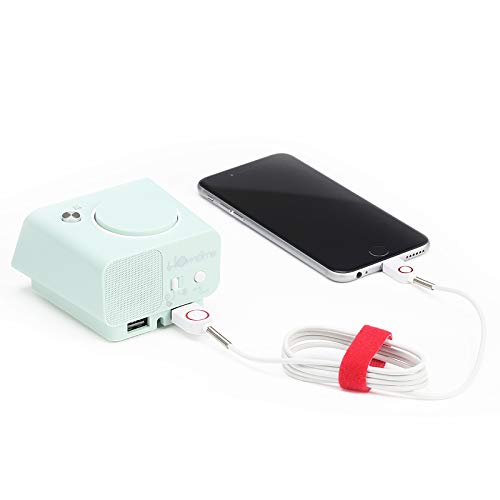
Image: The Homtime C1 alarm clock, turquoise in color, with a white charging cable connected to its side USB port, actively charging a black smartphone. This illustrates the dual USB charging capability.
7. Entretien
- Nettoyage: Use a soft, dry cloth to clean the surface of the clock. Do not use liquid cleaners or aerosol sprays.
- Stockage: Si vous devez ranger l'appareil pendant une période prolongée, débranchez-le de la prise de courant et rangez-le dans un endroit frais et sec.
- Évitez les impacts : Do not drop or subject the clock to strong impacts, as this may damage internal components.
8. Dépannage
| Problème | Cause possible | Solution |
|---|---|---|
| L'affichage de l'horloge est éteint. | Pas de connexion électrique. | Assurez-vous que l'adaptateur secteur est bien branché à l'horloge et à la prise murale. |
| L'alarme ne sonne pas. | L'alarme n'est pas activée ou est mal réglée. | Check if the alarm icon is displayed. Re-set the alarm time. |
| Le chargement USB ne fonctionne pas. | Problème de câble ou incompatibilité de l'appareil. | Essayez un autre câble USB. Assurez-vous que votre appareil est compatible avec une charge de 5 V/2.1 A. |
| Écran trop sombre/lumineux. | Auto-dimming or manual setting. | Briefly press the snooze/dimmer button to cycle through brightness levels. |
9. Spécifications
- Marque: L'heure de la maison
- Modèle: C1
- Couleur: Turquoise (Green)
- Type d'affichage : LCD numérique
- Caractéristiques spéciales : Alarm, Auto Dimmable, Snooze, Dual USB Charging Ports
- Source d'alimentation : Électrique avec fil
- Matériel: Acrylonitrile Butadiène Styrène, Plastique
- Type de montage : Dessus de table
- Sortie USB : 5V/2.1A (Total for both ports)
- Dimensions: (Se référer à l'emballage du produit pour connaître les dimensions exactes)
- Pays d'origine : Chine
10. Garantie et assistance
Homtime products are designed and manufactured to the highest quality standards. For information regarding warranty coverage, please refer to the warranty card included with your product or visit the official Homtime website. For technical support or service inquiries, please contact Homtime customer service through the contact information provided on the product packaging or website.
Veuillez conserver votre reçu d'achat comme preuve d'achat à des fins de garantie.
Ask a question about this manual
Ask about setup, troubleshooting, compatibility, parts, safety, or missing instructions. Manuals+ will review the question and use this page’s manual context to help answer it.