
Technical Precision T0021
Technical Precision Replacement Battery User Manual
Modèle : T0021
Produit terminéview
This manual provides essential information for the safe and effective use of your Technical Precision Replacement Battery, designed for Magellan T0021 devices. This battery is a high-quality replacement unit, not manufactured by Magellan, intended to restore power and functionality to your compatible device.
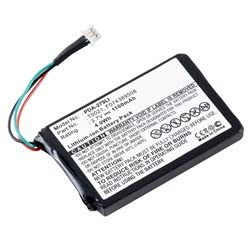
An image showing the Technical Precision replacement battery for Magellan T0021, featuring its compact rectangular shape, attached wires with a connector, and label displaying model number PDA-279LJ, part number T0021, 3.7V, and 1100mAh capacity.
Configuration et installation
Before installing the new battery, ensure your device is powered off and disconnected from any power sources. Refer to your Magellan T0021 device's original manual for specific instructions on accessing and replacing its internal battery compartment.
- Appareil hors tension : Completely shut down your Magellan T0021 device.
- Localiser le compartiment à piles : Identify and open the battery compartment on your device. This may require a small screwdriver or specific tools depending on the device model.
- Retirer l'ancienne batterie : Carefully disconnect and remove the old battery. Note the orientation and connection type.
- Insérer une nouvelle batterie : Align the Technical Precision replacement battery with the connectors in the device's battery compartment. Gently push it into place, ensuring a secure connection.
- Compartiment sécurisé : Fermez et verrouillez le compartiment à piles.
- Charge initiale: It is recommended to fully charge the new battery before its first use. Connect your device to its charger and allow it to charge until the battery indicator shows full capacity.
Note: Proper disposal of the old battery is crucial. Follow local regulations for battery recycling.
Mode d'emploi
Once installed and fully charged, your Technical Precision replacement battery will power your Magellan T0021 device as intended. The battery is rechargeable, allowing for repeated use.
- Chargement : Recharge the battery using the original charger supplied with your Magellan T0021 device. Avoid using unapproved chargers.
- Autonomie de la batterie : L'autonomie de la batterie variera en fonction de l'utilisation de l'appareil, des paramètres et des conditions environnementales.
- Performances optimales : For optimal battery performance, avoid frequently draining the battery completely before recharging.
Entretien
Un entretien adéquat peut prolonger la durée de vie de votre batterie.
- Température: Store and operate the battery within recommended temperature ranges (typically 0°C to 45°C or 32°F to 113°F). Extreme temperatures can degrade battery performance and lifespan.
- Stockage: If storing the device or battery for an extended period, ensure the battery is charged to approximately 50-70% capacity. Store in a cool, dry place.
- Nettoyage: Keep battery contacts clean and free of dust or debris. Use a dry, soft cloth if cleaning is necessary. Do not use liquids.
- Évitez les dommages physiques : Do not puncture, drop, or expose the battery to excessive force.
Dépannage
Si vous rencontrez des problèmes avec votre batterie de remplacement, tenez compte des points suivants :
- L'appareil ne s'allume pas :
- Ensure the battery is correctly installed and fully seated in its compartment.
- Verify the battery is charged. Connect the device to its charger for at least 30 minutes.
- Check if the device itself is functioning correctly with another known good power source, if possible.
- La batterie ne charge pas :
- Confirm the charger and charging cable are working correctly and are compatible with your device.
- Vérifiez que le port de chargement de votre appareil ne présente aucun débris ni dommage.
- Ensure the battery is properly connected inside the device.
- Durée de vie de la batterie courte :
- Review your device's settings; high screen brightness, GPS usage, and continuous connectivity can drain the battery faster.
- Ensure the battery has completed several charge/discharge cycles to reach optimal capacity.
- Les températures extrêmes peuvent affecter les performances de la batterie.
If problems persist after following these steps, contact Technical Precision customer support or a qualified service technician.
Caractéristiques
| Fonctionnalité | Détail |
|---|---|
| Marque | Précision technique |
| Nom du modèle | T0021 (Replacement) |
| ASIN | B07QS3HTW3 |
| Réutilisabilité | Rechargeable |
| Nombre d'unités | 1.00 Nombre |
| Fabricant | Précision technique |
| Date de première disponibilité | 8 décembre 2022 |
Garantie et assistance
For specific warranty information regarding your Technical Precision Replacement Battery, please refer to the documentation provided at the time of purchase or contact Technical Precision directly. This manual does not include warranty details.
For technical support or inquiries, please contact Technical Precision customer service. Visit the official Technical Precision store on Amazon for contact information or additional product details: Technical Precision Store