
1. Introduction
This manual provides detailed instructions for the operation and maintenance of your Trexonic TRX-68B-AMZ 3-Speed Turntable System. Please read this manual thoroughly before using the product to ensure proper function and to prevent damage.
2. Consignes de sécurité
- N'exposez pas l'appareil à la pluie ou à l'humidité.
- Ne bloquez aucune ouverture de ventilation.
- Assurez-vous que le cordon d’alimentation n’est pas pincé ou piétiné.
- Débranchez l'appareil pendant les orages ou lorsqu'il n'est pas utilisé pendant de longues périodes.
- Confiez toute intervention d'entretien à un personnel qualifié.
3. Contenu du colis
Vérifiez que tous les articles sont présents dans l'emballage :
- Trexonic TRX-68B-AMZ Main Unit
- Wired Shelf Speakers (2)
- Télécommande
- Manuel de l'utilisateur (ce document)
- Adaptateur secteur

Figure 3.1: Trexonic TRX-68B-AMZ Turntable System with included wired shelf speakers.
4. Produit terminéviewCommandes et fonctionnalités
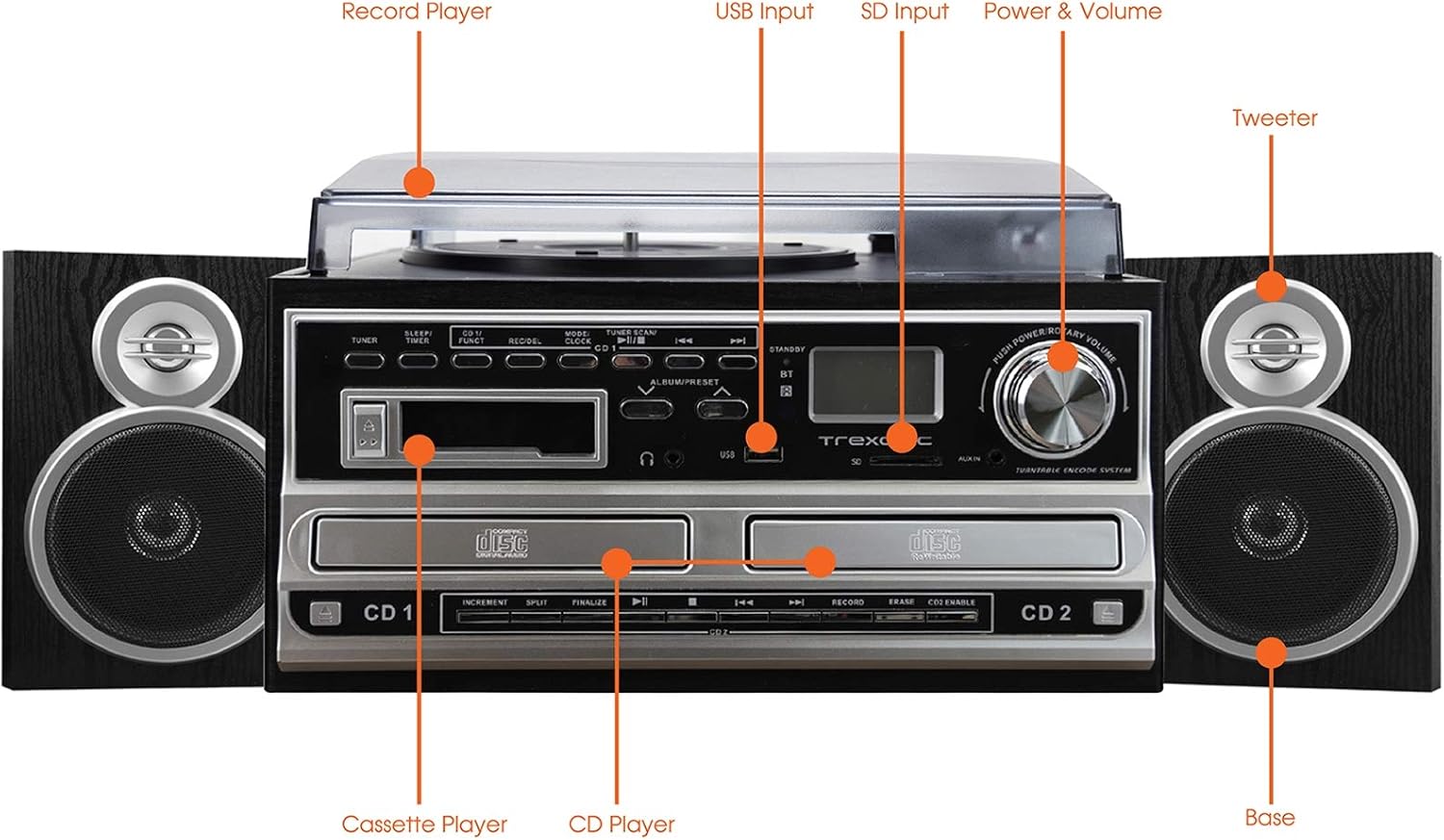
Figure 4.1: Front panel and top view of the Trexonic TRX-68B-AMZ with key components labeled.
- Tourne-disque : Pour écouter des disques vinyles.
- Entrée USB: Connect USB drives for playback or recording.
- Entrée SD : Insert SD cards for playback or recording.
- Bouton marche/arrêt et volume : Permet de contrôler la mise en marche/arrêt et le volume audio.
- tweeter: High-frequency speaker component.
- Base (Woofer): Low-frequency speaker component.
- Lecteur CD: For playing audio CDs and CD recording.
- Lecteur de cassettes : Pour lire et enregistrer des cassettes audio.
5. Installation
5.1 Déballage
Retirez soigneusement tous les composants de l'emballage. Conservez les matériaux d'emballage pour un transport ou un stockage ultérieur.
5.2 Connexion des enceintes
Connect the wired shelf speakers to the speaker output terminals on the rear of the main unit. Ensure correct polarity (positive to positive, negative to negative) for optimal sound quality.
5.3 Connexion d'alimentation
Plug the power adapter into the DC IN jack on the back of the unit, then plug the other end into a standard wall outlet (AC 100-240V, 50/60Hz).
6. Mode d'emploi
6.1 Commandes générales
- Bouton d'alimentation/volume : Tournez pour allumer/éteindre l'appareil et régler le volume.
- Bouton Mode/Fonction : Press to cycle through different modes (Turntable, CD, Cassette, FM, USB, SD, AUX, Bluetooth).
6.2 Fonctionnement du plateau tournant

Figure 6.1 : Gros plan view of the turntable platter and tonearm.
- Soulevez le cache-poussière.
- Placez un disque sur le plateau.
- Sélectionnez la vitesse appropriée (33, 45 ou 78 tr/min) à l'aide du sélecteur de vitesse.
- Move the tonearm to the desired position on the record. The platter will begin to spin automatically.
- Lower the tonearm gently onto the record.
- Pour arrêter la lecture, soulevez le bras de lecture et remettez-le en position initiale.
6.3 Fonctionnement du lecteur CD
- Press the Mode/Function button to select CD mode.
- Appuyez sur le bouton OPEN/CLOSE pour ouvrir le plateau CD.
- Placez le CD avec l'étiquette vers le haut.
- Press the OPEN/CLOSE button to close the tray. The CD will begin playing automatically.
- Utilisez les boutons PLAY/PAUSE, STOP, SKIP FORWARD et SKIP BACKWARD pour contrôler la lecture.
6.4 Fonctionnement du lecteur de cassettes

Figure 6.2 : Gros plan view of the cassette player slot.
- Press the Mode/Function button to select Cassette mode.
- Insérez une cassette audio dans la fente prévue à cet effet.
- Use the PLAY, PAUSE, FAST FORWARD, REWIND, and STOP buttons for control.
Fonctionnement de la radio FM 6.5
- Press the Mode/Function button to select FM Radio mode.
- Use the TUNER knob or SEEK buttons to find radio stations.
- Press the PRESET button to save or recall favorite stations.
6.6 Lecture USB/SD
- Insérez une clé USB dans le port USB ou une carte SD dans l'emplacement pour carte SD.
- Press the Mode/Function button to select USB or SD mode.
- L'appareil détectera et lira automatiquement les fichiers audio compatibles. files.
- Utilisez les boutons PLAY/PAUSE, STOP, SKIP FORWARD et SKIP BACKWARD pour contrôler la lecture.
6.7 Fonctions d'enregistrement
The Trexonic TRX-68B-AMZ allows recording from various sources to USB or SD card.
- Recording from Vinyl, CD, Cassette, or AUX to USB/SD:
- Insérez une clé USB ou une carte SD dans l'emplacement correspondant.
- Select the desired source mode (Turntable, CD, Cassette, or AUX).
- Begin playback of the source material.
- Press the RECORD button. The recording indicator will illuminate.
- Appuyez sur le bouton STOP pour arrêter l'enregistrement.
7. Entretien
7.1 Nettoyage de l'appareil
Wipe the unit with a soft, dry cloth. Do not use abrasive cleaners or solvents. For the dust cover, use a soft cloth and a mild detergent solution if necessary, then wipe dry.
7.2 Entretien et remplacement du stylet
The turntable stylus (needle) is a delicate component. Clean it periodically with a soft brush, brushing from back to front. A worn stylus can damage records and degrade sound quality. Replace the stylus approximately every 300-500 hours of playback, or if you notice a decrease in sound quality or increased record wear.
8. Dépannage
| Problème | Cause possible | Solution |
|---|---|---|
| Pas de courant | Cordon d'alimentation non branché ; prise de courant défectueuse | Vérifiez que le cordon d'alimentation est bien branché ; essayez une autre prise. |
| Pas de son | Volume too low; Speakers not connected; Incorrect mode selected | Increase volume; Check speaker connections; Select correct input mode. |
| La platine ne tourne pas | Unit not powered on; Tonearm not moved over platter | Turn on unit; Move tonearm over the record to activate platter. |
| Le CD ne joue pas | CD inserted incorrectly; CD scratched/dirty; Incorrect mode | Reinsert CD correctly; Clean or replace CD; Select CD mode. |
| Problèmes d'enregistrement | USB/SD full or incompatible; Source not playing | Check USB/SD capacity and format; Ensure source is playing during recording. |
9. Spécifications
| Fonctionnalité | Spécification |
|---|---|
| Marque | Trexonique |
| Numéro de modèle | TRX-68B-AMZ |
| Vitesses du plateau tournant | 33 / 45 / 78 tr/min |
| Formats d'enregistrement | MP3 (to USB/SD) |
| Média de lecture | Vinyl, CD, Cassette, FM Radio, USB, SD, AUX, Bluetooth |
| Composants inclus | Remote Control, Wired Shelf Speakers |
| Source d'énergie | Électrique avec fil |
| Dimensions (paquet) | 56.64 x 35.56 x 26.67 cm |
| Poids (colis) | 6.89 kg |
10. Informations sur la garantie
Trexonic products are designed and manufactured to the highest quality standards. For specific warranty details, please refer to the warranty card included with your product or contact Trexonic customer support. Keep your purchase receipt as proof of purchase.
11. Assistance clientèle
If you encounter any issues not covered in this manual or require further assistance, please contact Trexonic customer support. Contact information can typically be found on the manufacturer's official website ou sur l'emballage du produit.