
Introduction
This manual provides instructions for the TOUMEI C800 Series replacement remote control, compatible with TOUMEI, COCAR, AEHR, Yaufey, and VANKYO mini projectors, including models C800S, C800W, C800A, and C800. Please read this manual carefully before use to ensure proper operation and longevity of your device.
Produit terminéview
The TOUMEI C800 Series remote control is designed for intuitive operation of your compatible mini projector, offering convenient access to various functions.
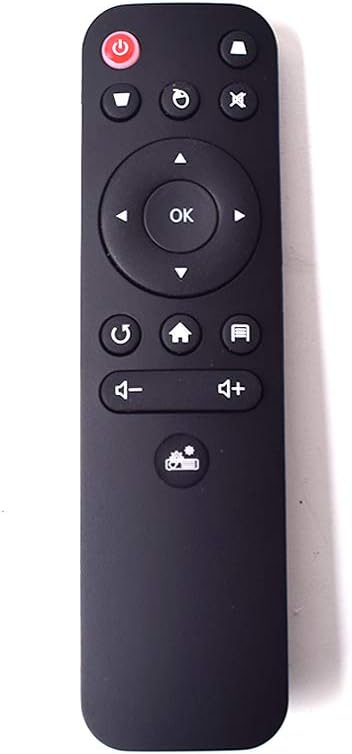
Image : Avant view of the TOUMEI C800 Series remote control, showing all buttons including power, navigation, volume, and function keys.
Disposition de la télécommande
- Bouton d'alimentation: Allume ou éteint le projecteur.
- Bouton muet: Mutes or unmutes audio output.
- Bouton Menu: Accesses projector settings or menu options.
- Bouton source: Selects the input source (e.g., HDMI, USB).
- Pavé de navigation (Haut, Bas, Gauche, Droite)Permet de naviguer dans les menus et les options.
- Bouton OK: Confirms selections or opens items.
- Bouton Retour/Retour: Retour à l'écran ou au menu précédent.
- Bouton d'accueil: Returns to the main home screen of the projector.
- Bouton de réduction du volumeDiminue le volume audio.
- Bouton d'augmentation du volumeAugmente le volume audio.
- Focus/Keystone Correction Button: Adjusts image focus or keystone distortion.
Installation
Installation de la batterie
La télécommande nécessite deux piles AAA (non incluses) pour fonctionner.
- Localisez le couvercle du compartiment à piles à l'arrière de la télécommande.
- Gently slide the cover downwards or press the tab and lift to open the compartment.
- Insérez deux piles AAA en veillant à ce que les bornes positive (+) et négative (-) soient correctement alignées avec les marquages à l'intérieur du compartiment.
- Remettez le couvercle du compartiment à piles en le faisant glisser en place jusqu'à ce qu'il s'enclenche correctement.

Image : Côté view of the remote control, highlighting the battery compartment release tab for opening.

Image: The remote control with its battery compartment open, clearly showing the slots for two AAA batteries and polarity markings.
Mode d'emploi
For optimal performance, point the remote control directly at the projector's infrared receiver.
Fonctions de base
- Marche/Arrêt:Appuyez sur le Bouton d'alimentation once to turn the projector on or off.
- Navigation:Utilisez le Pavé de navigation (Up, Down, Left, Right arrows) to move through menus and options on the projector screen.
- Sélection:Appuyez sur le Bouton OK to confirm a selection or open an item.
- Contrôle du volume:Utilisez le Augmenter le volume et Baisser le volume boutons pour régler le niveau audio.
- Muet Audio:Appuyez sur le Bouton muet to temporarily silence the audio. Press again to unmute.
- Écran d'accueil:Appuyez sur le Bouton d'accueil to return to the projector's main interface.
- Retour/Retour:Appuyez sur le Bouton Retour/Retour to go to the previous menu or screen.
- Sélection de la source d'entrée:Appuyez sur le Bouton source to cycle through available input sources (e.g., HDMI 1, HDMI 2, USB, AV).
- Menu/Paramètres:Appuyez sur le Bouton Menu to access the projector's settings menu.
- Focus / Keystone: Use the dedicated Focus/Keystone Correction Button to adjust image clarity or shape as needed.
Entretien
Nettoyage
Wipe the remote control with a soft, dry cloth. Do not use liquid cleaners, abrasive materials, or solvents, as these can damage the surface or internal components.
Stockage
Store the remote control in a cool, dry place away from direct sunlight and extreme temperatures. If the remote control will not be used for an extended period, remove the batteries to prevent potential leakage and damage.
Dépannage
| Problème | Solution |
|---|---|
| La télécommande ne répond pas. |
|
| Buttons are not working correctly or are sticky. |
|
| Remote control does not work with my TV. | This remote control is specifically designed for compatible TOUMEI C800 series mini projectors and is not intended for use with televisions or other non-projector devices. |
Caractéristiques
- Marque: TOUMEI
- Nom du modèle: C800S-RM (Compatible with C800S, C800W, C800A, C800 series projectors)
- Couleur: Noir
- Technologie de connectivité: Infrarouge
- Appareils compatibles: Mini Projectors (TOUMEI, COCAR, AEHR, Yaufey, VANKYO C800 Series)
- Nombre de boutons: 10
- Portée maximale: 10 mètres (environ 33 pieds)
- Type de batterie: 2 piles AAA (non incluses)
- Dimensions de la télécommande: 13.8 x 3.8 x 1.8 cm (environ 5.43 x 1.50 x 0.71 pouces)
- Poids de l'article: 100 grammes (environ 3.53 onces)
Garantie et assistance
Specific warranty information for this replacement remote control is not provided in the product details. For warranty claims or technical support, please contact the seller or manufacturer directly through your purchase platform.
Please refer to the original product packaging or purchase documentation for detailed warranty terms and conditions, if available.
Avis important
This remote control is designed exclusively for compatible mini projectors and is not suitable for televisions or other devices. Compatibility with specific projector models (C800S, C800W, C800A, C800) is confirmed. If you are unsure about compatibility with your specific projector model, please consult the seller before making a purchase to avoid inconvenience.