
Introduction
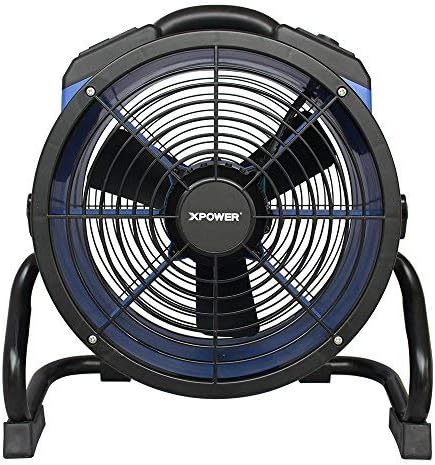
This manual provides essential information for the safe and efficient operation, maintenance, and troubleshooting of your XPOWER X-35AR Pro Industrial Axial Fan. Please read all instructions carefully before use and retain this manual for future reference.
Consignes de sécurité
- Veillez toujours à placer le ventilateur sur une surface stable et plane.
- Ne faites pas fonctionner le ventilateur avec un cordon ou une prise endommagés.
- Tenez les enfants et les animaux domestiques éloignés du ventilateur pendant son fonctionnement.
- Avoid placing objects through the fan grilles.
- Débranchez le ventilateur de la prise de courant avant de le nettoyer ou d'effectuer toute opération d'entretien.
- This fan is designed for indoor use in high-temperature environments up to 180°F (82°C). It does not produce heat.
Installation
Follow these steps to set up your XPOWER X-35AR Pro Axial Fan:
- Déballage: Carefully remove the fan from its packaging. Inspect for any damage during transit.
- Placement: Position the fan on a firm, flat surface. Ensure there is adequate clearance around the intake and exhaust grilles for optimal airflow.
- Rack/Stand Adjustment: The fan includes a rack/stand that allows for 360-degree rotation. Loosen the adjustment knobs on the sides of the stand to tilt the fan to your desired angle. Tighten the knobs securely to lock the position.

Mode d'emploi
To operate your XPOWER X-35AR Pro Axial Fan:
- Connexion électrique : Branchez le cordon d'alimentation du ventilateur dans une prise électrique standard.
- Marche/Arrêt : Locate the power switch or button on the control panel. Press to turn the fan ON. Press again to turn it OFF.
- Contrôle de vitesse variable : The fan features variable speed control. Use the designated knob or buttons to adjust the airflow intensity from low to high, according to your requirements.
- Prises de courant intégrées : The fan is equipped with built-in power outlets. These allow you to daisy-chain multiple XPOWER fans for extended coverage or to power other compatible devices (e.g., power tools, mobile phone chargers). Ensure the total current draw does not exceed the fan's rated capacity.
- Réglage de la direction du flux d'air : Loosen the side knobs on the stand, adjust the fan to the desired angle (up to 360 degrees), and then re-tighten the knobs to secure its position.
Entretien
Un entretien régulier garantit des performances optimales et une longue durée de vie à votre ventilateur :
- Nettoyage: Disconnect the fan from the power source before cleaning. Use a soft, damp cloth to wipe down the exterior surfaces. For the grilles and blades, use a vacuum cleaner with a brush attachment or compressed air to remove dust and debris. Do not use harsh chemicals or abrasive cleaners.
- Stockage: When not in use, store the fan in a clean, dry place. The fan can be stacked up to 5 units high for efficient storage or transportation. Wrap the 20 ft. power cord around the integrated cord wrap for neat storage.
Dépannage
| Problème | Cause possible | Solution |
|---|---|---|
| Le ventilateur ne s'allume pas. | No power supply; power cord not fully plugged in; circuit breaker tripped. | Vérifiez la prise de courant ; assurez-vous que le cordon est bien branché ; réenclenchez le disjoncteur. |
| Débit d'air réduit. | Grilles or blades are obstructed by dust/debris. | Unplug fan and clean grilles and blades as per maintenance instructions. |
| Bruit inhabituel pendant le fonctionnement. | Loose components; debris inside the fan. | Unplug fan and inspect for loose parts or foreign objects. If noise persists, contact customer support. |
Caractéristiques
| Fonctionnalité | Détail |
|---|---|
| Numéro de modèle | X-35AR Pro |
| Marque | Puissance X |
| Moteur | 1/4 HP Sealed Induction Motor |
| Débit d'air (maximum) | 1720 piXNUMX / min (pieds cubes par minute) |
| Ampmoyenne (Max) | 1.6 Amps |
| Source d'énergie | Électrique avec fil |
| Voltage | 12 volts |
| Quoitage | 184 watts |
| Dimensions du produit (P x L x H) | 9.2" x 18.6" x 19.4" |
| Poids | 17.6 livres |
| Matériel | Polycarbonate Housing, Plastic Blades |
| Longueur du cordon | 20 pi. |
| Caractéristiques spéciales | Variable Speed, Built-in Power Outlets, 360-degree Rotation, Stackable |
| Utilisation intérieure/extérieure | Intérieur |
Garantie et assistance
The XPOWER X-35AR Pro Industrial Axial Fan is backed by a garantie limitée du fabricant d'un anCette garantie couvre les défauts de matériaux et de fabrication dans des conditions normales d'utilisation.
For warranty claims, technical support, or service inquiries, please contact XPOWER customer support. Refer to the official XPOWER webPour obtenir les coordonnées les plus récentes, veuillez consulter le site web ou l'emballage du produit.