
1. Introduction et plusview
This manual provides detailed instructions for the installation, operation, and maintenance of your Gravity MGR-208BT Marine Stereo and Speaker System. Designed for marine environments, this system features a waterproof stereo receiver and 6.5-inch marine speakers with built-in LED lights, Bluetooth connectivity, and various audio playback options.
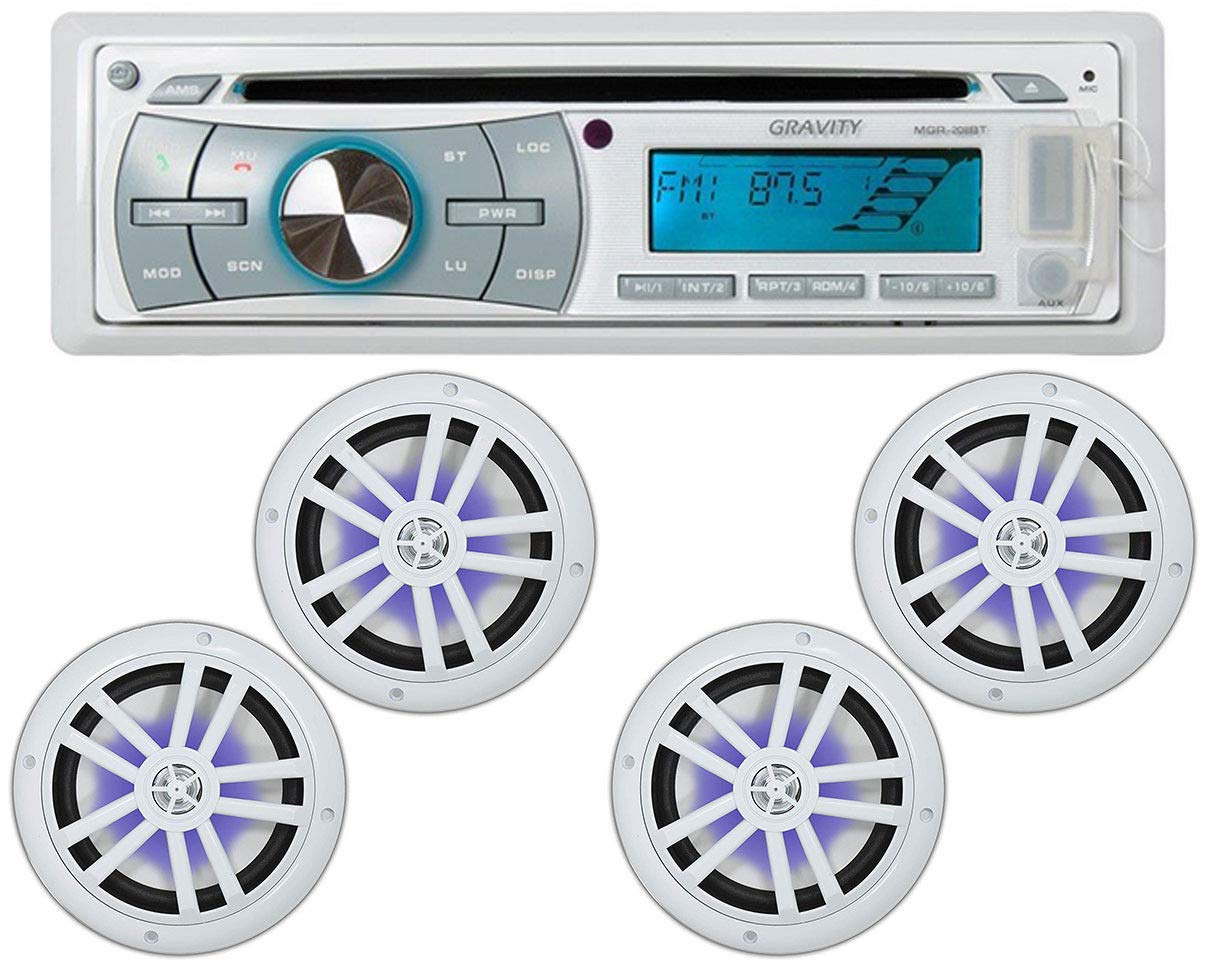
Image 1.1: The Gravity MGR-208BT Marine Stereo unit with two 6.5-inch marine speakers.
2. Consignes de sécurité
- Always disconnect the vehicle's battery before beginning any installation to prevent electrical shorts.
- Ensure all wiring connections are secure and properly insulated to prevent damage from moisture and vibration.
- Do not operate the stereo system at excessively high volumes for prolonged periods, as this may cause hearing damage.
- This product is designed for marine use with weather-resistant features. However, avoid direct high-pressure water jets on the unit.
- Consultez un installateur professionnel si vous avez des doutes sur une quelconque étape du processus d'installation.
3. Contenu du colis
Veuillez vérifier que tous les éléments énumérés ci-dessous sont inclus dans votre colis :
- 1 x Gravity MGR-208BT Bluetooth Marine Receiver
- 2 x Gravity 6.5-inch Marine Speakers with LED Lights
- 1 faisceaux de câbles
- 2 x Stereo Removal Keys
- 1 x Manuel d'utilisation (ce document)
- 1 x télécommande

Image 3.1: The Gravity MGR-208BT Marine Stereo Receiver unit.

Image 3.2: Two Gravity 6.5-inch Marine Speakers featuring built-in blue LED illumination.

Image 3.3: The remote control for the Gravity MGR-208BT Marine Stereo.
4. Configuration et installation
4.1 Stereo Receiver Installation
- Emplacement de montage : Choose a suitable location in your vessel that is protected from direct exposure to extreme weather conditions, although the unit is designed with a conformal-coated PCB for enhanced durability against moisture.
- Connexion électrique : Connect the yellow wire (constant 12V) to a constant 12V power source, the red wire (accessory 12V) to a switched 12V source, and the black wire (ground) to a reliable chassis ground.
- Connexions des haut-parleurs : Connect the speaker wires from the stereo's wire harness to your marine speakers. Ensure correct polarity (+/-) for optimal sound performance. The MGR-208BT supports a 4-channel output.
- Antenne: Connect your marine antenna to the designated input on the stereo.
- Unité sécurisée : Slide the stereo into the mounting sleeve until it clicks into place.
4.2 Installation des enceintes
The 6.5-inch marine speakers feature a low-profile design for easy integration into various marine watercrafts and off-road vehicles.
- Emplacement de montage : Select a flat surface for mounting. Ensure there is sufficient depth behind the mounting surface for the speaker magnet.
- Découper: Use the provided template (if applicable, or refer to specifications for cut-out dimensions) to cut a circular opening for each speaker.
- Câblage : Connect the speaker wires from the stereo to the terminals on the back of each speaker. Observe correct polarity.
- Haut-parleurs sécurisés : Mount the speakers using the supplied screws, ensuring a snug fit.

Image 4.1 : Arrière view of a Gravity MG680-LW marine speaker, showing wiring terminals and specifications.
5. Mode d'emploi
5.1 Fonctionnement de base
- Marche/Arrêt : Appuyez sur le PWR bouton pour allumer ou éteindre l'appareil.
- Contrôle du volume : Tournez le bouton central pour régler le niveau du volume.
- Sélection de la source : Appuyez sur le MODE button to cycle through available sources: Radio (AM/FM), CD, USB, AUX, and Bluetooth.
5.2 Fonctionnement Bluetooth
- Jumelage : Select Bluetooth mode. On your mobile device, search for available Bluetooth devices and select "MGR-208BT". Enter "0000" if a passcode is required.
- Streaming audio: Once paired, you can stream audio from your Bluetooth-enabled device to the stereo. Use your device or the stereo controls for playback (play/pause, skip track).
- Microphone intégré : The stereo includes a built-in Bluetooth microphone for hands-free calling.
5.3 Entrées USB et AUX
- Lecture USB: Insert a USB drive into the front USB port. The unit will automatically switch to USB mode and begin playing compatible audio files (MP3, WMA, AAC, WAV, FLAC).
- Entrée AUX: Connect an external audio device (e.g., MP3 player) to the front AUX input using a 3.5mm audio cable. Select AUX mode to play audio from the connected device.
- iPod/iPhone Connection: Direct connection for iPod/iPhone is supported with an optional cable.
5.4 Lecture de CD
- Insert a CD into the disc slot. The unit will automatically switch to CD mode and begin playback.
- The unit plays CDs, CD-Rs, and CD-RW discs, including those loaded with MP3, WMA, AAC, and WAV music files.
5.5 Paramètres audio
- Contrôles de tonalité : Appuyez sur le SEL button repeatedly to access Bass and Treble adjustments. Use the volume knob to adjust values (Bass: +/-10dB, Treble: +/-10dB).
- Drive EQs: Improves sound quality to compensate for exterior noise.
- Sound Reconstruction: Restores fullness to compressed digital files.
- Low-Pass Filter & Sub Level Control: Adjust these settings for optimal subwoofer performance, if connected.
- Speaker Setting Function: Optimize audio output for different sizes and types of speakers.
5.6 Display and Faceplate
- The unit features a glare-resistant white display with variable-color illumination (up to 5 different tones).
- The faceplate is removable for theft deterrence. To remove, press the release button and gently pull the faceplate off. Store it in the provided case.
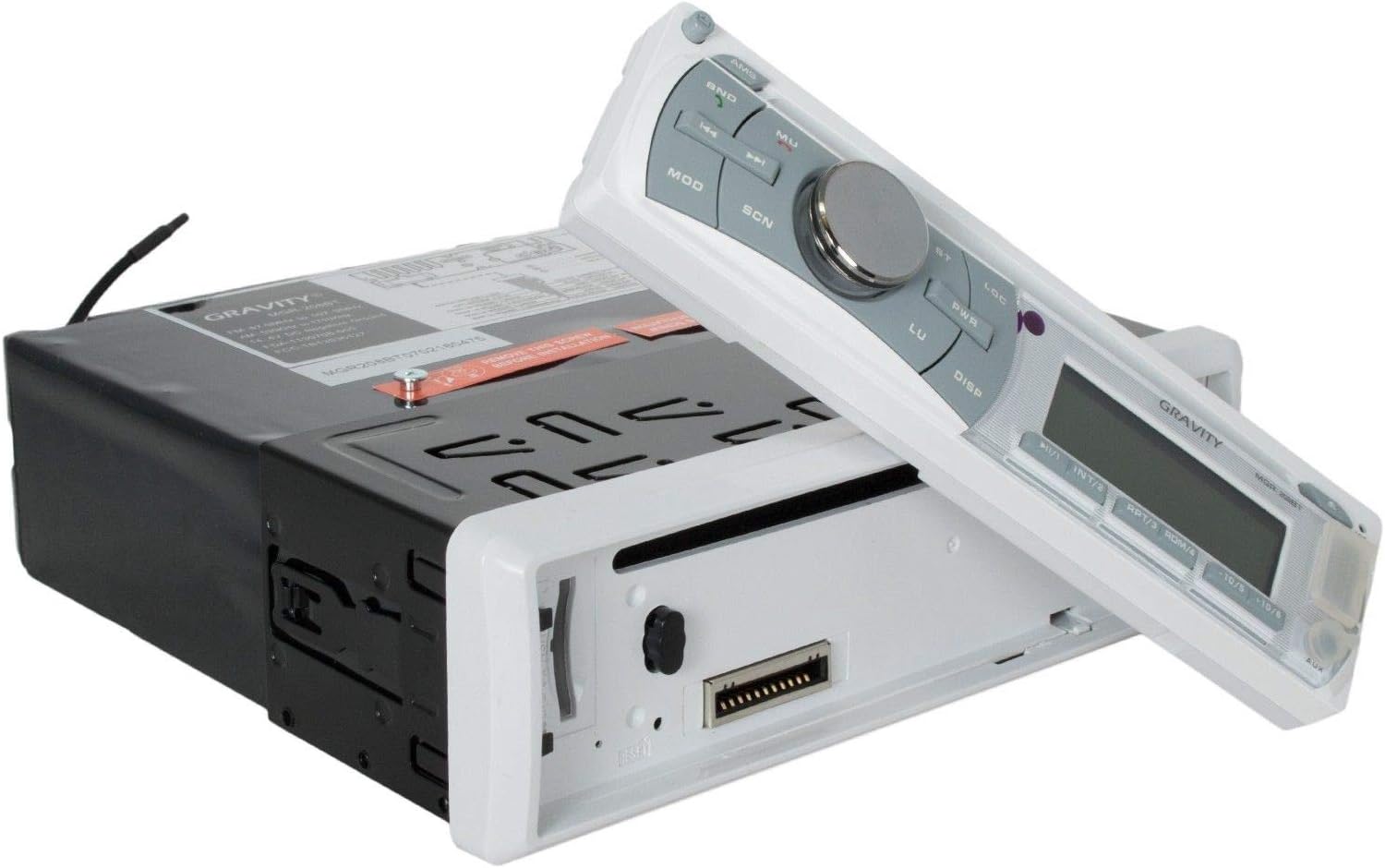
Image 5.1: The Gravity MGR-208BT Marine Stereo with its removable faceplate detached.

Image 5.2: The removable faceplate of the Gravity MGR-208BT stored in its protective case.
6. Entretien
- Nettoyage: Utilisez un chiffon doux et sec.amp cloth to clean the stereo unit and speakers. Avoid abrasive cleaners or solvents.
- Faceplate Care: When removed, store the faceplate in its protective case to prevent scratches and damage.
- Relations: Vérifiez régulièrement tous les branchements électriques pour détecter toute corrosion ou tout desserrage, en particulier en milieu marin.
- Résistance à l'eau : While the speakers are waterproof and the stereo has a conformal-coated PCB, ensure all covers (like USB/AUX input covers) are securely closed when not in use to maintain weather resistance.
7. Dépannage
| Problème | Cause possible | Solution |
|---|---|---|
| Pas de courant | Fusible grillé ; câblage incorrect ; connexion électrique desserrée. | Check and replace fuse; verify power and ground wiring; ensure connections are secure. |
| Pas de son | Volume too low; incorrect source selected; speaker wires disconnected; amplifier protection mode. | Increase volume; select correct source; check speaker wiring; power cycle unit. |
| L'appairage Bluetooth échoue | Bluetooth not enabled on device; device too far; interference; incorrect pairing procedure. | Ensure Bluetooth is on and discoverable; move device closer; restart both devices; follow pairing steps in Section 5.2. |
| Erreur de lecture CD/USB | Disc/USB damaged or incompatible format; dirty disc; incorrect file structure on USB. | Try a different disc/USB; clean disc; ensure files are compatible (MP3, WMA, AAC, WAV, FLAC). |
| Speakers not lighting up | LED power not connected or faulty. | Verify LED power connections (if separate); contact support if issue persists. |
8. Spécifications
- Modèle: MGR-208BT
- Technologie de connectivité: Bluetooth, USB
- Dossier spécial : Waterproof (speakers), Conformal-coated PCB (stereo)
- Appareils compatibles : Smartphone, Enceinte
- Type de connecteur : USB
- Mode de sortie audio : Stéréo
- Configuration du canal de son surround : 4 canaux
- Amplifier : MOSFET intégré ampAmplificateur (22 watts RMS/50 watts crête x 4 canaux)
- Formats de lecture : CDs, CD-Rs, CD-RWs, MP3, WMA, AAC, WAV (via CD/USB), FLAC (via USB)
- Afficher: Glare-resistant white display, variable-color illumination (up to 5 tones)
- Contrôles de tonalité : Bass +/-10dB, Treble +/-10dB
- Additional Audio Features: Drive EQs, Sound Reconstruction, Low-pass filter, Sub level control, Speaker Setting function
- Faceplate: Removable theft-deterrent faceplate
- Poids de l'article : Environ 9.7 livres (poids total du colis)
- Dimensions du produit : Dimensions approximatives : 9 x 12 x 8 pouces (emballage)
9. Garantie et assistance
Your Gravity MGR-208BT Marine Stereo and Speaker System is covered by a manufacturer's warranty. Please refer to the warranty card included in your package for specific terms and conditions, including warranty duration and coverage details.
For technical support, troubleshooting assistance, or warranty claims, please contact your retailer or the manufacturer's customer service department. Contact information can typically be found on the product packaging or the manufacturer's official website.