
1. Introduction
Thank you for choosing the DreamSky DS312 Small Digital Alarm Clock. This manual provides detailed instructions for setting up and operating your new alarm clock. Designed for clarity and ease of use, it features a large display, adjustable brightness, and convenient USB charging capabilities. Please read this manual thoroughly before use and retain it for future reference.
2. Contenu du colis
- Réveil numérique DreamSky DS312
- Adaptateur secteur USB-C
- Manuel d'utilisation
3. Produit terminéview
The DreamSky DS312 features a sleek design with a large LED display for easy readability. Key controls are located on the back panel for intuitive operation.

Figure 1 : Devant view of the DreamSky DS312 Digital Alarm Clock showing the large green time display.
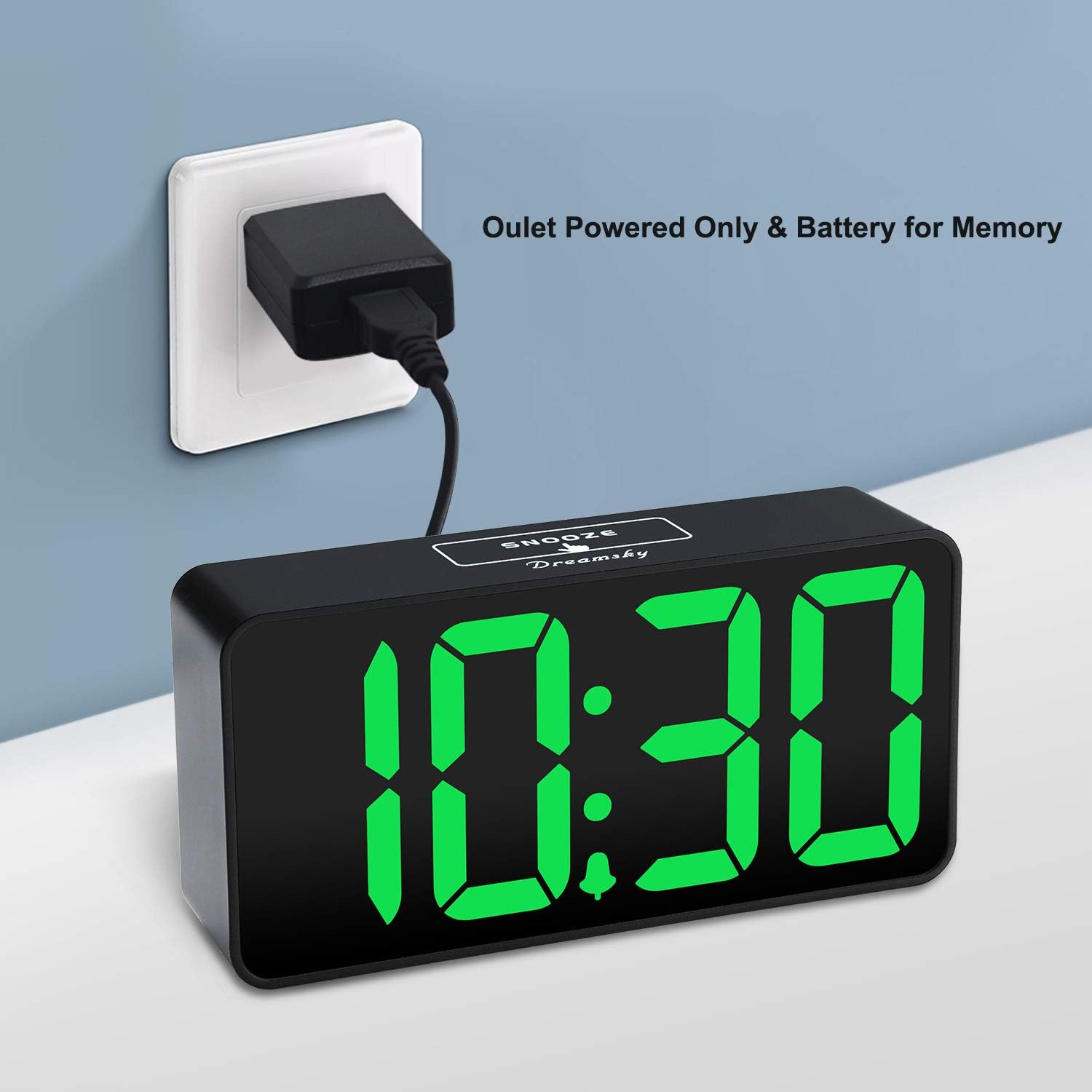
Figure 2 : Arrière view of the alarm clock, highlighting the control buttons for time, alarm, volume, and dimmer settings, along with the USB power input and an additional USB charging port.
Boutons et ports de commande :
- Le bouton de la sieste: Situé en haut, pour une pause temporaire de l'alarme.
- Bouton RÉGLAGE DE L'HEURE : Maintenez enfoncé pour accéder au mode de réglage de l’heure.
- Bouton RÉGLAGE D'ALARME : Maintenez enfoncé pour accéder au mode de réglage de l'alarme.
- Bouton marche/arrêt : Active/désactive la fonction d'alarme.
- Boutons +/- : Adjust time, alarm, volume, and brightness settings.
- Bouton 12/24 heures : Permet de basculer entre l'affichage de l'heure au format 12 heures et au format 24 heures.
- LOW VOLUME/HIGH VOLUME Slider: Régler le niveau sonore de l'alarme.
- LOW DIMMER/HIGH DIMMER Slider: Ajuste la luminosité de l’écran.
- Port d'entrée USB : Pour connecter l'adaptateur secteur.
- Port de sortie USB : Pour recharger des appareils externes.
- Compartiment à piles : For 2 x AAA backup batteries (not included).
4. Installation
4.1 Alimentation de l'horloge
The DreamSky DS312 is primarily powered by the included USB-C adapter. Connect the USB-C cable to the USB IN port on the back of the clock and plug the adapter into a standard electrical outlet.

Figure 3 : The alarm clock receiving power via its USB-C adapter plugged into a wall socket.
4.2 Batterie de secours (en option)
For memorizing time and alarm settings during a power outage, insert 2 x AAA batteries (not included) into the battery compartment on the back of the clock. Note that with battery power only, the screen will go blank and the alarm will not sound; batteries only retain settings until power is restored.
5. Mode d'emploi
5.1 Réglage de l'heure
- Appuyez et maintenez enfoncé le RÉGLAGE DE L'HEURE Appuyez sur le bouton pendant 2 secondes jusqu'à ce que les chiffres des heures clignotent.
- Utilisez le + or - boutons pour régler l'heure.
- Presse RÉGLAGE DE L'HEURE à nouveau pour confirmer l'heure et passer au réglage des minutes.
- Utilisez le + or - boutons pour régler les minutes.
- Presse RÉGLAGE DE L'HEURE one more time to save the settings and exit.
5.2 Réglage de l'alarme
- Appuyez et maintenez enfoncé le ENSEMBLE D'ALARME Appuyez sur le bouton pendant 2 secondes jusqu'à ce que les chiffres de l'heure de l'alarme clignotent.
- Utilisez le + or - boutons pour régler l'heure de l'alarme.
- Presse ENSEMBLE D'ALARME Veuillez confirmer à nouveau l'heure de l'alarme et passer au réglage des minutes.
- Utilisez le + or - boutons pour régler les minutes de l'alarme.
- Presse ENSEMBLE D'ALARME one more time to save the alarm settings and exit.
5.3 Activation/Désactivation de l'alarme
Appuyez sur le MARCHE/ARRÊT button to activate or deactivate the alarm. An alarm icon will appear on the display when the alarm is active.
5.4 Réglage de la luminosité de l'écran
Utilisez le LOW DIMMER/HIGH DIMMER slider on the back of the clock to adjust the brightness of the LED display to your preference. This allows for optimal visibility during the day and minimal disturbance at night.

Figure 4 : Illustration of the alarm clock's adjustable brightness dimmer, showing various display intensities from bright to completely off.
5.5 Réglage du volume de l'alarme
Utilisez le LOW VOLUME/HIGH VOLUME slider on the back of the clock to set the desired alarm sound level (30-90 dB). This ensures the alarm is neither too soft to wake you nor too loud to startle you.

Figure 5 : The alarm clock displaying time with a graphic indicating adjustable alarm volume levels.
5.6 Utilisation de la fonction Snooze
Lorsque l'alarme sonne, appuyez sur le grand bouton. ROUPILLON button on the top of the clock to temporarily pause the alarm for 9 minutes. The alarm will sound again after the snooze period.
Format 5.7 heure 12/24
Appuyez sur le 12/24H button to switch between 12-hour (with AM/PM indicator) and 24-hour time display formats.
5.8 ports de chargement USB
The clock includes a convenient USB OUT port on the back, allowing you to charge your smartphone or other small electronic devices directly from the clock, reducing the need for additional wall adapters.

Figure 6 : A smartphone connected to the alarm clock's USB charging port, illustrating its charging capability.
6. Caractéristiques
- Grand écran : 2-inch jumbo illuminated LED digits for easy visibility.
- Variateur de luminosité : Adjustable display brightness to suit day or night viewpréférences.
- Son d'alarme réglable : Alarm volume can be set from 30-90 dB.
- Fonction de répétition: Durée de la fonction de répétition : 9 minutes.
- Port de charge USB: Rechargez facilement votre smartphone ou autres appareils.
- Utilisation facile : Intuitive buttons for straightforward time and alarm setting.
- Batterie de secours: Conserve l'heure et les réglages de l'alarme en cas de coupure de couranttages (nécessite 2 piles AAA, non incluses).
7. Dépannage
Q: Can this digital clock run on batteries alone?
A: No. Battery function only works to store the clock time and settings in the case of a main power outage. The adapter is required as the main power source for this alarm clock.
Q: How do you turn off the alarm once it wakes you up?
A: When the alarm goes off, you can press any button at the back of the clock to turn off the alarm.
Q: How long does the alarm stay on?
A: The alarm will last for 2 minutes then shut off automatically if not manually turned off or snoozed.
8. Spécifications
| Attribut | Détail |
|---|---|
| Marque | RêveSky |
| Numéro de modèle | DS312 |
| Type d'affichage | LED numérique |
| Dimensions du produit | 5.3 po L x 2.6 po H |
| Source d'énergie | Corded Electric (USB-C Adapter) |
| Batterie de secours | 2 piles AAA (non incluses) |
| Matériel | Plastique |
| Caractéristiques spéciales | Large display, brightness dimmer, adjustable alarm volume, USB charging port |
9. Garantie et assistance
9.1 Informations sur la garantie
This DreamSky DS312 Digital Alarm Clock comes with a Limited Warranty. Please refer to the product packaging or contact customer support for specific warranty terms and conditions.
9.2 Assistance clientèle
For any questions, technical assistance, or warranty inquiries, please contact DreamSky Customer Support at: info@dreamsky4u.com