
1. Introduction
The T'nB FM Bluetooth Transmitter (Model FMCT05B) allows you to stream audio from your smartphone or other compatible devices to your car's FM radio. This device features Bluetooth connectivity, a USB port, an SD card slot, and an LCD screen for displaying essential information. Enjoy hands-free calling and versatile music playback directly through your vehicle's sound system.
2. Consignes de sécurité
AVERTISSEMENT: Use only the power adapter provided with this device. To prevent interference, avoid operating the transmitter in close proximity to other electronic devices.
3. Produit terminéview
Familiarize yourself with the components of your T'nB FM Bluetooth Transmitter.
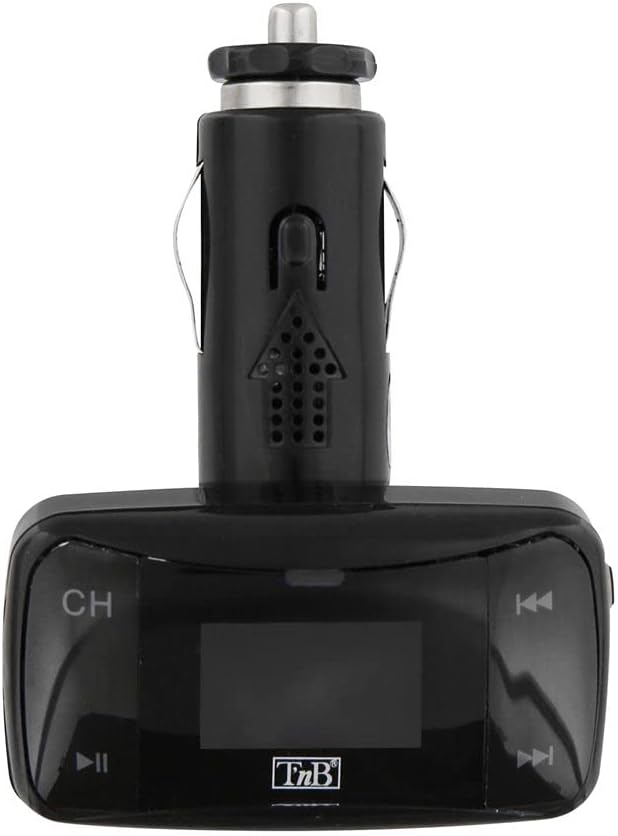
Figure 1 : Devant view of the T'nB FM Bluetooth Transmitter. This image displays the device's LCD screen, 'CH' button for frequency adjustment, and track navigation buttons.

Figure 2 : Incliné view of the T'nB FM Bluetooth Transmitter. This perspective shows the device's overall shape, the 12V car socket connector, and the side profile des boutons de commande.

Figure 3 : 3.5mm AUX Audio Cable. This cable can be used to connect external audio sources to the transmitter's AUX input.
4. Instructions de configuration
- Insérez l'émetteur : Plug the T'nB FM Bluetooth Transmitter firmly into your vehicle's 12V power socket (cigarette lighter port). The device's LCD screen should illuminate.
- Tune Your Car Radio: Turn on your car's FM radio and tune it to an unused FM frequency. Choose a frequency that has no strong broadcast signal to minimize interference.
- Fréquence de l'émetteur adaptée : On the T'nB transmitter, use the 'CH' button or frequency adjustment controls to set the transmitter's FM frequency to match the frequency selected on your car radio. Ensure both frequencies are identical for optimal audio transmission.
- Coupler via Bluetooth:
- Activez le Bluetooth sur votre smartphone ou appareil audio.
- Rechercher available Bluetooth devices. The transmitter should appear as "FMCT05B" or a similar name.
- Select the transmitter to pair. Once paired, the device will confirm the connection, and you can begin streaming audio.
5. Mode d'emploi
5.1 Lecture de musique
- Diffusion Bluetooth : Once paired, play music on your smartphone. The audio will be transmitted to your car's FM radio. Use the transmitter's track navigation buttons (◀◀ / ▶▶) to skip tracks and the play/pause button (▶▌▌) to control playback.
- Lecture de carte USB/SD : Insert a USB flash drive or an SD card containing MP3/MP4 audio files into the respective slot on the transmitter. The device will automatically detect and begin playing the audio files. Use the track navigation and play/pause buttons to control playback.
- Entrée AUX: Connect an external audio device (e.g., MP3 player) to the transmitter's 3.5mm AUX input using the provided cable. Select the AUX input mode on the transmitter if available, or ensure no other media is playing.
5.2 Appels mains libres
- Répondre / terminer les appels: When a call comes in, the music will pause. Press the play/pause button (▶▌▌) to answer the call. Press it again to end the call.
- Recomposer : Double-press the play/pause button (▶▌▌) to redial the last number called.
- Réglage du volume : Adjust the call volume using the volume controls on the transmitter or your car's radio.
Affichage LCD 5.3
The LCD screen displays the current FM frequency, volume level, track number, and song titles (when available from the source).
6. Entretien
- Veillez à ce que l'appareil reste propre et sec. Utilisez un chiffon doux et sec pour essuyer sa surface.
- Avoid exposing the transmitter to extreme temperatures, direct sunlight, or high humidity.
- Ne tentez pas de démonter ou de modifier l'appareil, car cela annulera la garantie et pourrait l'endommager.
7. Dépannage
- Pas d'alimentation : Ensure the transmitter is securely plugged into the 12V power socket and that the car's ignition is on. Check the car's fuse for the 12V socket if necessary.
- Mauvaise qualité audio/parasites :
- Adjust the FM frequency on both the transmitter and your car radio to a different, clear frequency with no strong broadcast signals.
- Ensure the volume on your audio source (smartphone, USB, SD card) is set to an appropriate level.
- Éloignez-vous des zones où les interférences radio sont importantes.
- Bluetooth ne se connecte pas :
- Ensure Bluetooth is enabled on your smartphone and the transmitter is powered on.
- Delete the transmitter from your phone's Bluetooth device list and attempt to pair again.
- Restart both your phone and the transmitter.
- La carte USB/SD ne fonctionne pas : Ensure the media is inserted correctly and contains compatible audio files (MP3/MP4 format). Try a different USB drive or SD card.
8. Spécifications
| Fonctionnalité | Spécification |
|---|---|
| Nom du modèle | FMCT05B |
| Marque | T'nB |
| Technologie de connectivité | Bluetooth, USB |
| Source d'énergie | USB (12V DC Car Socket) |
| Norme de communication sans fil | Bluetooth |
| Appareils compatibles | Speaker, MP3 Player, Car Stereo System, Smartphone, Headset |
| Type de média | SD Card, USB Drive |
| Interface matérielle | USB Type A |
| Méthode de contrôle | Tactile (Boutons) |
| Type de sortie audio | FM Radio, Speaker |
| Entrée audio | AUX 3.5 mm |
| Voltage | 12 volts (CC) |
9. Garantie et assistance
For warranty information or technical support, please refer to the documentation included with your purchase or contact T'nB customer service directly. Contact details can typically be found on the manufacturer's official website.