
1. Introduction
This manual provides essential information for the safe and efficient operation of your lightmaXX Nano Beam FX show effect light. Please read it thoroughly before use and retain it for future reference.
2. Consignes de sécurité
- Lisez attentivement toutes les instructions.
- Conservez ce manuel pour référence ultérieure.
- N'exposez pas l'appareil à la pluie ou à l'humidité.
- Assurer une ventilation adéquate.
- Débranchez l'appareil avant de le nettoyer ou de l'entretenir.
- Use only specified power supply.
- Évitez l'exposition directe des yeux à la source lumineuse.
- Cet appareil est destiné à un usage intérieur uniquement.
- Ensure the mounting bracket is securely fastened.
3. Contenu du colis
Verify that all items are present and in good condition.
- lightmaXX Nano Beam FX Unit
- Câble d'alimentation
- Télécommande
- Manuel d'instructions (ce document)

Image 1: lightmaXX Nano Beam FX unit, power cable, and remote control.
4. Produit terminéview
4.1 Panneau avant
The front panel features multiple lenses for projecting various light effects.
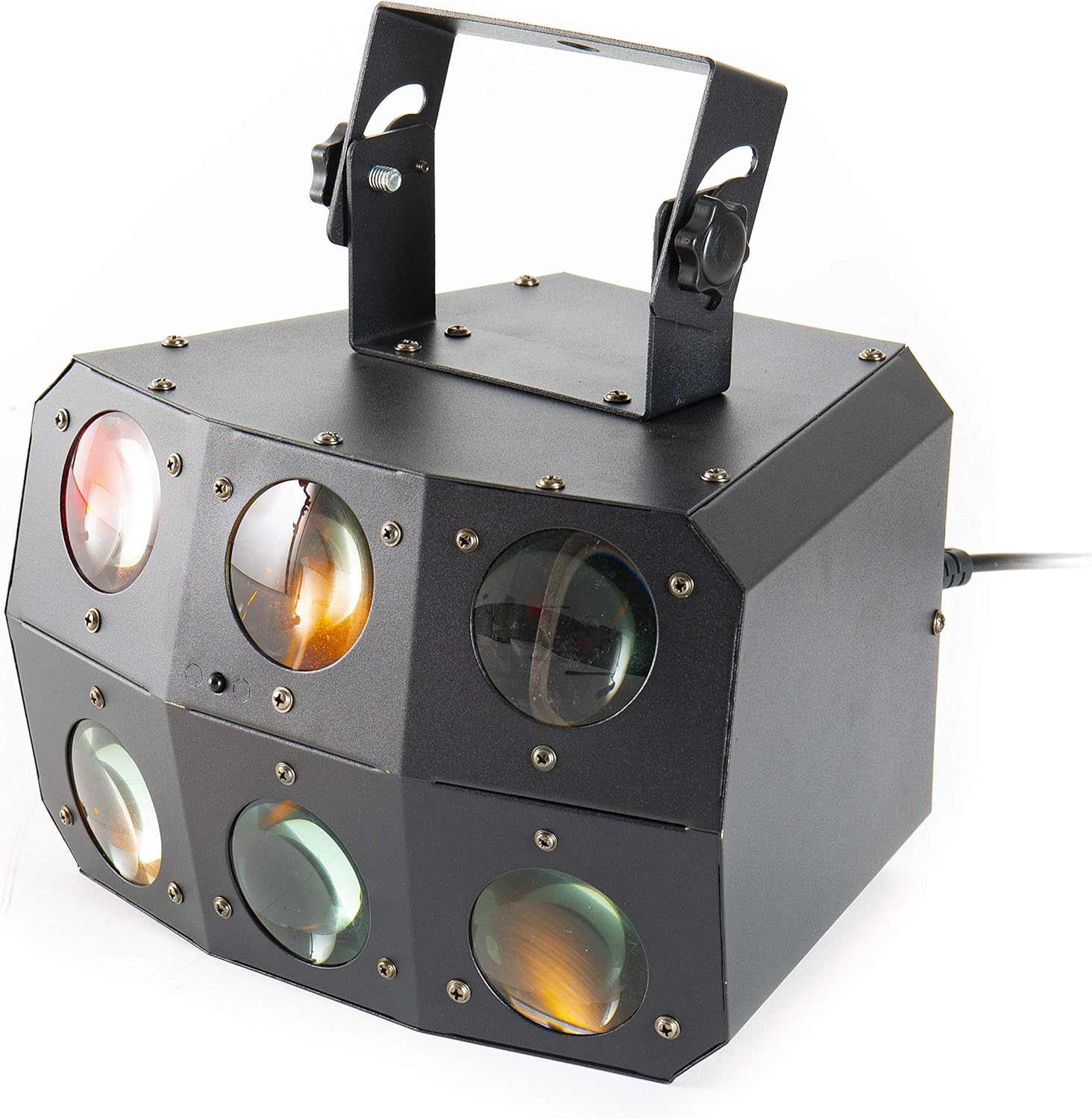
Image 2 : Gros plan view of the front lenses.
4.2 Panneau arrière et connexions
The rear panel provides power input/output, DMX connections, and control interface.

Image 3: Rear panel with connections and control interface.
- PUISSANCE DANS: Branchez ici le câble d'alimentation fourni.
- MISE SORTIE : For daisy-chaining power to other units.
- ENTRÉE DMX : Connect DMX controller or previous DMX device.
- SORTIE DMX : Connect to the next DMX device in the chain.
- MICRO: Built-in microphone for sound-activated modes.
- Affichage et boutons : For menu navigation and settings (MENU, UP, DOWN, ENTER).
- SAFETY ROPE: Point de fixation pour un câble de sécurité.
Télécommande 4.3
The included remote control allows for convenient operation of the unit's functions.
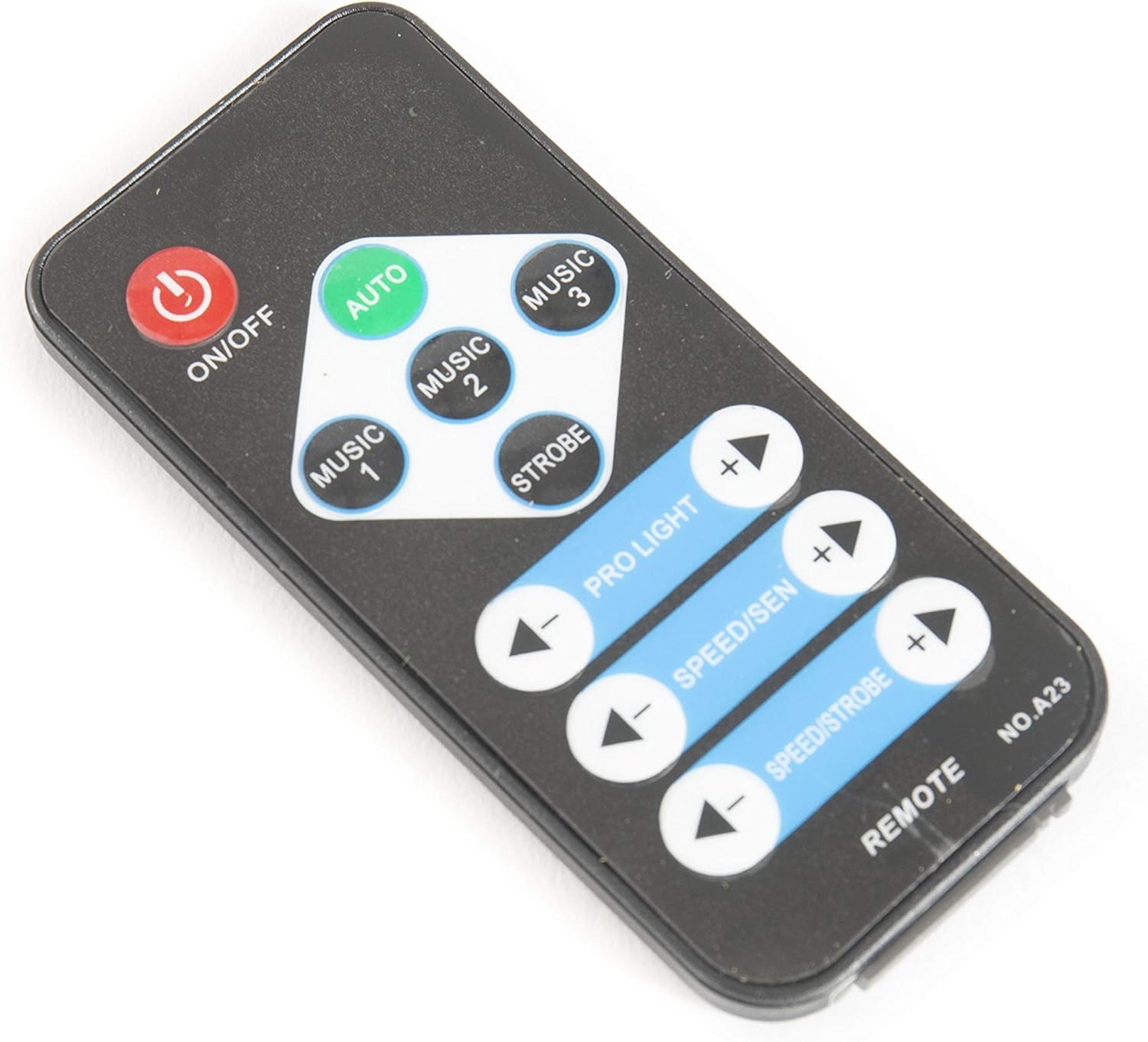
Image 4: Remote control for the Nano Beam FX.
- MARCHE/ARRÊT : Mettre l'appareil sous tension ou hors tension.
- VOITURE: Active le mode de programmation automatique.
- MUSIQUE 1/2/3 : Activates sound-activated modes with different sensitivities or patterns.
- STROBOSCOPIQUE : Activates strobe effect.
- PRO LIGHT: Adjusts light intensity or program selection.
- SPEED/SEN: Adjusts program speed or sound sensitivity.
5. Installation
5.1 Déballage
Carefully remove the unit from its packaging. Inspect for any damage during transit. Retain packaging for future transport or storage.
5.2 Montage
The Nano Beam FX unit is equipped with a mounting bracket for secure installation.

Image 5: Adjustable mounting bracket.
- Attach the unit securely to a truss, ceiling, or wall using appropriate clamps and hardware (not included).
- Always use a safety cable (not included) attached to the SAFETY ROPE point on the rear panel, ensuring it can hold the weight of the unit.
- Adjust the angle of the unit using the knobs on the mounting bracket.
5.3 Connexion d'alimentation
Connect the supplied power cable to the POWER IN socket on the rear panel and then to a suitable power outlet.
5.4 Connexion DMX (en option)
For advanced control, connect the unit to a DMX controller.
- Connect a DMX cable from your DMX controller's output to the DMX IN socket of the Nano Beam FX.
- If connecting multiple DMX devices, connect from the DMX OUT of the first unit to the DMX IN of the next.
- Refer to the DMX channel chart (not provided in product data) for specific DMX control parameters.
6. Fonctionnement
6.1 Mise sous/hors tension
Appuyez sur le MARCHE/ARRÊT button on the remote control or ensure the unit is connected to power. The unit will power on automatically when connected to power.
Modes de fonctionnement 6.2
The Nano Beam FX offers several operating modes, selectable via the remote control or the rear panel display.
- Mode automatique: Appuyez sur le AUTO button on the remote. The unit will cycle through its pre-programmed light shows automatically.
- Mode MUSIQUE : Presse MUSIQUE 1, MUSIQUE 2, ou MUSIQUE 3 on the remote. The unit will react to sound picked up by its internal microphone. Different music modes may offer varying sensitivities or patterns.
- Mode STROBOSCOPE : Appuyez sur le STROBE button on the remote to activate a flashing light effect.
- Mode DMX : If connected to a DMX controller, the unit will respond to DMX signals. Use the rear panel display to set the DMX address.

Image 6 : Example of light effects (blue and red).

Image 7 : Example of light effects (green and yellow).

Image 8 : Example of light effects (orange and red).
6.3 Adjustments via Remote Control
- PRO LIGHT: Utilisez le + et - buttons to cycle through different light programs or adjust intensity in certain modes.
- SPEED/SEN: Utilisez le + et - buttons to adjust the speed of automatic programs or the sensitivity of sound-activated modes.
7. Entretien
7.1 Nettoyage
Disconnect the unit from power before cleaning. Use a soft, lint-free cloth to wipe the exterior. For lenses, use a specialized lens cleaner and cloth to avoid scratches. Do not use abrasive cleaners.
7.2 Stockage
When not in use, store the unit in its original packaging or a suitable case in a dry, dust-free environment.
8. Dépannage
| Problème | Cause possible | Solution |
|---|---|---|
| L'unité ne s'allume pas. | Pas d'alimentation électrique ; câble défectueux. | Vérifiez le branchement du câble d'alimentation ; essayez une autre prise. |
| La télécommande ne fonctionne pas. | Batterie déchargée ; obstruction ; hors de portée. | Replace remote battery; ensure clear line of sight; move closer to unit. |
| No light effects. | Unit in DMX mode without DMX signal; program not selected. | Select AUTO or MUSIC mode; check DMX connection and settings. |
| Le mode activé par le son ne répond pas. | Sensibilité du microphone trop faible ; aucun son n'est enregistré. | Increase sensitivity using remote; ensure sound source is close to the unit. |
9. Spécifications
| Fonctionnalité | Détail |
|---|---|
| Modèle | Nano Beam FX |
| Marque | lumièremaXX |
| Dimensions du produit | 32 x 30 x 29 cm |
| Poids de l'article | 3.5 kg |
| Source d'énergie | Électrique avec fil |
| Source de lumière Wattage | 3 Watts (per light source) |
| Nombre de sources lumineuses | 24 |
| Référence constructeur | LIG0015648-000 |
| ASIN | B07JM9XVT4 |
10. Garantie et assistance
Pour obtenir des informations sur la garantie et une assistance technique, veuillez consulter le site officiel du fabricant. webConsultez le site web ou contactez votre revendeur. Conservez votre preuve d'achat pour toute réclamation au titre de la garantie.