
TOUMEI C800S
Manuel d'utilisation du mini-projecteur portable TOUMEI C800S
Modèle : C800S
Introduction
Merci pour votre achatasing the TOUMEI C800S Mini Portable Projector. This manual provides essential information for setting up, operating, and maintaining your device. Please read it thoroughly before use to ensure optimal performance and longevity of your projector.
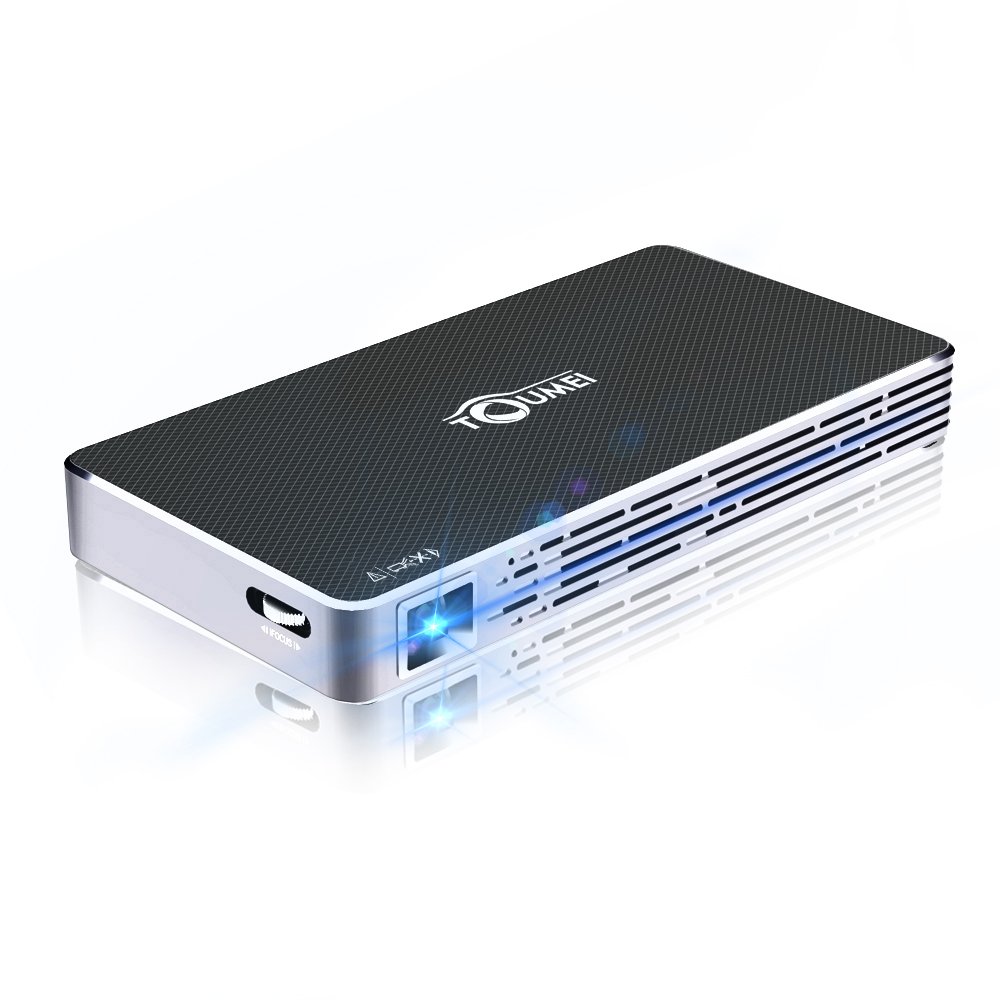
Image: The TOUMEI C800S Mini Portable Projector, showcasing its compact design and projection lens.
Contenu du colis
Vérifiez que tous les articles sont présents dans le colis :
- TOUMEI C800S DLP Projector
- Alimentation électrique
- Télécommande
- Mini trépied
- Câble HDMI
- Welcome Guide (this manual)
Produit terminéview
Familiarize yourself with the main components and features of your TOUMEI C800S projector.
Caractéristiques principales :
- DLP Projection Technology
- Correction trapézoïdale automatique
- LED Light Source with up to 30,000 hours lifespan
- Système d'exploitation Android 7.1
- 2.4G / 5G Dual-band WiFi and Bluetooth Connectivity
- Haut-parleur stéréo intégré
- 4200mAh Lithium-ion Battery for portable use
- Support for HDMI, USB, TF Card inputs
Installation
1. Mise sous/hors tension
- Pour allumer : Connect the power supply to the projector and a power outlet. Press and hold the power button on the projector or remote control until the device powers on.
- Pour éteindre : Press and hold the power button until the shutdown options appear, then select "Power Off". Alternatively, a short press might initiate shutdown depending on settings.
2. Initial Setup and Focus Adjustment
- Place the projector on a stable surface or mount it using a tripod.
- Point the projector towards a flat, light-colored wall or projection screen.
- Adjust the focus using the focus wheel located on the side of the projector until the image is clear and sharp.
- The projector features automatic keystone correction to adjust for distorted images when the projector is not perfectly perpendicular to the screen.
3. Connexion réseau (Wi-Fi)
- Accédez au menu « Paramètres » de l’interface du projecteur.
- Sélectionnez « Wi-Fi » et activez-le.
- Choisissez le réseau Wi-Fi 2.4 GHz ou 5 GHz de votre choix dans la liste.
- Saisissez le mot de passe Wi-Fi à l'aide du clavier virtuel et confirmez.
Mode d'emploi
1. Connecting to iOS Devices (Airplay)
- Ensure the projector's Wifidisplay application is updated to the latest version. Open Wifidisplay on the projector's desktop; it will prompt for updates automatically.
- Connect both your iPhone/iPad and the TOUMEI C800S projector to the même réseau Wi-Fi.
- Open the Wifidisplay application on the projector.
- Sur votre appareil iOS, ouvrez le Centre de contrôle et appuyez sur « Recopie d’écran » (ou « Recopie d’écran AirPlay »).
- Select the name of your projector from the list of available devices to begin mirroring.
2. Connecting to Android Devices (Multiscreen)
- Ensure both your Android device and the TOUMEI C800S projector are connected to the même réseau Wi-Fi.
- On the projector, open the Wifidisplay application (Menu -> Wifidisplay -> click to enter the app). The system will automatically search for mobile phone models.
- On your Android device, open the "Multiscreen" (or "Smart View", "Screen Cast", "Wireless Display" depending on your device model) feature. Your mobile model will be searched for on the projector.
- Select the projector's name from the list on your Android device and confirm the connection.
3. Connexion via HDMI
- Connectez une extrémité du câble HDMI au port HDMI du projecteur.
- Connect the other end of the HDMI cable to the HDMI output port of your source device (e.g., laptop, gaming console, TV box).
- On the projector, select the HDMI input source from the main menu or input selection option.
4. Connecting via USB/TF Card
- Insert your USB drive or TF card into the respective port on the projector.
- The projector's file manager will typically open automatically, allowing you to browse and play media files (videos, photos, documents) directly from the storage device.
Entretien
1. Nettoyage du projecteur
- Lentille: Utilisez un chiffon doux non pelucheux spécialement conçu pour les lentilles optiques. Essuyez délicatement la lentille en effectuant des mouvements circulaires. N’utilisez pas de nettoyants abrasifs ni n’exercez une pression excessive.
- Casing: Essuyez l'extérieur casinNettoyez avec un chiffon doux et sec. Pour les taches tenaces, frottez légèrement.ampNettoyez le chiffon avec de l'eau. Évitez d'utiliser des produits nettoyants chimiques.
- Vents: Periodically check the ventilation vents for dust accumulation. Use a soft brush or compressed air (held upright and at a distance) to clear any blockages. Ensure the projector is turned off and unplugged before cleaning vents.
2. Stockage
Lorsqu'il n'est pas utilisé pendant une période prolongée, rangez le projecteur dans un endroit frais et sec, à l'abri de la lumière directe du soleil et des températures extrêmes. Utilisez l'emballage d'origine ou un étui de protection pour le protéger de la poussière et des dommages.
3. Entretien de la batterie
- Pour prolonger la durée de vie de la batterie, évitez de la décharger complètement et fréquemment.
- En cas de stockage prolongé, chargez la batterie à environ 50 % avant de la ranger.
- Rechargez la batterie tous les 3 à 6 mois si elle n'est pas utilisée afin d'éviter une décharge profonde.
Dépannage
| Problème | Cause possible | Solution |
|---|---|---|
| Aucune image projetée | Alimentation non connectée ; projecteur éteint ; source d’entrée incorrecte ; cache-objectif en place. | Check power connection; Turn on projector; Select correct input (HDMI, USB, etc.); Remove lens cap. |
| L'image est floue | Mise au point incorrecte ; projecteur trop près/trop loin de l’écran. | Adjust the focus wheel; Adjust projection distance (1-5M). |
| Pas de son | Volume too low; Muted; External speakers not connected properly; Source device volume low. | Increase projector volume; Unmute; Check external speaker connection; Increase source device volume. |
| Impossible de se connecter au Wi-Fi | Mot de passe incorrect ; hors de portée ; problème de réseau. | Re-enter password carefully; Move projector closer to router; Restart router and projector. |
| La mise en miroir de l'écran ne fonctionne pas | Devices on different networks; Wifidisplay app not open/updated; Device compatibility. | Ensure both devices are on the same Wi-Fi; Open/update Wifidisplay app; Check device's mirroring function. |
Caractéristiques
| Fonctionnalité | Détail |
|---|---|
| Projection Technique | DLP |
| Source de lumière | DIRIGÉ |
| Durée de vie des LED | Jusqu'à 30,000 XNUMX heures |
| Luminosité | 100 ANSI Lumens |
| Rapport de contraste | 2000:1 |
| Résolution native | 854 x 480 pixels |
| Projecting Distance | 1 à 5 mètres |
| Projecting Image Size | 30 à 120 pouces |
| Correction trapézoïdale | Automatique |
| Système opérateur | Android 7.1 (support upgrade) |
| Wifi | Double bande 2.4 GHz / 5 GHz |
| Bluetooth | Soutenu |
| Stockage interne | 8 Go |
| Prise en charge de la carte TF | 32GB max |
| Batterie | Lithium-ion 4200mAh |
| Autonomie (batterie) | Environ 150 minutes |
| Standby Time (Battery) | 4 heures |
| Audio | Haut-parleur stéréo intégré |
| Interfaces d'entrée | HDMI, USB, carte TF |
| Dimensions (L x l x H) | 15.8 x 8 x 1.8 cm |
| Poids | 285 grammes |
Garantie et assistance
TOUMEI provides a worry-free 18-month warranty for the C800S DLP projector. For technical support, warranty claims, or any inquiries, please contact TOUMEI customer service through the official channels provided at the time of purchase or on the TOUMEI website.
Veuillez conserver votre preuve d'achat pour la validation de la garantie.
Ask a question about this manual
Ask about setup, troubleshooting, compatibility, parts, safety, or missing instructions. Manuals+ will review the question and use this page’s manual context to help answer it.