
Aftershokz AS650SG-BR
Aftershokz Air Bone Conduction Wireless Bluetooth Headphones
Manuel d'utilisation
Model: AS650SG-BR
1. Introduction
The Aftershokz Air Bone Conduction Wireless Bluetooth Headphones offer a unique open-ear listening experience, designed to keep you connected to your audio while remaining aware of your surroundings. Utilizing advanced bone conduction technology, these headphones transmit sound through your cheekbones, leaving your ears open to ambient sounds. This design is ideal for athletes, outdoor enthusiasts, and anyone who prioritizes situational awareness.

Image 1: Aftershokz Air Bone Conduction Wireless Bluetooth Headphones in Slate Grey. These lightweight headphones feature a flexible band and transducers that rest on the cheekbones.
The lightweight titanium frame ensures comfortable long-term wear, while features like PremiumPitch technology deliver rich audio. Integrated reflective strips enhance visibility during low-light activities, making them a safe choice for various environments.

Image 2: Two individuals running outdoors, demonstrating the open-ear design of the Aftershokz Air headphones, allowing them to hear their surroundings while enjoying audio.
2. Contenu de la boîte
Upon opening your Aftershokz Air package, you should find the following components:
- Aftershokz Air Headphone
- Étui de protection
- Câble de chargement
- Bouchons d'oreilles (à utiliser dans les environnements bruyants, si désiré)
3. Guide de configuration
3.1 Charge initiale
Before first use, fully charge your Aftershokz Air headphones. Connect the provided charging cable to the charging port on the headphones and plug the other end into a USB power source. The LED indicator will show charging status. A full charge provides up to 6 hours of continuous use.
3.2 Couplage Bluetooth
- Mise sous tension : Appuyez sur le bouton d'alimentation et maintenez-le enfoncé pendant 2 secondes.
- Activer le Bluetooth : Sur votre appareil (smartphone, tablette, ordinateur), activez le Bluetooth.
- Choisir un appareil: Look for "Aftershokz Air" in the list of available Bluetooth devices and select it.
- Confirmer la connexion : Once paired, the LED indicator will turn solid blue, and a voice prompt will confirm "Connected."
The headphones support multipoint pairing, allowing connection to two devices simultaneously. To use this feature, pair with the first device, then enter pairing mode again and pair with the second device. The headphones will automatically switch between devices.
4. Mode d'emploi
4.1 Porter vos écouteurs
Place the headphones with the transducers resting on your cheekbones, just in front of your ears. The band should wrap around the back of your head. Adjust for a comfortable and secure fit. The lightweight titanium material ensures minimal pressure.

Image 3: A man demonstrating the correct placement of the Aftershokz Air headphones, with the band resting comfortably around the back of his head and the transducers on his cheekbones.
4.2 Contrôles de base
- Marche/Arrêt : Appuyez sur le bouton d'alimentation et maintenez-le enfoncé pendant 2 secondes.
- Volume haut/bas : Utilisez les boutons de volume situés sur le côté du casque.
- Lecture/Pause : Appuyez une fois sur le bouton multifonction.
- Sauter la piste: Appuyez deux fois sur le bouton multifonction pour passer à la piste suivante, trois fois pour revenir à la piste précédente.
- Répondre/Terminer l'appel : Appuyez une fois sur le bouton multifonction pendant un appel entrant ou un appel actif.
- Assistant vocal: Maintenez le bouton multifonction enfoncé pendant 2 secondes pour activer l'assistant vocal de votre appareil (par exemple, Siri, Google Assistant).
The dual noise-canceling microphones ensure clear calls even in noisy environments.

Image 4: A close-up of a man wearing the Aftershokz Air headphones, emphasizing the discreet design and the quality of the audio experience provided by the PremiumPitch technology and dual noise-canceling microphones.
5. Médias produits
5.1 Vidéo officielle du produit
Video 1: "Push yourself Beyond Your Limits with Trekz Air". This video showcases the Aftershokz Air headphones in various active scenarios, highlighting their open-ear design, comfort, and suitability for sports and outdoor activities.
5.2 Additional Product Images

Image 5: A woman exercising, demonstrating the water-resistant capabilities of the Aftershokz Air headphones, making them suitable for intense workouts and various weather conditions.
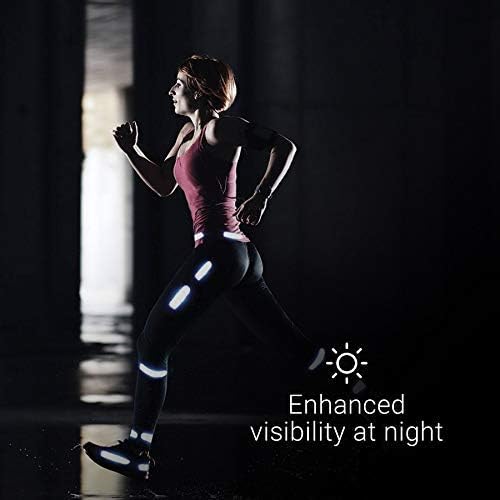
Image 6: A person running at night, illustrating the enhanced visibility provided by the reflective strips that can be adhered to clothing or gear, improving safety in low-light conditions.
6. Entretien
6.1 Nettoyage
To maintain the longevity and hygiene of your headphones, regularly wipe them with a soft, damp Chiffon. Évitez d'utiliser des produits chimiques agressifs ou des matériaux abrasifs. Assurez-vous que le port de charge est sec avant de recharger.
6.2 Stockage
When not in use, store your Aftershokz Air headphones in the provided protective case to prevent damage from dust, dirt, and impacts. Store in a cool, dry place away from extreme temperatures.
6.3 Entretien de la batterie
For optimal battery life, avoid fully discharging the headphones frequently. Charge them regularly, even if not in constant use. If storing for an extended period, charge them to about 50% before storage.
7. Dépannage
| Problème | Cause possible | Solution |
|---|---|---|
| Pas de son | Headphones not powered on or paired; volume too low; device volume too low. | Ensure headphones are on and paired. Increase headphone and device volume. |
| Impossible de jumeler | Écouteurs non en mode appairage ; Bluetooth de l’appareil désactivé ; interférences. | Ensure headphones are flashing red/blue. Turn device Bluetooth off/on. Move closer to device. |
| Problème de charge | Cable or power source issue; charging port dirty. | Try a different cable or USB port. Clean charging port gently. |
| Mauvaise qualité audio | Hors de portée Bluetooth ; interférences ; batterie faible. | Move closer to your device. Avoid strong electromagnetic fields. Charge headphones. |
If problems persist, please refer to the support section or visit the official Aftershokz website pour une assistance supplémentaire.
8. Spécifications
| Nom du modèle | AfterShokz Air Open-Ear |
| Numéro de modèle | AS650SG-BR |
| Technologie de connectivité | Bluetooth v4.2 |
| Portée Bluetooth | 10 mètres |
| Type de pilote audio | Conducteur à conduction osseuse |
| Gamme de fréquences | 20 Hz à 20,000 XNUMX Hz |
| Autonomie de la batterie | 6 heures |
| Temps de charge | (Not specified in input, omit or state typical) |
| Poids de l'article | 30 grammes (1.06 onces) |
| Matériel | Titane |
| Niveau de résistance à l'eau | Résistant à l'eau (anti-transpiration) |
| Microphone | Included, Noise Cancellation |
| Appareils compatibles | Smartphones ou tablettes iOS et Android compatibles Bluetooth et ordinateurs et ordinateurs portables Mac et PC |
| Méthode de contrôle | Tactile, Voix |
| Couleur | Gris ardoise |
| Code UPC | 811071030540 |
| Fabricant | Aftershokz Limited Corporation |
9. Garantie et assistance
For detailed warranty information and customer support, please refer to the warranty card included with your product or visit the official Aftershokz website. You can also find FAQs and additional resources there to help you with your Aftershokz Air headphones.
Support en ligne: Boutique officielle Aftershokz sur Amazon