
1. Introduction
This manual provides detailed instructions for the proper use and maintenance of your Edifier W820BT Bluetooth Headphones. Please read this manual thoroughly before using the product to ensure optimal performance and longevity.
2. Contenu du colis
Verify that all items listed below are included in your package. If any items are missing or damaged, please contact Edifier customer support.
- Edifier W820BT Bluetooth Headphones
- Câble de chargement (USB)
- Câble audio (3.5 mm)
- Manuel de l'utilisateur (ce document)
3. Produit terminéview
The Edifier W820BT headphones are designed for comfort and extended listening, featuring Bluetooth v4.1 connectivity and a long-lasting battery.
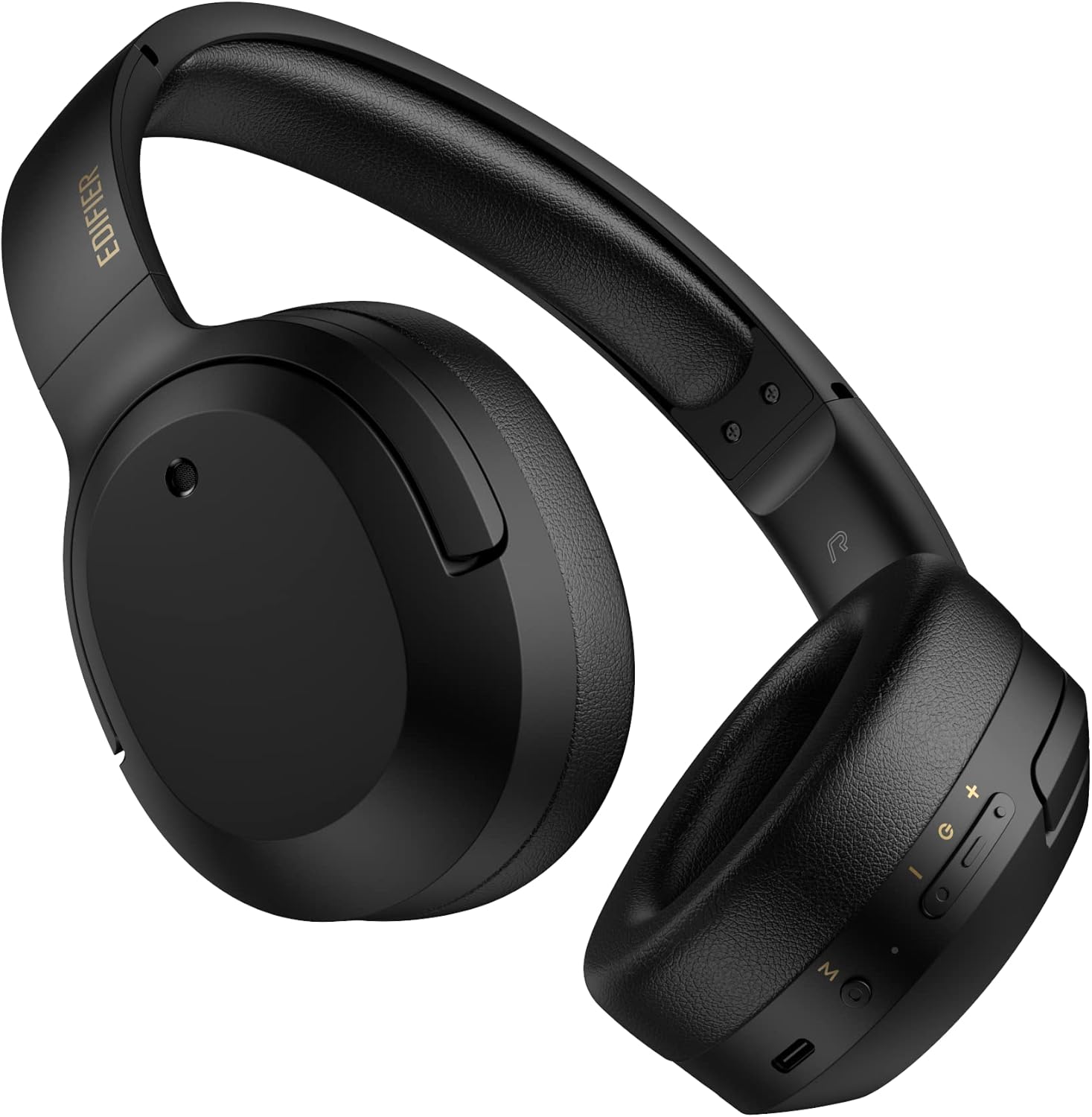
Figure 3.1 : Face avant view of the Edifier W820BT Bluetooth Headphones.

Figure 3.2 : Côté view of the Edifier W820BT Bluetooth Headphones, highlighting the control buttons.
Caractéristiques principales :
- Bluetooth V4.1 with CSR Technology for stable wireless connection.
- Jusqu'à 80 XNUMX heures d'autonomie de la batterie.
- Conception pliable pour faciliter le transport.
- Soft leather ear pads for comfort.
- Durable and flexible steel headband.
- On-ear controls for media playback and calls.
4. Installation
4.1 Chargement des écouteurs
Avant la première utilisation, chargez complètement les écouteurs.
- Connect the micro-USB end of the charging cable to the charging port on the headphone (located on the right earcup).
- Connectez l'extrémité USB-A du câble de chargement à un adaptateur secteur USB (non inclus) ou au port USB d'un ordinateur.
- The LED indicator will illuminate during charging and turn off once fully charged.
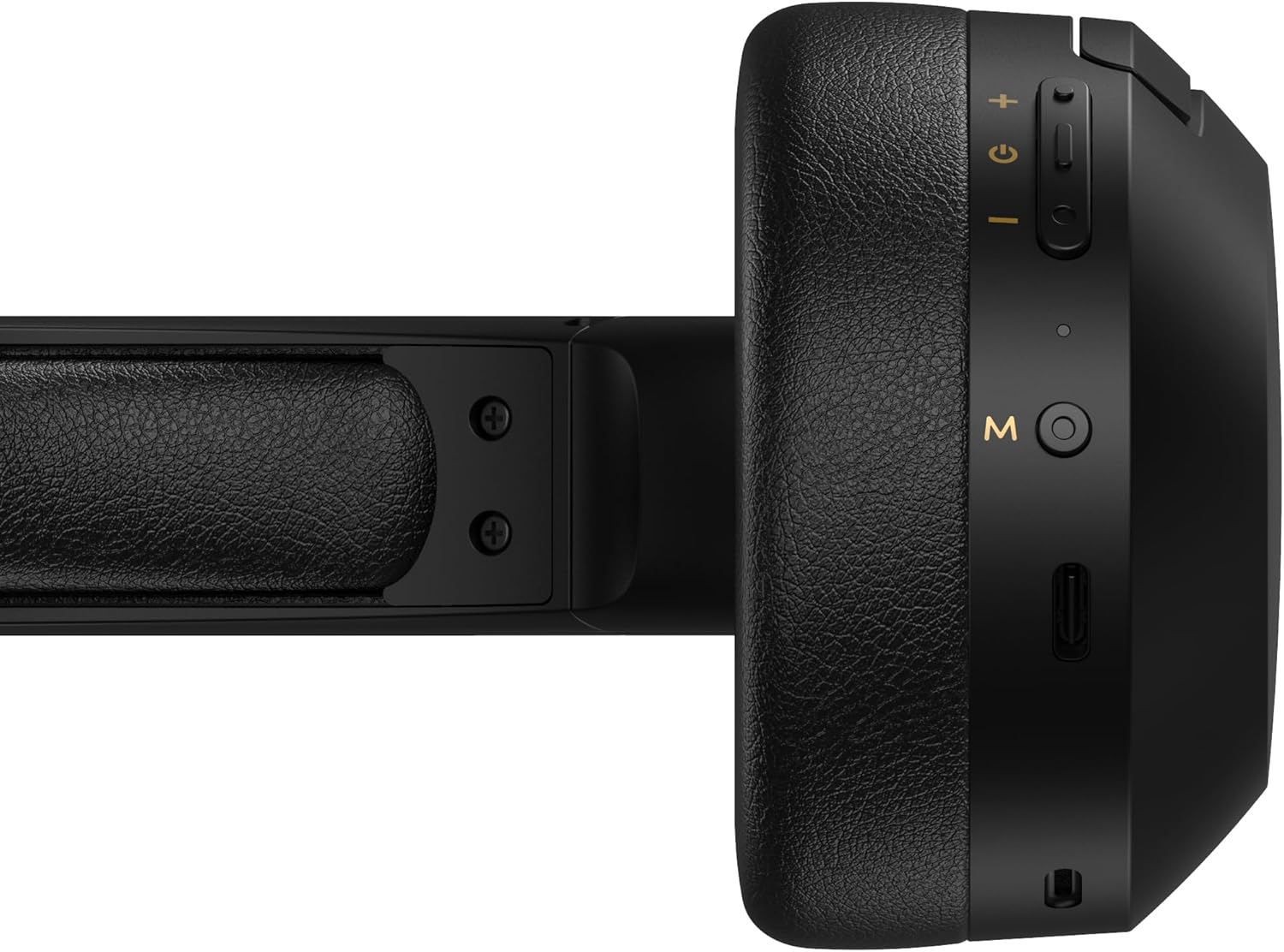
Figure 4.1: Close-up of the charging port and control buttons on the right earcup.
4.2 Mise sous/hors tension
- Pour allumer : Press and hold the multi-function button (usually marked with a power icon or 'M') for approximately 3 seconds until the LED indicator flashes blue.
- Pour éteindre : Maintenez le bouton multifonction enfoncé pendant environ 5 secondes jusqu'à ce que le voyant LED clignote en rouge puis s'éteigne.
4.3 Couplage Bluetooth
Pour connecter vos écouteurs à un appareil compatible Bluetooth :
- Assurez-vous que les écouteurs sont éteints.
- Maintenez le bouton multifonction enfoncé pendant environ 5 à 7 secondes jusqu'à ce que le voyant LED clignote alternativement en rouge et en bleu. Cela indique que le mode d'appairage est activé.
- Sur votre appareil (smartphone, tablette, ordinateur), activez le Bluetooth et recherchez les appareils disponibles.
- Select "EDIFIER W820BT" from the list of found devices.
- Une fois l'appairage effectué, le voyant LED clignotera lentement en bleu.
Note: Les écouteurs tenteront automatiquement de se reconnecter au dernier appareil apparié lors de leur mise sous tension.
5. Mode d'emploi
5.1 On-Ear Controls
The control buttons are located on the right earcup.
| Bouton/action | Fonction |
|---|---|
| Multi-function Button (M) |
|
| Augmenter le volume (+) |
|
| Baisser le volume (-) |
|
5.2 connexion filaire
The W820BT headphones can also be used with a wired connection.
- Connect one end of the 3.5mm audio cable to the audio input jack on the left earcup of the headphones.
- Connectez l'autre extrémité du câble audio 3.5 mm à la prise de sortie audio de votre appareil.
- Les écouteurs passeront automatiquement en mode filaire. La fonction Bluetooth sera désactivée.

Figure 5.1 : Connexion du câble audio 3.5 mm pour une écoute filaire.
6. Entretien
- Nettoyez les écouteurs avec un chiffon doux et sec. N'utilisez pas de produits nettoyants abrasifs ni de solvants.
- Évitez d'exposer les écouteurs à des températures extrêmes, à l'humidité ou à la lumière directe du soleil.
- Rangez les écouteurs dans un endroit frais et sec lorsqu'ils ne sont pas utilisés. Leur conception pliable permet un rangement compact.
- Do not disassemble the headphones. This will void the warranty.
7. Dépannage
If you encounter issues with your Edifier W820BT headphones, refer to the following common problems and solutions:
| Problème | Solution |
|---|---|
| Impossible d'allumer | Ensure the headphones are charged. Connect to a power source using the charging cable. |
| Impossible de coupler via Bluetooth |
|
| Pas de son |
|
| Mauvaise qualité sonore |
|
8. Spécifications
| Fonctionnalité | Détail |
|---|---|
| Nom du modèle | W820BT |
| Technologie de connectivité | Sans fil (Bluetooth), filaire (prise jack 3.5 mm) |
| Version Bluetooth | 4.1 |
| Autonomie de la batterie | Jusqu'à 80 heures |
| Forme de l'écouteur | Sur l'oreille |
| Matériel | Steel (headband) |
| Poids de l'article | 1.14 livre (environ 517 g) |
| Dimensions du produit | 9.25 x 7.64 x 3.41 pouces |
| Fabricant | Édificateur |
9. Garantie et assistance
Edifier provides a Garantie d'un an in the USA and Canada for the W820BT headphones. For warranty claims or technical support, please contact Edifier customer service.
For more information, visit the official Edifier webconsultez le site ou reportez-vous à votre documentation d'achat.
10. Démonstration vidéo
Watch the official product video for a visual guide on the Edifier W820BT Bluetooth Headphones' features and usage.
Vidéo 10.1 : Présentation officielle du produitview of the Edifier W820BT Bluetooth Headphones, demonstrating features like battery life, comfort, foldable design, and on-ear controls.