
Subcold ULTRA15
Manuel d'utilisation du mini-réfrigérateur/chauffeur Subcold Ultra 15
Model: ULTRA15
1. Introduction
This user manual provides comprehensive instructions for the safe and efficient operation, maintenance, and troubleshooting of your Subcold Ultra 15 Mini Fridge Cooler & Warmer. Please read this manual thoroughly before using the appliance and retain it for future reference.
The Subcold Ultra 15 is a versatile 15-liter capacity mini cooler and warmer, designed for portability and quiet operation. It features advanced thermometric technology, allowing it to cool items to 18°C below ambient temperature (minimum 3°C) or warm them up to 45-65°C. Its compact design and dual AC/DC power compatibility make it suitable for various environments, including bedrooms, offices, cars, and outdoor use.

Illustration 1.1 : Avant view of the Subcold Ultra 15 Mini Fridge Cooler & Warmer.
2. Consignes de sécurité importantes
Pour réduire les risques d'incendie, d'électrocution ou de blessure, suivez toujours ces précautions de sécurité de base :
- Lisez toutes les instructions avant d’utiliser l’appareil.
- Assurer le voltagVérifiez que le point E indiqué sur l'appareil correspond à votre alimentation électrique locale avant de le brancher.
- N’utilisez pas l’appareil si le cordon ou la fiche est endommagé(e). En cas de dommage, contactez un technicien qualifié.
- Ne plongez pas l'appareil, le cordon ou la fiche dans l'eau ou d'autres liquides.
- Keep ventilation openings clear. Do not block the fan or air vents on the back of the unit.
- This appliance is designed for indoor use or in a vehicle. Do not use outdoors or in wet conditions.
- Débranchez l'appareil de la prise électrique lorsqu'il n'est pas utilisé ou avant de le nettoyer.
- Ne laissez pas les enfants utiliser l'appareil sans surveillance.
- Évitez de placer l'appareil à la lumière directe du soleil ou à proximité de sources de chaleur.
- Assurez-vous que l'appareil est placé sur une surface stable et plane.

Image 2.1 : Arrière view of the Subcold Ultra 15, highlighting the control panel and ventilation grilles. Ensure these vents are not obstructed during operation.
3. Contenu du colis
Veuillez cocher la case correspondant aux éléments suivants :
- Subcold Ultra 15 Mini Fridge Cooler & Warmer Unit
- AC Power Lead (230V)
- DC Power Lead (12V for car cigarette socket)
- Removable Internal Shelves (2)
- Manuel de l'utilisateur (ce document)
4. Installation
4.1. Déballage
- Retirez soigneusement l'appareil de son emballage.
- Retirez tous les matériaux d'emballage, y compris les films ou rubans adhésifs de protection.
- Vérifiez que l'appareil ne présente aucun signe de dommage. En cas de dommage, ne l'utilisez pas et contactez le service client.
4.2. Placement
Place the mini fridge on a firm, flat, and stable surface. Ensure there is adequate ventilation around the unit, especially at the back where the fan and vents are located. Avoid placing it in direct sunlight or near heat-emitting appliances.

Image 4.1: The Subcold Ultra 15 positioned on a desk, demonstrating suitable placement in an office or personal space.
4.3. Connexion électrique
The Subcold Ultra 15 can be powered by either AC (household) or DC (vehicle) power.
- AC Power (Household): Connect the AC power lead to the AC input port on the back of the unit, then plug the other end into a standard 230V wall outlet.
- Alimentation CC (véhicule) : Connect the DC power lead to the DC 12V input port on the back of the unit, then plug the other end into your vehicle's 12V cigarette lighter socket.
Ensure the power switch on the back of the unit is in the "OFF" position before connecting or disconnecting power.
5. Mode d'emploi
5.1. Mode de refroidissement
- Assurez-vous que l'appareil est connecté à une source d'alimentation.
- Locate the switch on the back panel.
- Slide the switch to the "COLD" position. The green indicator light will illuminate.
- Allow approximately 1-2 hours for the internal temperature to stabilize. The unit can cool to 18°C below ambient temperature, with a minimum temperature of 3°C.
5.2. Warming Mode
- Assurez-vous que l'appareil est connecté à une source d'alimentation.
- Locate the switch on the back panel.
- Slide the switch to the "WARM" position. The red indicator light will illuminate.
- Allow approximately 1-2 hours for the internal temperature to stabilize. The unit can warm items up to 45-65°C.
5.3. Internal Configuration
The Subcold Ultra 15 features two removable internal shelves and two door holders, allowing you to customize the storage space for various items, from beverages to cosmetics.

Image 5.1 : Intérieur view of the Subcold Ultra 15, showing the removable shelves and door storage for flexible organization.
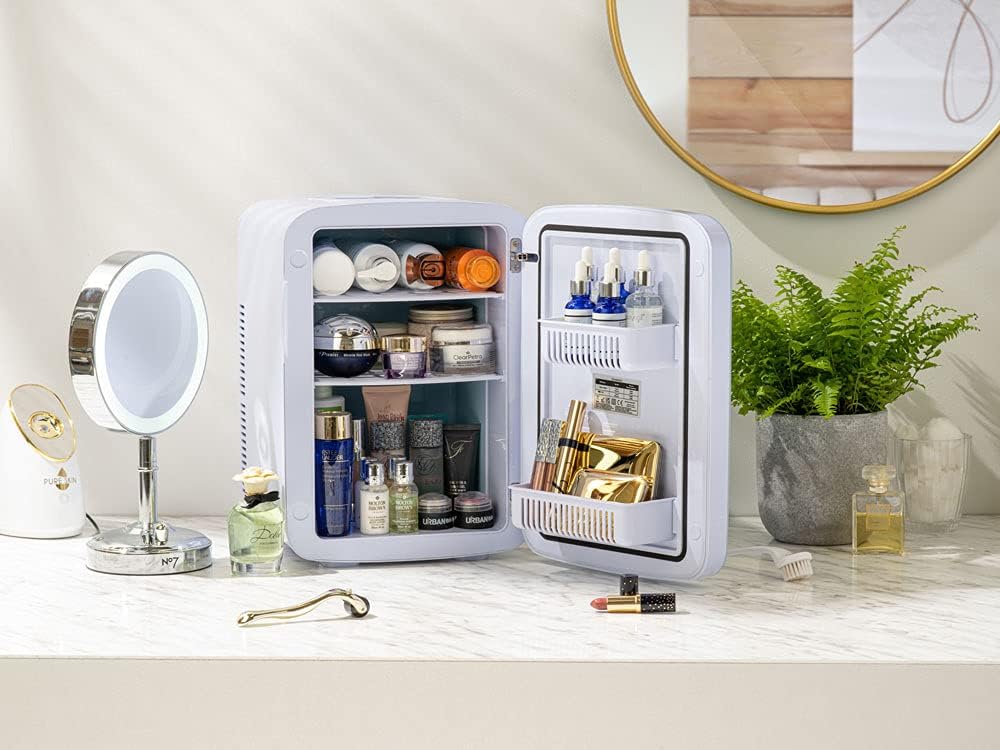
Image 5.2: The Subcold Ultra 15 used for storing cosmetics, demonstrating its versatility beyond food and drinks.
6. Entretien
6.1. Nettoyage
- Débranchez toujours l’appareil avant de le nettoyer.
- Essuyez les surfaces intérieures et extérieures avec un chiffon doux dampterminé avec de l'eau et du savon doux.
- N’utilisez pas de nettoyants abrasifs, de solvants ou de produits chimiques agressifs, car ils peuvent endommager les surfaces.
- Assurez-vous que l'appareil soit complètement sec avant de le rebrancher.
- Regularly check and clean the ventilation grilles on the back to prevent dust buildup, which can affect performance.
6.2. Dégivrage
The Subcold Ultra 15 features manual defrost. If ice buildup occurs on the interior cooling plate, unplug the unit and allow the ice to melt naturally. Wipe away any melted water with a clean cloth.
6.3. Stockage
When not in use for extended periods, unplug the unit, clean it thoroughly, and leave the door slightly ajar to prevent odors and mildew. Store in a dry, cool place.
7. Dépannage
| Problème | Cause possible | Solution |
|---|---|---|
| L'unité ne s'allume pas. | No power supply; power cord not properly connected; power switch is OFF. | Check power outlet; ensure power cord is securely connected; slide power switch to COLD or WARM. |
| L'appareil ne refroidit/ne chauffe pas efficacement. | Insufficient ventilation; ambient temperature too high/low; door not closed properly; fan obstructed. | Ensure adequate space around the unit; check door seal; clear any obstructions from the fan/vents. |
| Bruit inhabituel provenant de l'appareil. | L'appareil n'est pas installé sur une surface plane ; le ventilateur est obstrué. | Place unit on a stable, flat surface; check for and remove any fan obstructions. The unit operates with a low noise level of 35 dB. |
| Excessive condensation/ice buildup. | High humidity; frequent door opening; manual defrost needed. | Reduce frequency of door opening; perform manual defrost as described in Section 6.2. |
8. Spécifications
| Fonctionnalité | Détail |
|---|---|
| Marque | Subcold |
| Modèle | ULTRA15 |
| Capacité | 15 litres |
| Dimensions du produit (L x P x H) | 26.9 x 33.2 x 38 cm |
| Poids de l'article | 4.85 kg |
| Température de refroidissement | Down to 3°C (18°C below ambient) |
| Température de réchauffement | Up to 45-65°C |
| Voltage | 230 V CA, 12 V CC |
| Quoitage | 50 watts |
| Niveau de bruit | 35 dB |
| Type de dégivrage | Manuel |
| Matériau de la porte | Verre |
| Étagères | 2 (amovible) |

Image 8.1: External dimensions of the Subcold Ultra 15 Mini Fridge.

Image 8.2: Internal dimensions of the Subcold Ultra 15 Mini Fridge.

Image 8.3: Energy efficiency label for the Subcold Ultra 15, indicating 75 kWh/annum and 35 dB noise level.
9. Garantie et assistance
9.1. Garantie du fabricant
The Subcold Ultra 15 Mini Fridge Cooler & Warmer comes with a Garantie constructeur d'un an À compter de la date d'achat, cette garantie couvre les défauts de matériaux et de fabrication dans des conditions normales d'utilisation. Elle ne couvre pas les dommages causés par une mauvaise utilisation, un accident, une modification non autorisée ou une installation incorrecte.
9.2. Assistance clientèle
For technical assistance, warranty claims, or any questions regarding your Subcold Ultra 15, please visit the official Subcold website ou contactez leur service client.
Officiel Website: https://www.subcold.com/
Please have your model number (ULTRA15) and proof of purchase ready when contacting support.
Ask a question about this manual
Ask about setup, troubleshooting, compatibility, parts, safety, or missing instructions. Manuals+ will review the question and use this page’s manual context to help answer it.