
Introduction
This manual provides detailed instructions for the safe and efficient operation of your Mikado MD-BT20S 20W Bluetooth AmpAmplificateur. Veuillez lire attentivement ce manuel avant d'utiliser le produit et conservez-le pour toute consultation ultérieure.
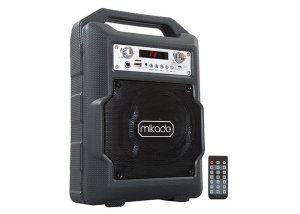
Image: The Mikado MD-BT20S 20W Bluetooth Amplifier, a portable audio system with an integrated handle.
Consignes de sécurité
- N’exposez pas l’appareil à l’eau ou à une humidité excessive.
- Évitez de placer l'appareil à proximité de sources de chaleur ou à la lumière directe du soleil.
- N’essayez pas de démonter ou de réparer l’appareil vous-même. Confiez toute intervention à un personnel qualifié.
- Use only the specified power supply (DC-5V) and compatible lithium battery.
- Tenir hors de portée des enfants.
Contenu du colis
The Mikado MD-BT20S package includes:
- Mikado MD-BT20S Bluetooth AmpUnité de lificateur
- Manuel de l'utilisateur (ce document)
- Certificat de garantie
- Télécommande
- Câble de chargement USB
Produit terminéview
Familiarize yourself with the various parts and controls of your MD-BT20S amplifier.
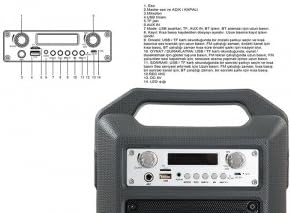
Image : détaillée view of the Mikado MD-BT20S control panel with numbered components.
- Contrôle de l'écho : Ajuste l'effet d'écho pour l'entrée microphone.
- Master Volume and ON/OFF Switch: Controls the overall volume and powers the device on/off.
- Entrée microphone : Prise jack 6.35 mm pour connecter un microphone.
- Port USB : Pour connecter des clés USB afin de lire de l'audio files.
- Fente pour carte TF (Micro SD) : For inserting Micro SD cards to play audio files.
- Port AUX IN : Prise jack 3.5 mm pour connecter des périphériques audio externes.
- Bouton Mode : Switches between USB, TF, AUX In, BT (Bluetooth), and FM radio modes. Press and hold to initiate FM station search.
- Piste précédente / Baisser le volume : Appui court pour revenir à la piste/station précédente. Appui long pour baisser le volume.
- Play/Pause / FM Scan: Short press to play/pause audio. In FM mode, short press to auto-scan and save stations.
- Piste suivante / Augmenter le volume : Appui court pour passer à la piste/station suivante. Appui long pour augmenter le volume.
- Recording Button (REC): Initiates and stops audio recording to USB/TF card.
- Entrée CC 5 V : Power input port for charging or operating the device via USB cable.
- Affichage LED: Affiche le mode actuel, le numéro de piste, la fréquence FM, etc.
Installation
Mise sous tension de l'appareil
The MD-BT20S supports dual power modes: DC-5V via USB cable or internal lithium battery.
- To charge the internal battery or operate via external power, connect the provided USB cable to the DC 5V input on the unit and a compatible USB power adapter (not included) or USB port.
- Ensure the battery is sufficiently charged for portable use.

Image : Arrière view de la amplifier showing the battery compartment and a USB charging cable.
Mise sous tension initiale
Turn the Master Volume knob (labeled 2 in Product Overview) clockwise to power on the device. The LED display will illuminate.
Mode d'emploi
Sélection du mode
Press the "Mode" button (labeled 7) repeatedly to cycle through available input sources: Bluetooth (BT), USB, TF (Micro SD), AUX In, and FM Radio.
Connexion Bluetooth
- Changer le amplifier to "BT" mode using the Mode button. The LED display will show "BT" and a pairing indicator may flash.
- Sur votre smartphone ou autre appareil compatible Bluetooth, recherchez les appareils Bluetooth disponibles.
- Select "MD-BT20S" from the list to pair.
- Une fois appairés, les amplifier will emit a confirmation sound, and the "BT" indicator will stop flashing. You can now play audio from your device.
Lecture de carte USB/TF
- Insérez une clé USB ou une carte TF (Micro SD) contenant des fichiers audio MP3. files into the respective port (labeled 4 for USB, 5 for TF).
- Le amplifier will automatically switch to USB or TF mode and begin playing the first track. If not, press the "Mode" button to select the correct source.
- Use the Previous/Next Track buttons (labeled 8 and 10) for navigation and the Play/Pause button (labeled 9) for playback control. Long press Previous/Next for volume adjustment.
Fonctionnement de la radio FM
- Changer le amplifier to "FM" mode using the Mode button.
- To perform an automatic station scan, press and hold the "Mode" button (labeled 7) or the Play/Pause button (labeled 9) for a few seconds. The ampL'amplificateur analysera et enregistrera les stations FM disponibles.
- Use the Previous/Next Track buttons (labeled 8 and 10) to navigate between saved stations. Long press for volume adjustment.
Connexion d'entrée AUX
- Connect an external audio device (e.g., MP3 player, laptop) to the "AUX IN" port (labeled 6) using a 3.5mm audio cable (not included).
- Changer le amplifier to "AUX In" mode using the Mode button.
- Contrôlez la lecture depuis votre appareil externe connecté.
Utilisation du microphone
Connect a microphone to the Microphone Input port (labeled 3). Adjust the Echo control (labeled 1) and Master Volume (labeled 2) as needed.
Fonction d'enregistrement
To use the recording function, ensure a USB drive or TF card is inserted. Press the "REC" button (labeled 11) to start recording. Press again to stop.
Télécommande
The included remote control provides convenient access to various functions, including power, mode selection, track navigation, volume control, and EQ settings. Point the remote control directly at the amplifier's front panel for optimal response.
Entretien
- Nettoyez l'appareil avec un chiffon doux et sec. N'utilisez pas de nettoyants abrasifs ni de solvants.
- Veillez à ce que les ports soient exempts de poussière et de débris.
- Lorsqu'il n'est pas utilisé pendant une période prolongée, rangez le ampConserver l'amplificateur dans un endroit frais et sec.
- Évitez de laisser tomber ou de soumettre l'appareil à des impacts violents.
Dépannage
| Problème | Cause possible | Solution |
|---|---|---|
| Pas de courant | Batterie déchargée ; câble d'alimentation non branché | Charge the battery; Connect the USB power cable |
| Pas de son | Volume too low; Incorrect mode selected; Device not paired (Bluetooth) | Augmenter le volume ; sélectionner le mode d’entrée approprié ; réappairer l’appareil Bluetooth |
| L'appairage Bluetooth a échoué | Amplifier not in BT mode; Device too far; Interference | Assurer amplifier is in BT mode; Move devices closer; Turn off other Bluetooth devices |
| La carte USB/TF ne fonctionne pas. | Incorrect file format; Card not inserted correctly; Corrupted files | Assurer files are MP3; Reinsert card; Try a different card/files |
Caractéristiques
- Modèle: Mikado MD-BT20S
- Puissance de sortie : 20 W
- Connectivité : Bluetooth, USB, TF (Micro SD), AUX In, FM Radio
- Puissance d'entrée : DC 5 V (USB)
- Appareils compatibles : Smartphones, ordinateurs portables
- Dimensions: 34.5 x 15 x 24 cm
- Poids: 6 kilogrammes
- Couleur: Noir
- Caractéristiques spéciales : Lightweight, LED Display, Remote Control
Garantie et assistance
This product comes with a warranty certificate included in the package. Please refer to the warranty certificate for specific terms and conditions. For technical support or service inquiries, please contact your local Mikado dealer or authorized service center.