
SIGMA BC 23.16 STS Set
SIGMA BC 23.16 STS Set Wireless Cyclocomputer User Manual
Model: BC 23.16 STS Set | Brand: SIGMA
1. Introduction
The SIGMA BC 23.16 STS Set is a high-performance wireless cyclocomputer designed to provide comprehensive data for your cycling activities. This manual will guide you through the installation, setup, operation, and maintenance of your device to ensure optimal performance and longevity.
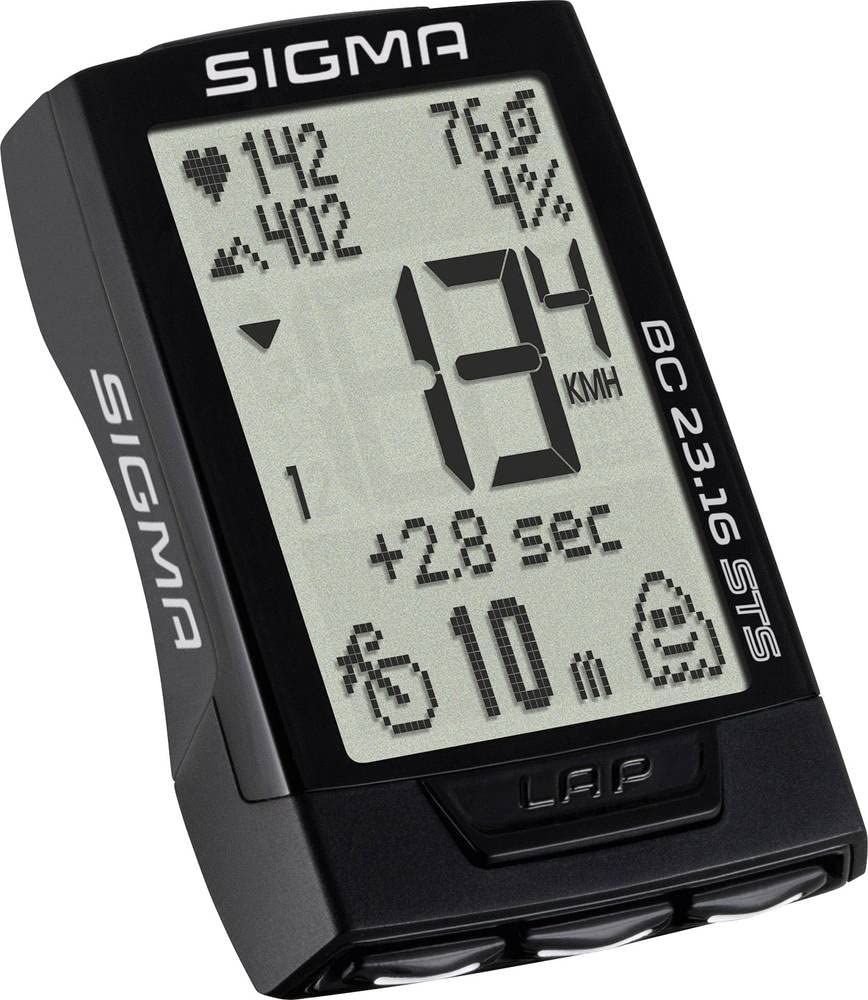
Image: The main unit of the SIGMA BC 23.16 STS Set cyclocomputer, displaying various metrics.
2. Contenu du colis
Avant de procéder à l'installation, veuillez vérifier que tous les composants sont présents dans l'emballage :
- SIGMA BC 23.16 STS Cyclocomputer Unit
- Émetteur de vitesse STS
- STS Cadence Transmitter (if included in set)
- R1 DUO Comfortex+ Heart Rate Transmitter (if included in set)
- Support guidon/potence
- Aimant à rayons
- Cadence Magnet (if included in set)
- Matériel de montage (joints toriques, attaches de câble)
- Batteries (CR2032 for computer, CR2032 for speed/cadence transmitters, CR2032 for heart rate transmitter)
- Manuel d'instructions (ce document)

Image: All components included in the SIGMA BC 23.16 STS Set package, laid out for inspection.
3. Configuration et installation
3.1 Installation de la batterie
The cyclocomputer and transmitters come with pre-installed batteries. If replacement is needed, use CR2032 batteries. Ensure correct polarity when inserting new batteries.

Image: View of the battery compartment for the SIGMA BC 23.16 STS cyclocomputer, showing the CR2032 battery.
Note: An integrated memory chip saves all total values and settings when changing the battery, preventing data loss.
3.2 Mounting the Cyclocomputer and Transmitters
- Handlebar/Stem Mount: Secure the mount to your handlebar or stem using the provided O-rings or cable ties.
- Speed Transmitter: Attach the speed transmitter to the front fork, ensuring it aligns with the spoke magnet. The distance between the transmitter and magnet should be approximately 5-10 mm.
- Spoke Magnet: Fasten the magnet to a spoke on your front wheel.
- Cadence Transmitter (if applicable): Mount the cadence transmitter to the chainstay, aligning it with the cadence magnet on the crank arm.
- Heart Rate Transmitter (if applicable): Wear the heart rate chest strap directly on your skin, just below your chest muscles.
3.3 Paramètres initiaux
Upon first use or after a battery change, you will need to configure basic settings:
- Langue: Sélectionnez votre langue préférée.
- Unités: Choose between kilometers (km/h) or miles (mph) for speed and distance.
- Taille de la roue: Accurately measure and input your wheel circumference for precise speed and distance readings. Refer to your bicycle tire for circumference values or measure manually.
- Format de l'heure : Set 12h or 24h format.
- Données personnelles : Input age, weight, and gender for accurate calorie and heart rate zone calculations.

Image: Diagram illustrating the button layout and their primary functions on the SIGMA BC 23.16 STS cyclocomputer.
4. Mode d'emploi
The BC 23.16 STS features an intuitive interface with multiple functions accessible via its buttons.
4.1 Affichage et navigation
The cyclocomputer features a 2.1-inch display with a backlight function for visibility in various lighting conditions. Use the buttons on the device to navigate through different data screens and menus.

Image: The 2.1-inch screen of the SIGMA BC 23.16 STS cyclocomputer, highlighting its dimensions and backlight capability.
4.2 Fonctions des touches
The BC 23.16 STS offers over 23 functions, including:
- Vitesse actuelle, moyenne et maximale
- Distance (Trajet, Total)
- Ride Time (Trip, Total)
- Horloge
- Température
- Heart Rate (Current, Average, Maximum, Zones)
- Cadence (Current, Average, Maximum)
- Power (Current, Average, Maximum)
- Altitude Functions (Current, Ascent, Descent, Gradient)
- Fonction tour
- Consommation de calories
4.3 Automatic Bike Recognition
The cyclocomputer supports automatic recognition for up to two different bikes. This allows you to use the same computer on multiple bicycles without manually changing settings. Ensure each bike has its own speed and cadence transmitters paired to the computer.

Image: Illustration of the automatic bike recognition feature, showing two different cyclists with their respective bikes (Bike 1 and Bike 2).
5. Entretien
Proper maintenance ensures the longevity and accuracy of your SIGMA BC 23.16 STS Set.
- Nettoyage: Clean the cyclocomputer and transmitters with a soft, damp tissu. N'utilisez pas de produits chimiques agressifs ou de nettoyants abrasifs.
- Remplacement de la batterie : Replace batteries when the low battery indicator appears. Refer to section 3.1 for battery installation details.
- Stockage: Lorsqu'il n'est pas utilisé pendant une période prolongée, rangez l'appareil dans un endroit frais et sec, à l'abri de la lumière directe du soleil.
- Résistance à l'eau : The device is water-resistant, but not waterproof. Avoid submerging it in water.
6. Dépannage
If you encounter issues with your cyclocomputer, refer to the following common problems and solutions:
| Problème | Cause/solution possible |
|---|---|
| No Speed Display |
|
| Lectures incorrectes |
|
| L'affichage est vide |
|
| Heart Rate Not Displaying |
|
7. Spécifications
| Fonctionnalité | Détail |
|---|---|
| Marque | SIGMA |
| Numéro de modèle | 2317 (BC 23.16 STS Set) |
| Type d'affichage | Écran LCD |
| Taille de l'écran | 2.1 pouces (environ 5.3 cm) |
| Type de capteur | Speed Sensor (STS Wireless) |
| Composition de la batterie | Lithium (CR2032) |
| Type de montage | Support de guidon |
| User Interface Input | Boutons |
| Couleur | Noir |
| Fonctions | 23+ functions (Speed, Distance, Time, HR, Cadence, Power, Altitude, etc.) |
| Autonomie de la batterie | 2 ans et plus (unité informatique) |
8. Garantie et assistance
Garantie: The product information indicates "Nessuna" (None) for product warranty. Please refer to your point of purchase for any specific return or exchange policies.
Soutien: For further assistance, technical questions, or detailed information not covered in this manual, please visit the official SIGMA webVous pouvez également consulter leur site web ou contacter leur service client. Vous trouverez plus d'informations sur le site. SIGMA Store on Amazon.
Ask a question about this manual
Ask about setup, troubleshooting, compatibility, parts, safety, or missing instructions. Manuals+ will review the question and use this page’s manual context to help answer it.