
Eurom Alutherm 2000 Wi-Fi
Manuel d'utilisation du radiateur à convection Wi-Fi Eurom Alutherm 2000
Model: Alutherm 2000 Wi-Fi (EUM360776)
1. Introduction
Thank you for choosing the Eurom Alutherm 2000 Wi-Fi convection heater. This manual provides essential information for the safe and efficient operation, installation, and maintenance of your new heater. Please read these instructions carefully before use and keep them for future reference.
The Eurom Alutherm 2000 Wi-Fi is an elegant convection heater designed to integrate seamlessly into any interior. With a power output of 2000 W, it is capable of heating spaces between 49-65 m³, making it suitable for living rooms, bedrooms, or offices. This heater can be wall-mounted for continuous heating and features a built-in thermostat to maintain your desired temperature. Control is made convenient through the free Eurom Smart app, which also allows for connecting multiple heaters.
2. Consignes de sécurité
Respectez toujours les consignes de sécurité suivantes afin de réduire les risques d'incendie, d'électrocution ou de blessure :
- Lisez toutes les instructions avant d’utiliser ce radiateur.
- N’utilisez pas ce radiateur à proximité immédiate d’une baignoire, d’une douche ou d’une piscine.
- Ne couvrez pas le radiateur. Le couvrir peut entraîner une surchauffe et un incendie.
- Gardez les matériaux inflammables tels que les meubles, les rideaux et autres objets combustibles à au moins 1 mètre (3 pieds) de l'avant et des côtés du radiateur.
- Assurer le voltagLa tension indiquée sur l'étiquette signalétique correspond à votre tension secteur.tage.
- N’utilisez aucun appareil de chauffage dont le cordon ou la prise est endommagé, ou après que l’appareil a mal fonctionné, est tombé ou a été endommagé de quelque manière que ce soit.
- Cet appareil n'est pas destiné à être utilisé par des personnes (y compris les enfants) ayant des capacités physiques, sensorielles ou mentales réduites, ou manquant d'expérience et de connaissances, à moins qu'elles ne bénéficient d'une surveillance ou d'instructions concernant l'utilisation de l'appareil par une personne responsable de leur sécurité.
- Les enfants doivent être surveillés pour s’assurer qu’ils ne jouent pas avec l’appareil.
3. Produit terminéview
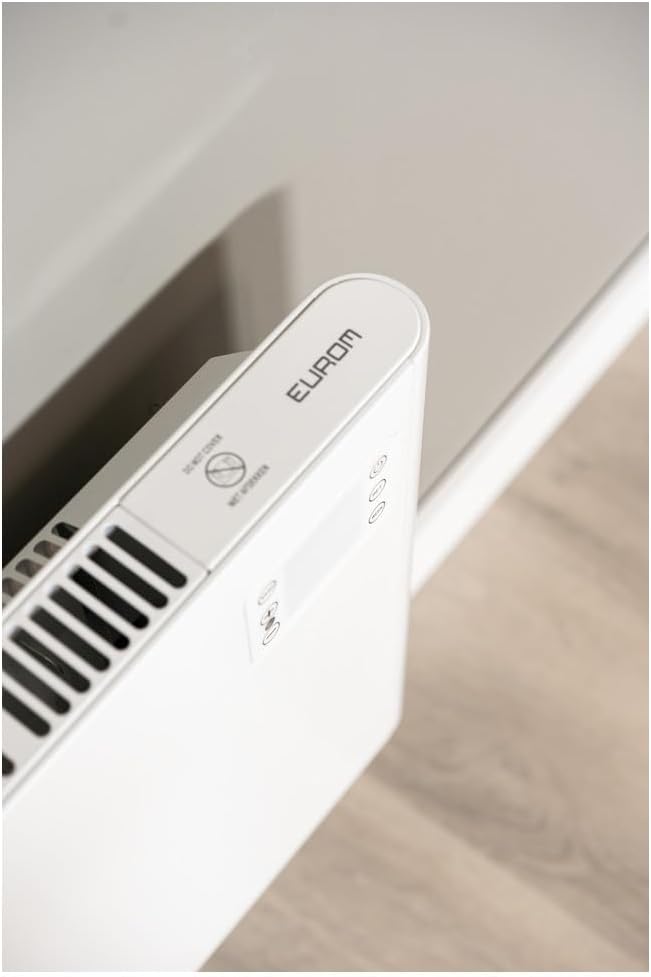
The Eurom Alutherm 2000 Wi-Fi heater features a sleek design and intuitive controls. Below are key components and their descriptions.



4. Configuration et installation
The Eurom Alutherm 2000 Wi-Fi heater offers flexible installation options: wall-mounted or freestanding.
4.1 Montage mural
For permanent heating, the unit can be securely mounted to a wall. Refer to the included mounting template and hardware for precise installation. Ensure the heater is installed at a safe distance from flammable materials and that there is adequate clearance for air circulation.

4.2 Installation autoportante
If you prefer a portable solution, attach the provided feet to the base of the heater. Place the heater on a stable, level surface, ensuring it is not obstructed and has sufficient space around it for proper operation.

4.3 Connexion d'alimentation
Once installed, plug the heater into a suitable electrical outlet. Ensure the main power switch (Figure 3.4) is in the 'OFF' position before plugging in. After plugging in, switch the main power switch to 'ON'.
5. Mode d'emploi
The Alutherm 2000 Wi-Fi can be operated via its integrated control panel, the remote control, or the Eurom Smart app.
5.1 Fonctionnement du panneau de commande
The control panel (Figure 3.6) allows direct adjustment of settings:
- Bouton d'alimentation : Allume ou éteint le chauffage.
- Bouton Mode : Cycles through different operating modes (e.g., Comfort, ECO, Anti-frost).
- Bouton de réglage: Confirme les sélections ou accède aux menus de paramètres.
- Réglage de la température (+/-) : Augmente ou diminue la température souhaitée.
- Bouton SEMAINE : Accesses weekly programming settings.
5.2 Fonctionnement de la télécommande
The remote control (Figure 3.5) provides convenient access to all heater functions from a distance. Its buttons mirror the functions available on the control panel.
5.3 Eurom Smart App Control (Wi-Fi)
For advanced control and scheduling, download the free Eurom Smart app. This app allows you to:
- Turn the heater on/off remotely.
- Set and adjust the desired temperature.
- Program weekly heating schedules.
- Connect and manage multiple Eurom Wi-Fi heaters.
Follow the in-app instructions for pairing your heater with the app and connecting to your home Wi-Fi network.
6. Entretien
Un entretien régulier garantit des performances optimales et une longue durée de vie à votre appareil de chauffage.
- Nettoyage: Débranchez toujours le radiateur et laissez-le refroidir complètement avant de le nettoyer. Utilisez un chiffon doux et sec.amp Nettoyer les surfaces extérieures avec un chiffon. Ne pas utiliser de nettoyants abrasifs ni de solvants.
- Stockage: Si vous devez entreposer le radiateur pendant une période prolongée, assurez-vous qu'il soit propre et sec. Rangez-le dans un endroit frais et sec, de préférence dans son emballage d'origine.
- Inspection: Periodically check the power cord and plug for any signs of damage. If damage is found, do not use the heater and contact qualified service personnel.
7. Dépannage
If you encounter issues with your Eurom Alutherm 2000 Wi-Fi heater, refer to the following common problems and solutions:
| Problème | Cause possible | Solution |
|---|---|---|
| Le radiateur ne s'allume pas. | Pas d'alimentation électrique ; interrupteur principal éteint ; protection contre la surchauffe activée. | Check power outlet and plug; Ensure main power switch (Figure 3.4) is ON; Unplug, allow to cool for 30 minutes, then restart. |
| Heater not heating to desired temperature. | Temperature setting too low; Room size exceeds heater capacity; Obstruction of air vents. | Increase temperature setting; Ensure heater is appropriate for room size; Clear any obstructions from air vents. |
| Problèmes de connexion Wi-Fi. | Weak Wi-Fi signal; Incorrect app pairing; Router issues. | Ensure heater is within Wi-Fi range; Re-pair the heater with the Eurom Smart app; Restart your Wi-Fi router. |
| Heater overheats or runs continuously. | Thermostat malfunction; Air vents blocked; Software glitch. | Ensure vents are clear and heater is not covered; If issue persists, unplug and contact support. (Remarque : Un utilisateur review mentioned potential overheating issues if the management module gets stuck. Always monitor the heater.) |
| Heater does not restart automatically after power outage. | Limites de conception. | This model may require manual restart after a power interruption. |
Si le problème persiste après avoir essayé ces solutions, veuillez contacter le service client d'Eurom.
8. Spécifications
| Fonctionnalité | Spécification |
|---|---|
| Marque | Eurom |
| Numéro de modèle | EUM360776 |
| Couleur | Blanc |
| Dimensions du produit (L x l x H) | 101 x 46 x 12 cm |
| Poids | 6 kilogrammes |
| Classe d'efficacité énergétique | B |
| Caractéristiques spéciales | Wi-Fi Compatible, Electronic Thermostat |
| Facteur de forme | Tour |
| Utilisation intérieure/extérieure | Intérieur |
| Source d'énergie | Électrique avec fil |
| Méthode de chauffage | Convection |
| Type de montage | Support mural |
9. Garantie et assistance
For warranty information, please refer to the documentation provided with your purchase or visit the official Eurom website. If you require technical assistance, spare parts, or have any questions regarding your Eurom Alutherm 2000 Wi-Fi heater, please contact Eurom customer support directly. Contact details can typically be found on the product packaging or the manufacturer's website.
Ask a question about this manual
Ask about setup, troubleshooting, compatibility, parts, safety, or missing instructions. Manuals+ will review the question and use this page’s manual context to help answer it.