
1. Introduction
Merci pour votre achatasing the Kaiser MSA-5708GY Professional 8-inch Amplified Wireless Speaker. This device is designed to provide high-quality audio with versatile connectivity options, including Bluetooth, USB, SD card, and AUX input. It also features a microphone input for public address or karaoke, and dynamic multicolor LED lights. Please read this manual thoroughly before operating the speaker to ensure proper use and to maximize its performance and longevity.
2. Consignes de sécurité
- Source d'alimentation : Use only the provided charging cable and adapter. Ensure the power supply matches the speaker's requirements.
- Eau et humidité : Do not expose the speaker to water, rain, or excessive moisture. Avoid placing liquid-filled objects on or near the speaker.
- Chaleur: Keep the speaker away from heat sources such as radiators, heat registers, stoves, or other heat-producing appliances.
- Ventilation: Do not block any ventilation openings. Ensure adequate airflow around the speaker.
- Nettoyage: Débranchez l'appareil avant de le nettoyer. Utilisez un chiffon doux et sec. N'utilisez pas de nettoyants liquides ni d'aérosols.
- Entretien: N'essayez pas de réparer vous-même ce produit. Confiez tous les travaux d'entretien à du personnel de service qualifié.
- Batterie: L'enceinte contient une batterie rechargeable. Ne pas exposer la batterie à une chaleur excessive ni à la lumière directe du soleil. Recycler les piles conformément à la réglementation locale.
3. Contenu du colis
Vérifiez que tous les éléments sont présents dans le colis :
- Kaiser MSA-5708GY AmpHaut-parleur sans fil lifié
- Microphone filaire
- Télécommande
- Charging Cable / Power Adapter
4. Produit terminéview
Familiarisez-vous avec les principaux composants et commandes de votre enceinte.
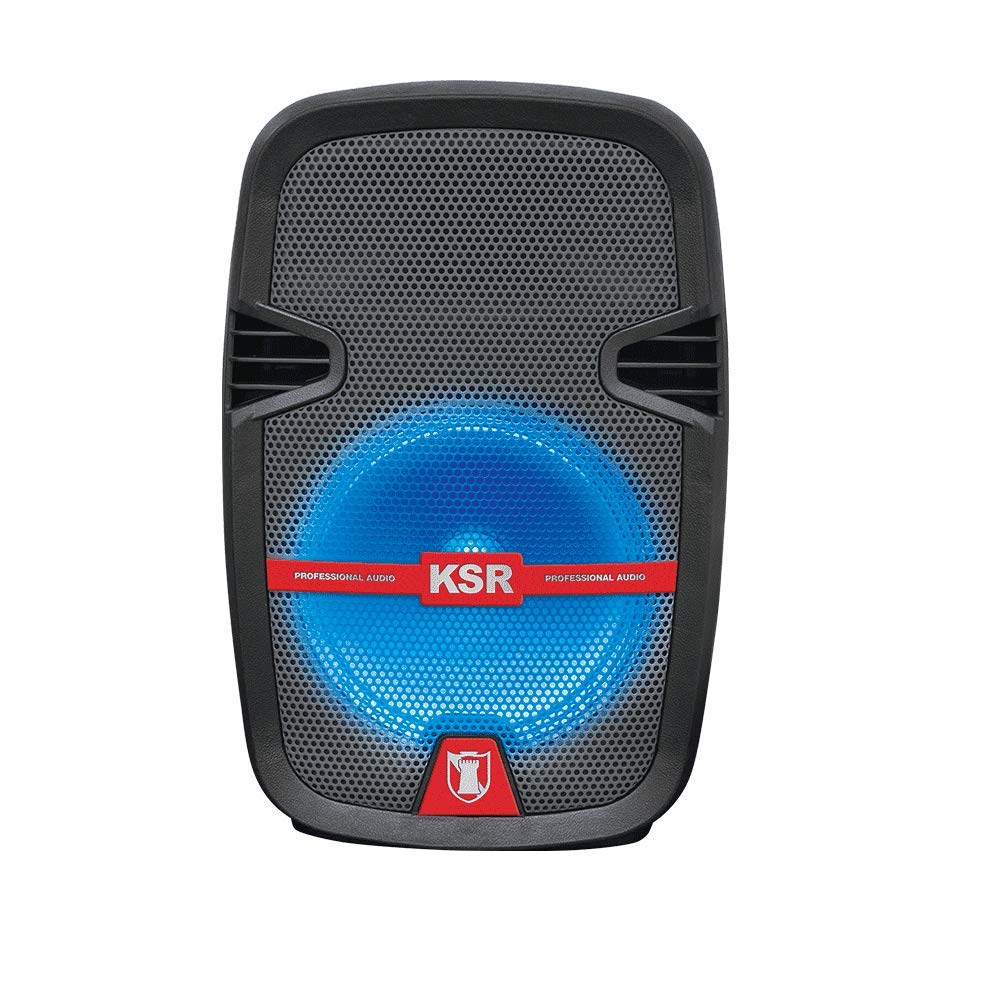
Figure 1 : Devant view of the Kaiser MSA-5708GY speaker, showing the 8-inch woofer with multicolor LED lights and the control panel.
Fonctionnalités du panneau de commande :
- Afficher: Affiche le mode actuel, le numéro de piste ou la fréquence FM.
- Bouton Mode : Switches between Bluetooth, USB, SD, AUX, and FM Radio modes.
- Bouton Lecture/Pause : Démarre ou interrompt la lecture.
- Boutons Précédent/Suivant : Permet de naviguer entre les pistes ou les stations FM.
- Bouton de volume : Règle le volume principal.
- Bouton de volume du micro : Régler le volume d'entrée du microphone.
- Microphone Bass/Treble Knobs: Adjusts bass and treble for the microphone input.
- Interrupteur d'éclairage LED : Toggles the multicolor LED lights on/off.
Rear Panel / Side Connections:
- Port USB : Pour les clés USB.
- Emplacement pour carte SD : Pour les cartes mémoire SD.
- Entrée AUX (3.5 mm) : Pour les périphériques audio externes.
- Entrée microphone (6.3 mm) : For connecting a wired microphone.
- Port de charge : Pour connecter l'adaptateur secteur.
- Interrupteur: Allume ou éteint le haut-parleur.
- Stand Mount Socket: For mounting the speaker on a compatible stand.
5. Installation
5.1 Chargement de la batterie
- Branchez le câble de chargement fourni au port de chargement de l'enceinte.
- Plug the other end of the cable into a suitable power outlet.
- The charging indicator light (if present) will illuminate, indicating that the battery is charging.
- Prévoyez environ 3 à 4 heures pour une charge complète. Le voyant peut changer de couleur ou s'éteindre une fois la charge terminée.
- Débranchez le chargeur une fois la batterie complètement chargée afin de préserver sa durée de vie.
Note: For optimal battery performance, fully charge the speaker before first use.
5.2 Mise sous/hors tension
- To power on, locate the Power Switch on the speaker and toggle it to the "ON" position.
- To power off, toggle the Power Switch to the "OFF" position.
5.3 Mounting on a Stand
The speaker features a rear knob and a socket for mounting on a compatible speaker stand.
- Ensure the speaker stand is stable and rated for the speaker's weight (4 kg).
- Carefully place the speaker onto the stand's pole, aligning it with the stand mount socket.
- Tighten the rear knob on the speaker to secure it firmly to the stand.
6. Mode d'emploi
6.1 Connectivité Bluetooth
- Power on the speaker. The speaker will typically enter Bluetooth pairing mode automatically, indicated by a flashing Bluetooth icon or a voice prompt. If not, press the "Mode" button until "Bluetooth" is selected.
- Sur votre appareil mobile (smartphone, tablette, etc.), activez le Bluetooth et recherchez les appareils disponibles.
- Select "MSA-5708GY" from the list of devices.
- Once paired, the speaker will confirm the connection, and the Bluetooth indicator will stop flashing.
- You can now play audio from your device through the speaker. Control playback and volume from your device or the speaker's controls.
Note: The Bluetooth range is up to 10 meters (33 feet) in open areas.
Lecture de cartes USB/SD 6.2 pouces
- Insert a USB flash drive or an SD card (pre-loaded with MP3 audio files) dans le port/fente respectif du haut-parleur.
- The speaker should automatically switch to USB or SD mode and begin playing audio. If not, press the "Mode" button to select "USB" or "SD".
- Utilisez les boutons Lecture/Pause, Précédent et Suivant de l'enceinte ou de la télécommande pour gérer la lecture.
6.3 Radio FM
- Power on the speaker and press the "Mode" button until "FM" mode is selected.
- Press and hold the Play/Pause button to initiate an automatic scan for FM stations. The speaker will scan and save available stations.
- Utilisez les boutons Précédent et Suivant pour naviguer entre les stations FM enregistrées.
6.4 Entrée AUX
- Connectez une extrémité d'un câble audio de 3.5 mm (non fourni) au port d'entrée AUX du haut-parleur.
- Connectez l'autre extrémité du câble à la prise casque ou à la sortie audio de votre appareil audio externe (par exemple, lecteur MP3, ordinateur portable).
- Appuyez sur le bouton « Mode » jusqu'à ce que le mode « AUX » soit sélectionné.
- Play audio from your external device. Adjust volume from both the external device and the speaker.
6.5 Utilisation du microphone
- Connect the wired microphone to the 6.3mm microphone input jack on the speaker.
- Réglez le bouton « MIC VOL » pour contrôler le volume du microphone.
- Use the "MIC BASS" and "MIC TREBLE" knobs to fine-tune the microphone's sound.
6.6 lumières LED multicolores
The speaker features integrated multicolor LED lights that illuminate the woofer.
- To activate or deactivate the LED lights, use the dedicated LED Light Switch on the control panel.
6.7 Fonctionnement de la télécommande
The included remote control allows for convenient operation from a distance. Ensure the remote control has working batteries and is pointed towards the speaker's IR receiver.
- Bouton d'alimentation : Turns the speaker on/off (standby).
- Bouton Mode : Switches input modes.
- Volume +/- : Règle le volume principal.
- Lecture/Pause : Démarre/interrompt la lecture.
- Précédent Suivant: Saute des pistes ou des stations FM.
- EQ: (If available) Cycles through equalizer presets.
- Boutons numériques : (If available) Direct track selection in USB/SD mode or FM station input.
7. Entretien
7.1 Nettoyage
- Débranchez toujours le haut-parleur de la source d'alimentation avant de le nettoyer.
- Utilisez un chiffon doux, sec et non pelucheux pour essuyer les surfaces extérieures du haut-parleur.
- N’utilisez pas de nettoyants abrasifs, de cires ou de solvants, car ils pourraient endommager la finition.
- Évitez de laisser pénétrer l’humidité dans les ouvertures.
7.2 Entretien de la batterie
- Pour prolonger la durée de vie de la batterie, évitez de la décharger complètement et fréquemment.
- If the speaker will not be used for an extended period, charge it to about 50% and store it in a cool, dry place. Recharge every 3-6 months to prevent deep discharge.
- N'exposez pas la batterie à des températures extrêmes.
8. Dépannage
| Problème | Cause possible | Solution |
|---|---|---|
| Pas de courant | Battery is drained; Power switch is off; Charging cable not connected properly. | Charge the battery; Ensure power switch is ON; Check charging cable connection. |
| Pas de son | Volume is too low; Incorrect input mode selected; Device not connected properly (Bluetooth, AUX, USB/SD). | Increase master volume; Select correct input mode; Reconnect device or re-pair Bluetooth. |
| Bluetooth ne se connecte pas | Speaker not in pairing mode; Device Bluetooth is off; Speaker is too far from device; Interference. | Ensure speaker is in Bluetooth mode; Enable Bluetooth on device; Move device closer to speaker (within 10m); Avoid obstacles. |
| La lecture USB/SD ne fonctionne pas | Incorrect file Format ; carte USB/SD corrompue ; mode incorrect sélectionné. | Assurer fileLes fichiers sont au format MP3 ; essayez une autre carte USB/SD ; sélectionnez le mode USB/SD. |
| Le microphone ne fonctionne pas | Microphone not connected; MIC VOL knob is low; Microphone is faulty. | Vérifiez que le microphone est bien connecté ; augmentez le volume du microphone ; testez avec un autre microphone si disponible. |
9. Spécifications
| Modèle: | MSA-5708GY |
| Marque: | kaiser |
| Puissance audio : | 2,500W PMPO / 8W RMS |
| Taille du haut-parleur : | 8 pouces (20.32 cm) |
| Connectivité : | Bluetooth, USB, SD, AUX (3.5mm), Microphone (6.3mm) |
| Gamme Bluetooth: | Jusqu'à 10 mètres |
| Batterie: | Rechargeable, up to 4 hours continuous music playback |
| Radio: | Radio FM |
| Impédance: | 4 Ohms |
| Dimensions (L x l x H) : | 30 x 44 x 25 cm |
| Poids: | 4 kg |
| Appareils compatibles : | Ordinateur portable, smartphone |
10. Informations sur la garantie
This Kaiser MSA-5708GY speaker comes with a Garantie de 3 mois À compter de la date d'achat, cette garantie couvre les défauts de fabrication dans des conditions normales d'utilisation. Elle ne couvre pas les dommages causés par une mauvaise utilisation, un accident, des modifications non autorisées ou l'usure normale. Veuillez conserver votre preuve d'achat pour toute réclamation au titre de la garantie.
11. Assistance clientèle
If you encounter any issues or have questions regarding your Kaiser MSA-5708GY speaker that are not addressed in this manual, please contact Kaiser customer support. Refer to the product packaging or the official Kaiser website pour obtenir les informations de contact les plus récentes.
When contacting support, please have your product model number (MSA-5708GY) and proof of purchase readily available.