
Technical Precision DMIL-AZ-D89E-7
Technical Precision Replacement for Leica Dmil Light Bulb Instruction Manual
Model: DMIL-AZ-D89E-7 | Brand: Technical Precision
1. Introduction
This manual provides essential information for the safe and effective use of your Technical Precision Replacement for Leica Dmil Halogen Light Bulb. Please read these instructions carefully before installation and retain for future reference.
2. Produit terminéview
The Technical Precision Replacement for Leica Dmil Light Bulb is a 35W, 6V halogen bulb designed for microscope lighting applications. It features a T3 bulb shape with a 2-pin G4 base, providing clear illumination.
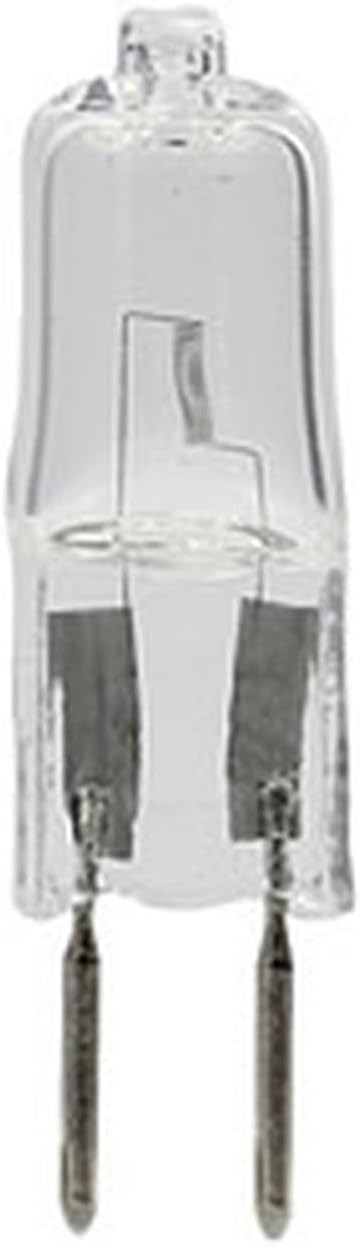
Figure 2.1 : Face avant view of the Technical Precision Replacement Halogen Bulb, showing its clear glass and two-pin G4 base.

Figure 2.2 : Angulaire view of the Technical Precision Replacement Halogen Bulb, highlighting the internal filament structure.
3. Consignes de sécurité
Respectez toujours les consignes de sécurité suivantes :
- Risque de brûlures : Les ampoules halogènes fonctionnent à haute température. Laissez-les refroidir complètement avant de les manipuler.
- Risque de choc électrique : Always disconnect power to the fixture before installing, removing, or inspecting the bulb.
- À manipuler avec précaution : Avoid touching the glass part of the bulb with bare hands. Oils from your skin can create hot spots, leading to premature failure. Use a clean cloth or gloves when handling.
- Élimination appropriée : Éliminez les ampoules usagées conformément à la réglementation locale.
- Compatibilité: Ensure the replacement bulb's specifications (voltage, quoitage, base type) match the requirements of your equipment.
4. Installation
Follow these steps to install the replacement halogen bulb:
- Débrancher l'alimentation : Turn off and unplug the microscope or lighting fixture from the power source.
- Autoriser le refroidissement : If the previous bulb was in use, wait for it to cool down completely to avoid burns.
- Ampoule d'accès : Ouvrez soigneusement le lamp housing or access panel to expose the old bulb. Refer to your microscope's or fixture's manual for specific instructions on accessing the bulb.
- Retirer l'ancienne ampoule : Gently pull the old bulb straight out from its G4 base. Avoid twisting or bending the pins.
- Installer une nouvelle ampoule : Holding the new bulb with a clean cloth or gloves, align the two pins with the holes in the G4 socket. Gently push the bulb straight into the socket until it is firmly seated. Do not force it.
- Logement sécurisé : Close and secure the lamp housing or access panel.
- Restaurer l'alimentation : Plug the microscope or lighting fixture back into the power source.
5. Fonctionnement
Once installed, the halogen bulb operates as part of your microscope or lighting fixture. Simply turn on the device's power switch to illuminate the bulb. Adjust brightness settings as per your equipment's controls.
6. Entretien
Halogen bulbs generally require minimal maintenance. However, periodic checks can prolong their lifespan and ensure optimal performance:
- Nettoyage: If the bulb's glass surface becomes dusty or smudged, ensure the bulb is cool and power is disconnected. Gently wipe the glass with a clean, lint-free cloth moistened with rubbing alcohol. Allow to dry completely before re-energizing.
- Inspection: Periodically inspect the bulb and its socket for any signs of damage, corrosion, or loose connections. Replace the bulb if the glass is cracked or the filament is broken.
7. Dépannage
Si l'ampoule ne s'allume pas après l'installation, tenez compte des points suivants :
- Pas d'alimentation : Ensure the microscope or lighting fixture is properly plugged in and the power switch is on. Check the power outlet.
- Installation incorrecte : Verify that the bulb is fully and correctly seated in its socket. The pins must make proper contact.
- Blown Fuse/Circuit Breaker: Check the fuse or circuit breaker for the lighting fixture or the electrical circuit it is connected to.
- Defective Bulb: Although rare, a new bulb can sometimes be defective. If possible, test with another known-good bulb.
- Fixture Issue: If all else fails, the issue might be with the lighting fixture itself (e.g., faulty socket, wiring, or internal component). Consult a qualified technician.
8. Spécifications
| Attribut | Valeur |
|---|---|
| Marque | Précision technique |
| Numéro de modèle | DMIL-AZ-D89E-7 |
| Type de lumière | Halogène |
| Quoitage | 35 watts |
| Voltage | 6 Volts (as per product title) |
| Forme de l'ampoule Taille | T3 |
| Culot de l'ampoule | G4 (2-Pin) |
| Luminosité | 1585 lumens |
| Type de finition | Clair |
| Nombre d'unités | Paquet de 1 |

Figure 8.1: Lighting Facts for the bulb, detailing brightness, estimated life, and energy usage.
9. Garantie et assistance
For information regarding warranty, returns, or technical support, please refer to the official Technical Precision website ou contactez directement leur service client. Vous pouvez également visiter le Technical Precision Store on Amazon pour plus de détails.