
Introduction
This manual provides detailed instructions for the use and maintenance of your Strong SRT 7404 HD remote control. This remote is designed as an original replacement for the Strong SRT 7404 HD FRANSAT receiver, ensuring full compatibility and functionality.
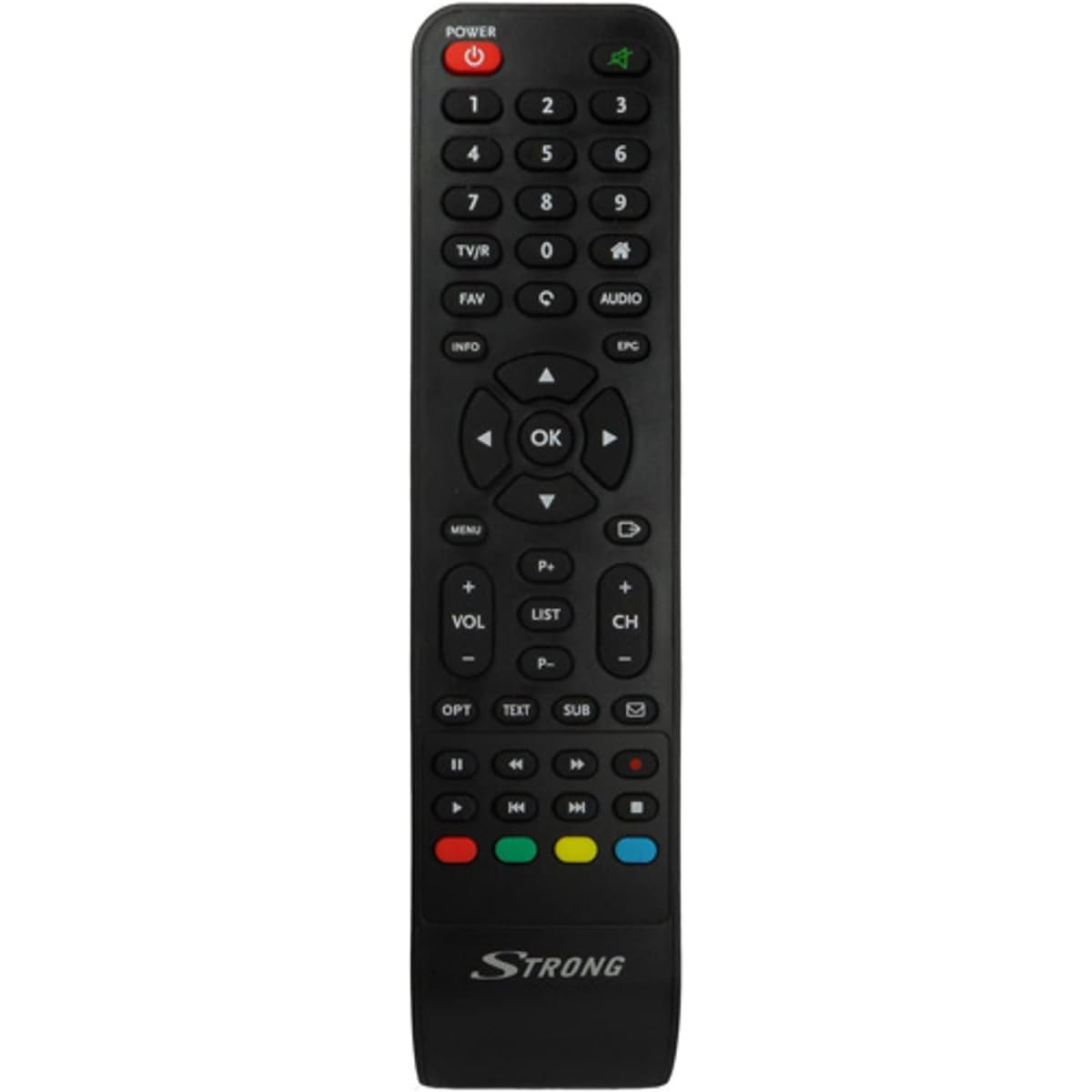
Image: The Strong SRT 7404 HD remote control, black in color, featuring various control buttons for television and receiver functions.
Installation
1. Installation de la batterie
- Localisez le compartiment à piles à l'arrière de la télécommande.
- Pour ouvrir le couvercle de la batterie, faites-le glisser vers le bas ou dans le sens indiqué par la flèche.
- Insert two AAA alkaline batteries (not included), ensuring the positive (+) and negative (-) terminals align correctly with the markings inside the compartment.
- Remettez le couvercle de la batterie en le faisant glisser dans sa position jusqu'à ce qu'il s'enclenche correctement.
Note: Always use new alkaline batteries for optimal performance. Do not mix old and new batteries, or different types of batteries.
2. Utilisation initiale
The Strong SRT 7404 HD remote control is an original replacement and is pre-programmed for the Strong SRT 7404 HD FRANSAT receiver. No additional setup or pairing is typically required. Simply install the batteries and point the remote control towards your receiver to begin operation.
Mode d'emploi
This section outlines the basic functions of the remote control buttons.
- Bouton d'alimentation : Allume ou éteint le récepteur.
- Canal haut/bas : Navigates through television channels.
- Volume haut/bas : Règle le volume audio.
- Bouton de sourdine: Silences or restores the audio.
- Touches numériques (0-9): Directly selects channels or enters numerical data.
- Bouton Menu : Permet d'accéder au menu principal du récepteur.
- Boutons de navigation (Haut, Bas, Gauche, Droite, OK) : Permet de naviguer dans les menus et de confirmer les sélections.
- Bouton Quitter/Retour : Retourne à l'écran précédent ou quitte un menu.
- Bouton d'informations : Affiche les informations du programme.
- Boutons de couleur (rouge, vert, jaune, bleu) : Functions vary depending on the on-screen menu or application.
Refer to your Strong SRT 7404 HD FRANSAT receiver's manual for specific functions related to its menu system and advanced features.
Entretien
Nettoyage
Pour nettoyer la télécommande, essuyez délicatement sa surface avec un chiffon doux et sec. Pour les saletés tenaces, frottez légèrement avec un chiffon doux.ampen the cloth with water. Avoid using abrasive cleaners, solvents, or alcohol, as these can damage the remote's finish or internal components.
Remplacement de la batterie
Replace batteries when the remote control becomes unresponsive or its range decreases significantly. Follow the battery installation steps outlined in the "Setup" section. Dispose of used batteries according to local regulations.
Stockage
En cas de non-utilisation prolongée, retirez les piles afin d'éviter les fuites qui pourraient endommager la télécommande. Rangez-la dans un endroit frais et sec, à l'abri de la lumière directe du soleil et des températures extrêmes.
Dépannage
- La télécommande ne répond pas :
- Vérifiez que les piles sont correctement insérées avec la polarité correcte (+/-).
- Remplacez les piles usagées par des piles alcalines neuves.
- Assurez-vous qu'aucun obstacle ne se trouve entre la télécommande et le capteur infrarouge du récepteur.
- Assurez-vous d'être dans la zone de fonctionnement efficace (jusqu'à 10 mètres).
- Pointez la télécommande directement vers le récepteur.
- Certains boutons ne fonctionnent pas :
- Nettoyez la surface de la télécommande, en particulier autour des boutons qui ne répondent pas, afin d'éliminer toute saleté ou débris pouvant empêcher un bon contact.
- If cleaning and battery replacement do not resolve the issue, the button or remote may be faulty.
Caractéristiques
| Fonctionnalité | Détail |
|---|---|
| Marque | FORT |
| Nom du modèle | 7404 |
| Dossier spécial | Léger |
| Couleur | Noir |
| Nombre maximal d'appareils pris en charge | 1 |
| Appareils compatibles | TV Decoder (Strong SRT 7404 HD FRANSAT Receiver) |
| Technologie de connectivité | Radio Fréquence |
| Nombre de boutons | 5 |
| Type de contrôleur | Télécommande |
| Portée maximale | 10 mètres |
| Type de batterie | Alcaline (AAA, non incluse) |
| Pays d'origine | Chine |
Garantie et assistance
Informations sur la garantie
This Strong SRT 7404 HD remote control comes with a 2-year warranty from the date of purchase. This warranty covers manufacturing defects under normal use. Please retain your proof of purchase for warranty claims.
Assistance clientèle
For further assistance, technical support, or warranty inquiries, please contact Strong customer service. Contact details can typically be found on the official Strong websur le site ou auprès de votre revendeur.
You can visit the official Strong brand store for more information: Strong Brand Store