
1. Produit terminéview
The Tenergy 11W Dimmable LED Desk Lamp (Model FY-0001) is designed to provide versatile lighting for various tasks, featuring adjustable brightness, multiple color temperatures, and a convenient USB charging port. Its sleek design and flexible arm make it suitable for home and office environments.

Image: The Tenergy 11W LED Desk Lamp, montrerasing its modern design and adjustable features.
2. Contenu de la boîte
- Tenergy 11W Dimmable LED Desk Lamp
- Câble de chargement USB
- Adaptateur secteur
- Manuel de l'utilisateur (ce document)

Image: The Tenergy 11W LED Desk Lamp and its included accessories laid out on a surface.
3. Installation
- Retirez soigneusement tous les composants de l'emballage.
- Placez le lamp base sur une surface stable et plane.
- Connectez l'adaptateur secteur à la prise lamp's power input port, typically located at the rear of the base.
- Branchez l'adaptateur secteur dans une prise électrique standard.amp's indicator light should illuminate, indicating it is ready for use.
4. Mode d'emploi
4.1 Mise sous/hors tension
Pour tourner le lamp on or off, gently touch the Marche/Arrêt button located on the touch control panel on the lampla base.
4.2 Réglage de la luminosité
Le lamp offers 5 levels of brightness. Use the + et - buttons on the touch control panel to increase or decrease the light intensity.
4.3 Changing Light Modes (Color Temperature)
Le lamp features 4 distinct light modes, each with a different color temperature, optimized for various activities:
- Mode de lecture : Provides a bright, neutral white light ideal for reading.
- Mode d'étude : Offers a cooler, more focused light to enhance concentration.
- Mode détente : Emits a warm, soft light for a comfortable and calming atmosphere.
- Mode veille: Delivers a very warm, dim light suitable for winding down before sleep.
To switch between these modes, repeatedly touch the corresponding icon on the control panel.

Image: Visual representation of the four adjustable light color temperatures available on the lamp.
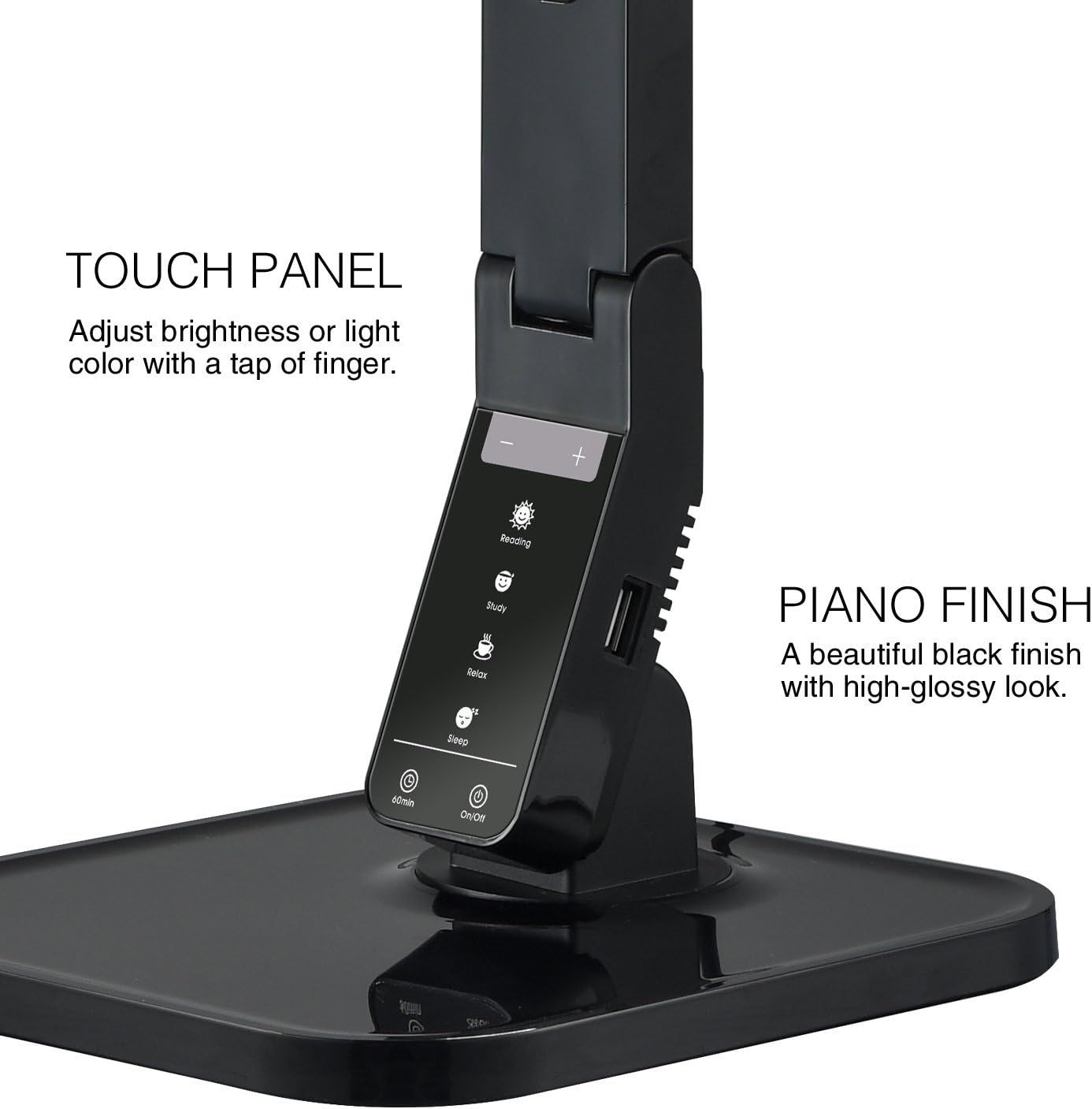
Image: The touch control panel with various light mode and brightness adjustment icons.
4.4 Utilisation du port de chargement USB
A USB charging port is integrated into the lamp's base, allowing you to charge compatible devices such as smartphones or tablets. Simply connect your device's USB charging cable to the port.

Image: A smartphone being charged via the integrated USB port on the lampla base.
4.5 Réglage du Lamp Bras
Le lamp features an adjustable arm that allows you to direct the light precisely where needed. The arm can be folded, extended, and swiveled to achieve optimal positioning.

Image: Illustrations demonstrating the flexibility and adjustability of the lample bras de.
4.6 Fonction minuterie
Le lamp includes a 60-minute timer function. To activate, press the 60 min button on the control panel. The lamp s'éteindra automatiquement après 60 minutes.
4.7 Vidéo officielle du produit
Video: An official product video from Tenergy Corporation demonstrating the features and benefits of the 11W LED Desk Lamp, including its adjustable lighting, USB charging, and sleek design.
5. Entretien
- Nettoyage: Pour nettoyer le lamp, especially its glossy finish, use a soft, dry microfiber cloth. Avoid abrasive cleaners or harsh chemicals that may damage the surface.
- Stockage: En cas de non-utilisation prolongée, rangez le lamp dans un endroit frais et sec.
6. Dépannage
- Lamp ne s'allume pas : Assurez-vous que l'adaptateur secteur est correctement branché sur les deux prises.amp and a working electrical outlet. Check if the outlet is receiving power.
- Le port USB ne charge pas : Vérifiez le lamp is powered on and the USB cable is properly connected to both the lamp and your device. Ensure your device is compatible with USB charging.
- Lumière vacillante : If the light flickers, try unplugging the lamp for a few minutes and then plugging it back in. If the issue persists, contact customer support.
7. Spécifications
| Numéro de modèle | FY-0001 |
| Marque | Ténergie |
| Quoitage | 11 watts |
| Type de source lumineuse | DIRIGÉ |
| Niveaux de luminosité | 5 |
| Light Colors / Modes | 4 (Reading, Study, Relax, Sleep) |
| Méthode de contrôle | Touche |
| Technologie de connectivité | USB |
| Source d'énergie | Électrique avec fil |
| Dimensions du produit | 7"P x 6.75"L x 16.7"H |
| Type de matériau | Plastique |
| Type de finition | Brillant |
8. Garantie et assistance
For warranty information or technical support, please visit the official Tenergy webConsultez leur site web ou contactez leur service client. Conservez votre reçu d'achat pour toute réclamation au titre de la garantie.
Tenergy Store: https://www.amazon.com/stores/Tenergy/page/5AE2FFA8-E197-4708-9169-C4D8CB488E9E