1. Introduction
The Viecar CY300 is a compact and efficient OBDII car diagnostic scanner designed to retrieve vehicle diagnostic information. This tool supports all OBD II protocols, including the Controller Area Network (CAN) protocol, making it compatible with most 1996 and newer vehicles.
This manual provides detailed instructions for the proper use and maintenance of your CY300 diagnostic scanner.
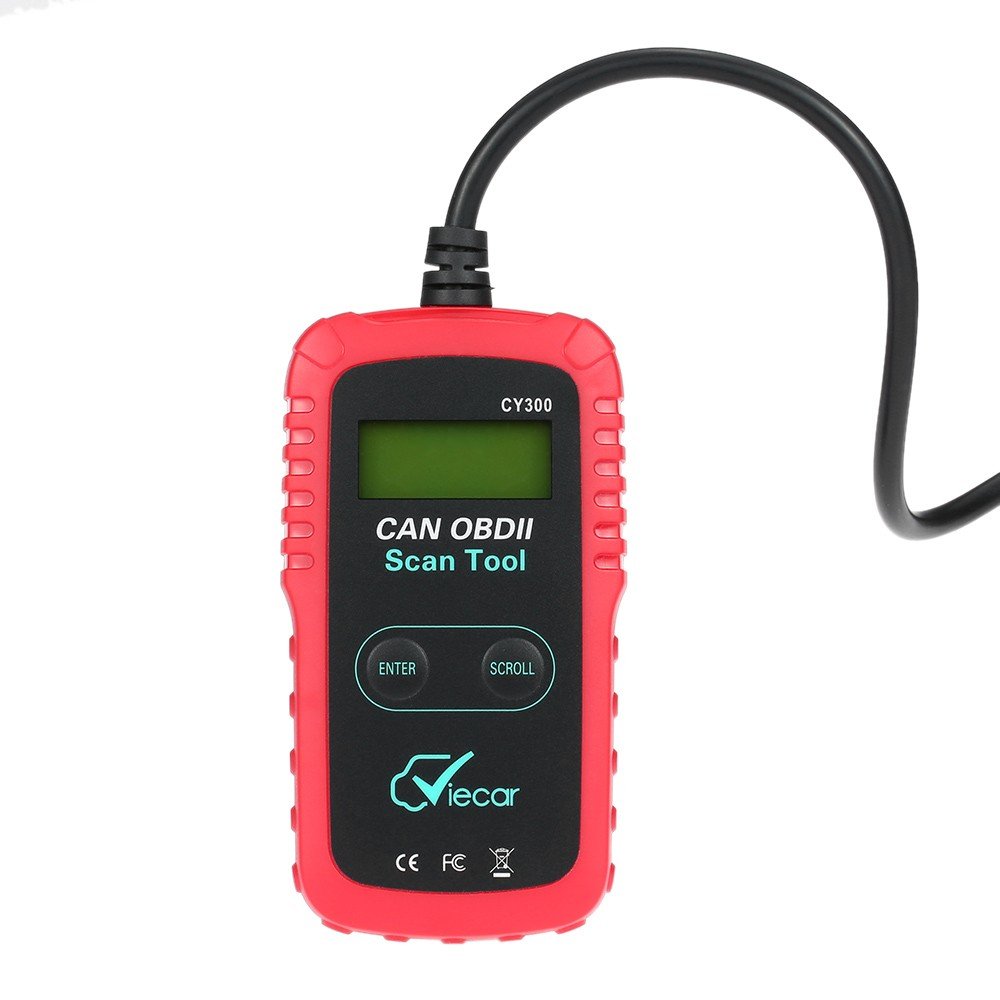
Figure 1.1: Viecar CY300 OBDII Car Diagnostic Scanner. The device is red and black with an integrated cable and OBDII connector.
2. Consignes de sécurité
- Effectuez toujours les tests automobiles dans un environnement sûr.
- Portez des lunettes de protection conformes aux normes ANSI.
- Gardez les vêtements, les cheveux, les mains, les outils, l'équipement d'essai, etc., à l'écart de toutes les pièces mobiles ou chaudes du moteur.
- Conduire le véhicule dans une zone de travail bien ventilée ; les gaz d'échappement sont toxiques.
- Placez des blocs devant les roues motrices et ne laissez jamais le véhicule sans surveillance pendant les tests.
- Soyez extrêmement prudent lorsque vous travaillez autour de la bobine d'allumage, du capuchon du distributeur, des fils d'allumage et des bougies d'allumage. Ces composants créent des vol dangereuxtages lorsque le moteur tourne.
- Gardez un extincteur adapté aux feux d'essence/chimiques/électriques à proximité.
- Ne connectez ou déconnectez aucun équipement de test lorsque le contact est mis ou que le moteur tourne.
3. Produit terminéview
The Viecar CY300 is designed for ease of use, featuring a clear display and intuitive buttons for navigation.
3.1 Principales caractéristiques
- Reads and clears generic and manufacturer-specific Diagnostic Trouble Codes (DTCs).
- Éteint le voyant moteur (MIL).
- Supports multiple trouble code requests: generic, pending, and manufacturer-specific codes.
- Reviewétat de préparation aux émissions des moniteurs OBD.
- Determines Malfunction Indicator Lamp (MIL) statut.
- Retrieves Vehicle Identification Number (VIN) on 2002 and newer vehicles that support Mode 9.
- Easy plug-and-play operation.
- No internal batteries required; powered directly via the detachable OBD II cable from the vehicle.
3.2 Composants de l'appareil

Figure 3.1: Labeled components of the Viecar CY300. This image highlights the LCD display, Enter button, Scroll button, and the OBD II connector.
- Écran LCD : Backlit, 2-line, 8-character display for showing diagnostic information.
- Bouton Entrée : Confirme les sélections ou les actions.
- Bouton de défilement : Permet de naviguer dans les menus et les données.
- Connecteur OBD II : Connects the tool to the vehicle's OBD II port.
4. Installation
The Viecar CY300 is designed for simple plug-and-play operation. Follow these steps to set up your device:
- Localisez le port OBD II : The OBD II port is typically located under the dashboard on the driver's side of the vehicle. Refer to your vehicle's service manual for the exact location if you cannot find it.
- Connectez le scanner : With the vehicle's ignition off, firmly plug the CY300's OBD II connector into the vehicle's OBD II port. Ensure a secure connection.
- Mettre le contact : Turn the vehicle's ignition to the "ON" position (do not start the engine). The scanner will automatically power on, drawing power from the vehicle's battery.
- Initialisation du système : The scanner will perform a system initialization and link to the vehicle's onboard computer. This may take a few seconds. Once linked, the main menu or a diagnostic screen will appear.
5. Mode d'emploi
Once the scanner is connected and powered on, you can begin diagnostic operations.
5.1 Lecture des codes de diagnostic d'anomalie (DTC)
- From the main menu, use the Rouleau button to navigate to the "Read Codes" option.
- Appuyez sur le Entrer bouton pour sélectionner.
- The scanner will display any stored DTCs. Use the Rouleau bouton pour view multiple codes if present.
5.2 Effacement des codes d'anomalie de diagnostic (DTC)
Avertissement: Clearing DTCs will erase all diagnostic data from the vehicle's computer. Ensure you have recorded any necessary information before proceeding.
- From the main menu, use the Rouleau button to navigate to the "Erase Codes" option.
- Appuyez sur le Entrer bouton pour sélectionner.
- Confirm your choice when prompted. The Check Engine Light (MIL) should turn off after successful clearing.
5.3 Checking I/M Readiness Status
This function checks the status of the emission-related monitoring systems to determine if they are ready for an emissions test.
- From the main menu, use the Rouleau button to navigate to the "I/M Readiness" option.
- Appuyez sur le Entrer bouton pour sélectionner.
- The display will show the status of various monitors (e.g., "OK" for complete, "INC" for incomplete).
5.4 Récupération des informations du véhicule (VIN)
This function allows you to retrieve the Vehicle Identification Number (VIN) for vehicles that support Mode 9.
- From the main menu, use the Rouleau button to navigate to the "Vehicle Info" option.
- Appuyez sur le Entrer bouton pour sélectionner.
- The VIN will be displayed on the screen.
6. Entretien
Proper maintenance ensures the longevity and reliable operation of your Viecar CY300 scanner.
- Nettoyage: Use a soft, dry cloth to clean the exterior of the scanner. Do not use abrasive cleaners or solvents.
- Stockage: Store the device in a clean, dry environment away from direct sunlight, extreme temperatures, and excessive moisture. Keep it in its original packaging or a protective case when not in use.
- Entretien des câbles : Avoid bending or kinking the OBD II cable excessively. Always grasp the connector when plugging or unplugging, not the cable itself.
- Mises à jour logicielles : Vérifiez le fabricant webConsultez régulièrement le site pour vérifier les mises à jour logicielles disponibles afin de garantir des performances optimales et une compatibilité avec les véhicules plus récents.
7. Dépannage
If you encounter issues with your Viecar CY300, refer to the following common troubleshooting steps:
- Pas d'alimentation :
- Ensure the OBD II connector is firmly plugged into the vehicle's port.
- Vérifiez que le contact du véhicule est en position « ON ».
- Vérifiez le fusible du véhicule pour le port OBD II (consultez le manuel de votre véhicule).
- Erreur de lien / Erreur de communication :
- Confirm the vehicle is OBD II compliant (generally 1996 and newer).
- Assurez-vous que le contact est mis et que le moteur est éteint.
- Check for any loose connections at the OBD II port.
- Try connecting the scanner to a different OBD II compliant vehicle to rule out a scanner issue.
- Blocages d'écran :
- Débranchez le scanner du véhicule, attendez quelques secondes, puis rebranchez-le.
- Vérifiez que la batterie du véhicule est suffisamment chargée.
- Lectures incorrectes :
- Assurez-vous que le logiciel du scanner est à jour.
- Verify the vehicle's information (VIN, year, make, model) is correctly recognized by the scanner.
8. Spécifications
The following table outlines the technical specifications for the Viecar CY300 OBDII Car Diagnostic Scanner:

Figure 8.1: Visual representation of Viecar CY300 dimensions and key specifications.
| Spécification | Détail |
|---|---|
| Modèle | Viecar CY300 |
| Couleur | Rouge + Noir |
| Matériel | Plastique |
| Afficher | Backlit LCD, 2-line, 8 characters |
| Température de fonctionnement | 0°C à 50°C (32°F à 122°F) |
| Température de stockage | -20°C à 70°C (-4°F à 158°F) |
| Source d'énergie | 10 to 15.5 Volts provided via vehicle battery (no internal batteries) |
| Dimensions du produit (L x l x H) | 12 cm x 6.5 cm x 2.1 cm (environ 4.7 x 2.6 x 0.8 pouces) |
| Poids du colis | 260 g (environ 9 oz) |
| Code UPC | 712383577481, 712383583871, 712383579997, XNUMX |
| ASIN | B01KSV9GDM |
| Date de première disponibilité | 17er août 2016 |
9. Garantie et assistance
Pour toute information relative à la garantie, veuillez consulter la documentation fournie lors de votre achat ou contacter votre revendeur. Les conditions de garantie peuvent varier selon la région et le vendeur.
If you require technical support or have questions not covered in this manual, please contact the retailer or manufacturer directly. Keep your purchase receipt and product model number (CY300) available for faster service.
