
1. Introduction
This manual provides detailed instructions for the installation, operation, and maintenance of the MCO Home MH9-CO2-WD Z-Wave Smart Carbon Dioxide Sensor. This device is designed to accurately monitor CO2 levels, temperature, and humidity in real-time, and can be integrated into any Z-Wave network with other certified Z-Wave devices. It can also be equipped with outputs to directly control ventilation systems, contributing to improved indoor air quality.
2. Informations importantes sur la sécurité
- Lisez attentivement toutes les instructions avant l'installation et l'utilisation.
- L'installation doit être effectuée par un électricien qualifié conformément aux normes électriques locales.
- Assurez-vous que l'alimentation électrique est débranchée avant toute installation ou maintenance.
- This device is designed for indoor use only. Do not expose to moisture or extreme temperatures.
- N’essayez pas de réparer ou de modifier l’appareil. Confiez toute intervention à un personnel qualifié.
3. Contenu du colis
Vérifiez que tous les éléments sont présents dans le colis :
- MCO Home MH9-CO2-WD Sensor Unit
- Accessoires de montage (vis, chevilles)
- Manuel d'utilisation
4. Produit terminéview
The MCO Home MH9-CO2-WD is a smart multi-sensor device featuring a clear display and intuitive controls. It continuously monitors CO2 concentration, ambient temperature, and relative humidity.
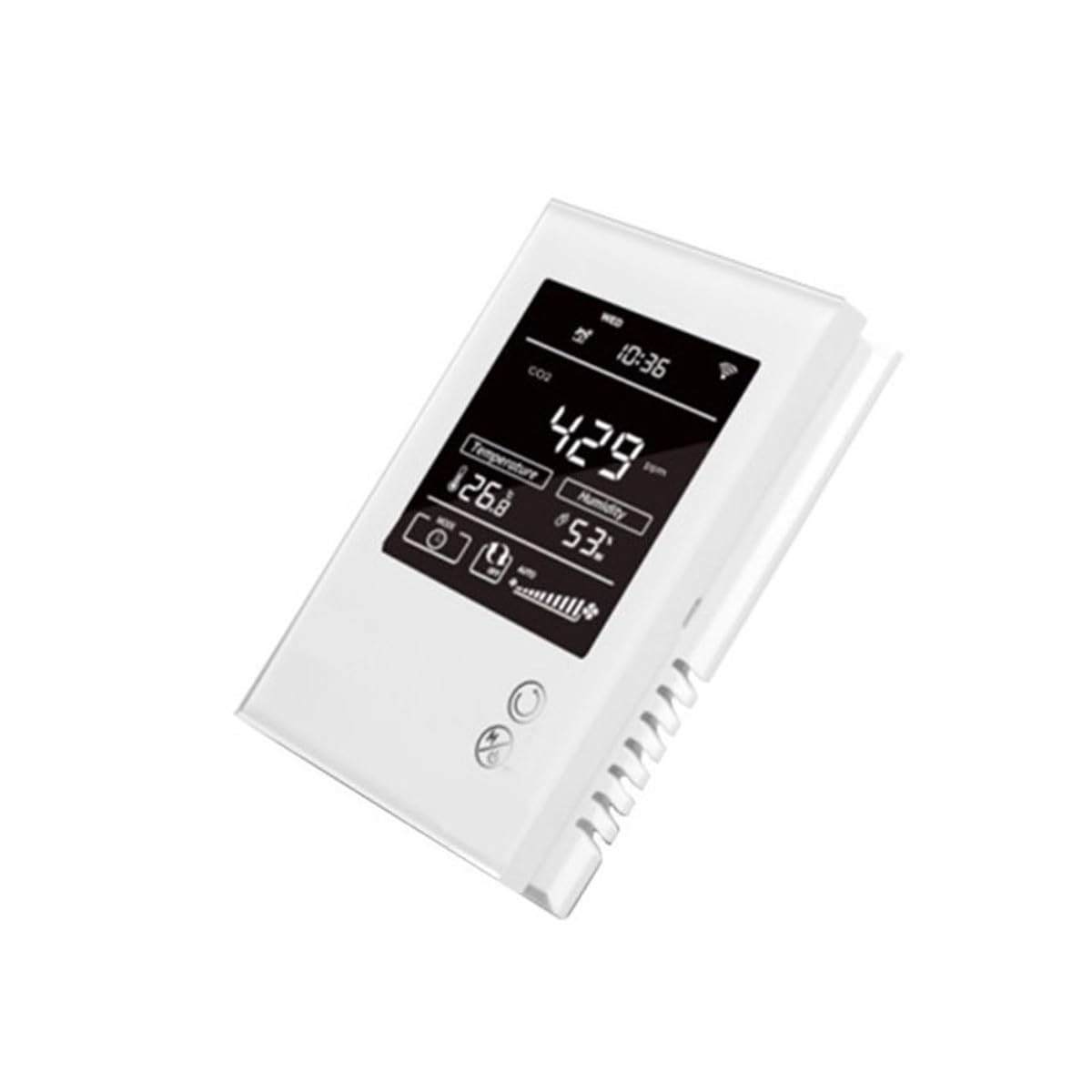
Figure 1 : Face avant view of the MCO Home MH9-CO2-WD sensor, displaying CO2 levels, temperature, and humidity.
The device integrates advanced sensors for accurate environmental monitoring. Its Z-Wave compatibility allows for seamless integration into smart home systems, enabling automated responses based on detected air quality parameters.

Figure 2: The multi-sensor capability of the device for comprehensive environmental monitoring.
5. Configuration et installation
5.1 Montage mural
- Choose a suitable vertical wall location, away from direct sunlight, drafts, or heat sources, to ensure accurate readings.
- Ouvrez soigneusement l'appareil casing pour accéder aux trous de fixation.
- Mark the drilling points on the wall using the device as a template.
- Percez des trous et insérez des chevilles si nécessaire.
- Fixez l'appareil au mur à l'aide des vis fournies.
5.2 Connexion d'alimentation
The device requires a 230V AC power supply. Connect the power wires to the designated terminals inside the device. Ensure proper polarity and secure connections. Always disconnect power before making any electrical connections.
5.3 Inclusion du réseau Z-Wave
To add the sensor to your Z-Wave network:
- Mettez votre contrôleur Z-Wave en mode d'inclusion (appairage). Consultez le manuel de votre contrôleur pour obtenir des instructions spécifiques.
- On the MH9-CO2-WD sensor, follow the device-specific instructions (usually involving a button press sequence) to initiate inclusion mode.
- The device will confirm successful inclusion on its display or through an indicator light.
- Once included, the sensor will appear in your Z-Wave controller's device list, and you can configure its parameters.
6. Fonctionnement
6.1 Affichage des informations
The device's display provides real-time readings:
- Concentration de CO2 : Displays the current carbon dioxide level in parts per million (ppm). Range: 0-2000 ppm.
- Température: Shows the ambient temperature in Celsius (°C). Range: -9.0 ~ 50 °C.
- Humidité: Indicates the relative humidity (RH) percentage. Range: 0% ~ 99% RH.
6.2 CO2 Alarm Settings
The sensor features an audible alarm for high CO2 levels. The standard alarm threshold is set at 1000 ppm, but this value is adjustable through the device's settings or via your Z-Wave controller. When the CO2 level exceeds the set threshold, an alarm will sound.
6.3 Ventilation System Control
The MH9-CO2-WD can be configured to control external ventilation systems. By connecting the device's outputs to a ventilation system, you can automate air exchange based on CO2, temperature, or humidity levels, ensuring optimal indoor air quality.

Figure 3: The sensor can be integrated into a climate control system to manage ventilation.

Figure 4: The device helps maintain clean air quality by monitoring CO2 levels.
7. Entretien
7.1 Nettoyage
To maintain the device's appearance and functionality, periodically wipe the exterior with a soft, dry cloth. Do not use abrasive cleaners, solvents, or chemical agents, as these can damage the casing ou composants internes.
7.2 Étalonnage
While the sensor is designed for long-term accuracy, environmental CO2 sensors may require periodic calibration to ensure precise readings over time. Refer to the advanced settings within your Z-Wave controller or MCO Home's official support documentation for any available calibration procedures.
8. Dépannage
8.1 Problèmes courants
- L'appareil ne s'allume pas : Check the 230V AC power connection. Ensure the circuit breaker is on.
- No Z-Wave connectivity: Ensure the device is within range of your Z-Wave controller. Try re-including the device into the network. Check for interference from other wireless devices.
- Lectures inexactes : Ensure the sensor is not placed near heat sources, open windows, or in direct sunlight. Allow sufficient time for the sensor to stabilize after initial power-up.
- Dysfonctionnement de l'affichage : If the display is not functioning correctly, ensure the power supply is stable. If the issue persists, contact customer support.
9. Spécifications
Données techniques
| Fonctionnalité | Spécification |
|---|---|
| Numéro de modèle | MCOEMH9-CO2 |
| Alimentation électrique | 230 V c.a. |
| Gamme CO2 | 0-2000 ppm |
| Standard Alarm Threshold | 1000 ppm (adjustable) |
| Plage de température | -9.0 ~ 50 °C |
| Taux d'humidité | 0% ~ 99% HR |
| Installation | Wall mount (vertical) |
| Dimensions (L x l x H) | 9 x 2.8 x 13 cm |
| Poids | 300 grammes |
| Type d'alarme | Audible |
| Connectivité | Z-Wave |
| Pays d'origine | les états-unis d'Amérique |
10. Garantie et assistance
10.1 Informations sur la garantie
MCO Home products are covered by a limited warranty. For specific warranty terms and conditions, please refer to the warranty card included with your product or visit the official MCO Home webConsultez le site. Conservez votre reçu d'achat comme preuve d'achat pour toute réclamation au titre de la garantie.
10.2 Assistance clientèle
If you encounter any issues or have questions regarding the installation, operation, or maintenance of your MCO Home MH9-CO2-WD sensor, please contact MCO Home customer support. Contact details can be found on the official MCO Home websur votre site ou dans la documentation de votre produit.