
Introduction
This instruction manual provides detailed information for the CASIO Wave Ceptor WVA-M650B-1AJF radio-controlled solar watch. This timepiece combines advanced technology with practical features, ensuring accurate timekeeping and convenience. Please read this manual thoroughly to understand the functions and proper operation of your watch.

Figure 1 : Face avant view of the CASIO Wave Ceptor WVA-M650B-1AJF watch.
Installation
1. Charge initiale (Tough Solar)
Your watch is equipped with a Tough Solar power system, which converts light into electrical energy to charge the built-in rechargeable battery. For optimal performance, ensure the watch is exposed to light regularly.
- Place the watch where its face is exposed to bright light (e.g., near a window).
- Avoid covering the watch face with clothing while wearing it.
- A full charge can provide approximately 6 months of operation with normal function use, or up to 20 months in power-saving mode.

Figure 2: Icon representing solar charging capability.

Figure 3: Illustration of the watch's solar panel charging its battery.
2. Time Calibration (Multi-Band 6 Radio Reception)
The watch automatically receives standard radio waves from six global stations (Japan, China, North America, Europe) to ensure accurate timekeeping.
- The watch attempts automatic reception up to 6 times a day (5 times for Chinese radio waves).
- For best reception, place the watch near a window or in an open area at night.
- Manual reception is also possible. Refer to the detailed operation guide for instructions.
- If radio wave reception is not possible, the watch operates with standard quartz accuracy (average monthly difference of ±15 seconds).

Figure 4: Icon representing radio wave reception capability.

Figure 5: Global map illustrating the Multi-Band 6 radio wave reception coverage areas in Japan, North America, Europe, and China.
Mode d'emploi
The WVA-M650B-1AJF features a combination of analog hands and digital displays. The small hand at the 9 o'clock position indicates the current mode.

Figure 6 : Détaillé view of the watch face, highlighting the analog hands and digital display areas.
Fonctions clésview
- Heure mondiale : Displays the current time in 48 cities (29 time zones) worldwide, with daylight saving time settings and UTC (Coordinated Universal Time) display. Includes a home city swap function.
- Chronomètre: 1/100-second stopwatch with a 24-hour measuring capacity and split time function.
- Minuteur: Countdown timer settable in 1-minute increments, up to a maximum of 60 minutes. Features 1-second measurement and an 8-time auto-repeat function.
- Alarmes: Five daily alarms, with one alarm featuring a snooze function. An hourly time signal is also available.
- Calendrier entièrement automatique : Automatically adjusts for month lengths and leap years until the year 2099.
- Format 12/24 heures : Basculez entre l'affichage de l'heure au format 12 heures et au format 24 heures.
- Lumière LED : Features a full auto LED light with afterglow, illuminating the display automatically when the watch is tilted towards your face in the dark.

Figure 7: The watch face showing different modes and functions, including world time and stopwatch.
Entretien
1. Water Resistance (10 BAR)
This watch is rated for 10 BAR water resistance, making it suitable for daily use, showering, and swimming. However, it is not intended for scuba diving.
- N’actionnez pas les boutons lorsque la montre est mouillée ou immergée.
- Rincez la montre à l'eau douce après une exposition à l'eau salée.

Figure 8: Icon symbolizing the watch's water resistance, suitable for rain and splashes.
2. Power Saving Function
To conserve power, the watch automatically turns off its display when left in a dark place for a certain period. The timekeeping continues internally.
- The display will reactivate when exposed to light or when a button is pressed.
- Regular exposure to light is crucial for maintaining a sufficient charge.
Dépannage
1. Affichage de l'heure incorrect
- Check Radio Reception: Ensure the watch is in an area with good radio signal reception. Obstacles like buildings or being indoors can interfere. Try placing it near a window overnight.
- Réglage manuel de l'heure : If automatic reception fails consistently, you can manually adjust the time. Refer to the full user manual for detailed steps on manual time setting.
2. Watch Not Functioning / Display Blank
- Vérifier le niveau de charge : The watch might be low on charge. Expose the watch face to bright light for several hours to charge it. The battery indicator (if visible) should show a higher level.
- Mode économie d'énergie: If the watch has been in a dark place, it might be in power-saving mode. Expose it to light or press any button to reactivate the display.
3. Les boutons ne répondent pas
- Exposition à l'eau : Ensure the watch is completely dry. Buttons should not be operated underwater or when wet.
- Remise à zéro: In rare cases, a full reset might be necessary. Consult the comprehensive user manual for instructions on performing a watch reset.
Caractéristiques
| Numéro de modèle | WVA-M650B-1AJF |
| Marque | CASIO (WAVE CEPTOR) |
| Mouvement | Quartz (Tough Solar, Radio-controlled) |
| Résistance à l'eau | 10 BARS (100 mètres) |
| Matériau du boîtier | Résine |
| Matériau de la bande | Urethane/Rubber type |
| Diamètre du boîtier | 43.5 mm |
| Épaisseur du boîtier | 14.5 mm |
| Largeur de bande | 18 mm |
| Longueur de la bande | 20.5 cm |
| Poids | 47 g |
| Type d'affichage | Analogique-numérique |
| Caractéristiques spéciales | Solar Radio Watch, World Time, Alarm, Calendar |
| Source d'énergie | Battery-powered (Rechargeable via Solar) |
| Fermoir | Boucle |
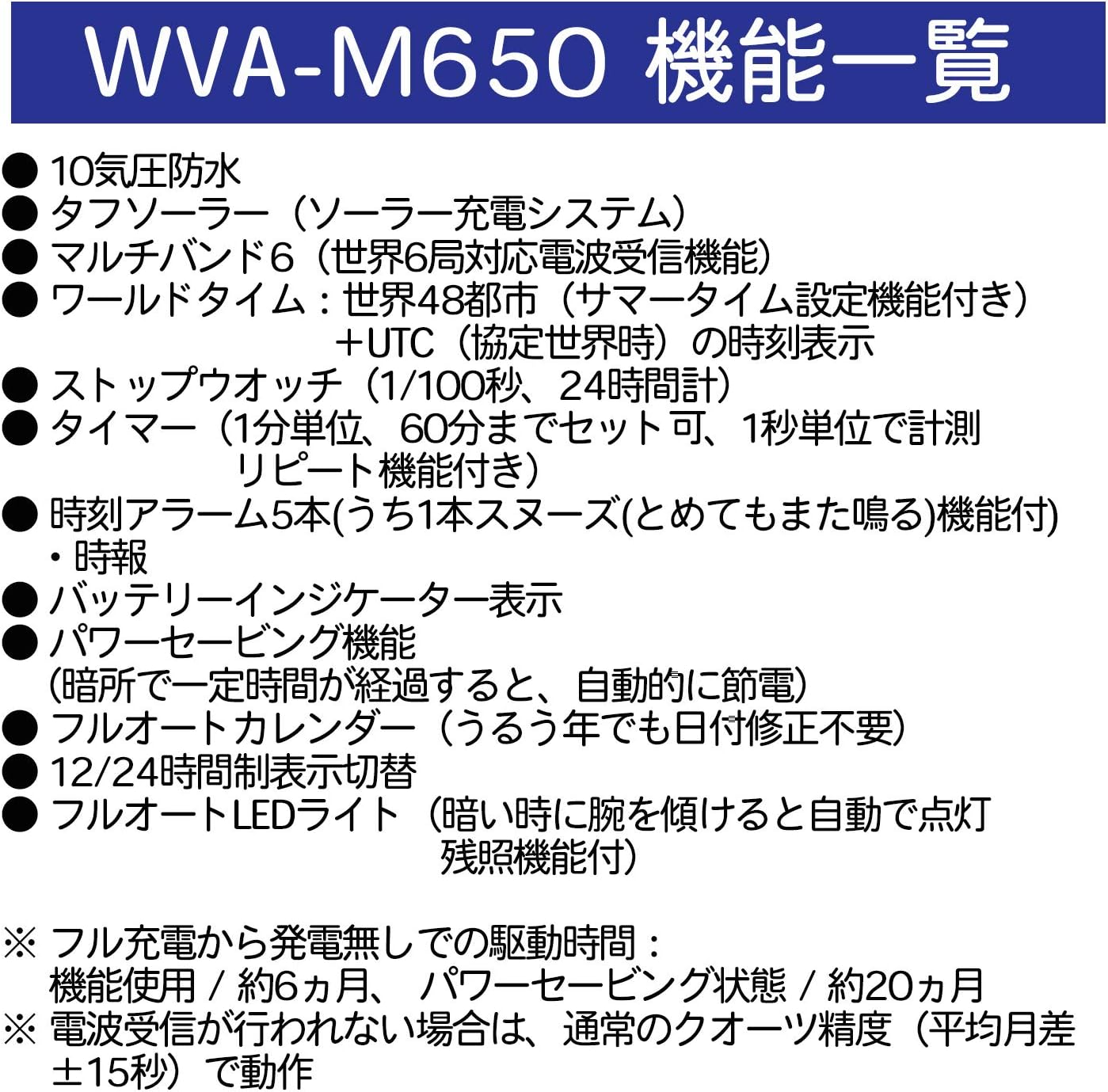
Figure 9 : Côté profile of the watch, showing its thickness and button layout.
Informations sur la garantie
Ce produit est livré avec un Garantie de 1 ans from the date of purchase. The warranty covers manufacturing defects under normal use. Please retain your proof of purchase for warranty claims.
La garantie ne couvre pas :
- Damage caused by improper use or accidents.
- Normal wear and tear of the case, band, or glass.
- Dommages causés par une réparation ou une modification non autorisée.
Soutien
For further assistance, detailed operating instructions, or service inquiries, please refer to the official CASIO website or contact CASIO customer support in your region.
Ressources en ligne : Visit the official CASIO website for comprehensive manuals and FAQs.
Service client: Contact information for CASIO customer service can typically be found on their regional websites.