
1. Introduction
This manual provides essential information for the installation, operation, and maintenance of your Genuine Ford ET4Z-19G490-A Rear View Camera Assembly. This component is an Original Equipment Manufacturer (OEM) part, designed and manufactured to Ford standards for specific vehicle models. Please read this manual thoroughly before proceeding with installation or use.
2. Consignes de sécurité
- Always disconnect the vehicle's battery before beginning any electrical work to prevent electrical shock or damage to vehicle systems.
- Assurez-vous que toutes les connexions sont bien fixées et correctement isolées afin d'éviter les courts-circuits.
- Refer to your vehicle's service manual for specific wiring diagrams and component locations.
- If you are not comfortable performing the installation, seek assistance from a qualified automotive technician.
- L'arrière view camera is an aid and does not replace the driver's responsibility to check surroundings and mirrors before backing up.
3. Contenu du colis
Vérifiez que tous les composants sont présents avant de commencer l'installation :
- 1x Ford ET4Z-19G490-A Camera Assembly
If any parts are missing or damaged, do not proceed with installation. Contact your supplier for assistance.
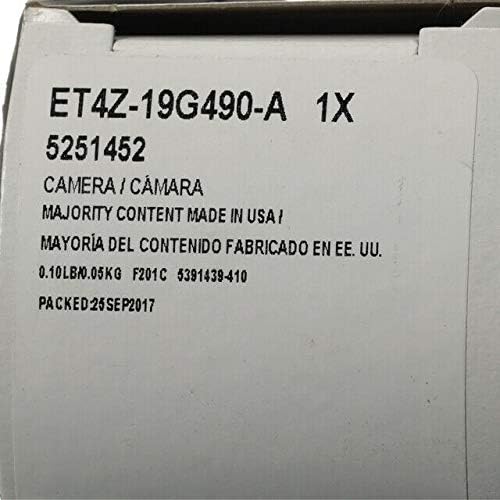
Figure 3.1: Packaging label indicating the ET4Z-19G490-A camera assembly.
4. Installation
Installation of the Ford ET4Z-19G490-A camera assembly typically involves replacing an existing camera unit. Due to variations in vehicle models and trim levels, specific installation steps may differ. It is highly recommended to consult your vehicle's official service manual or reputable online resources for detailed, vehicle-specific instructions.
Étapes générales d'installation :
- Préparation: Garez le véhicule sur une surface plane, serrez le frein de stationnement et coupez le contact. Débranchez la borne négative de la batterie du véhicule.
- Accéder: Gain access to the existing camera assembly. This often requires removing interior trim panels, tailgate components, or exterior emblems, depending on your vehicle model.
- Disconnect Old Camera: Carefully disconnect the electrical connector and any mounting hardware securing the old camera.
- Install New Camera: Position the new Ford ET4Z-19G490-A camera assembly into the mounting location. Ensure proper orientation (lens facing outwards and downwards for rear view). Secure it with the appropriate mounting hardware.
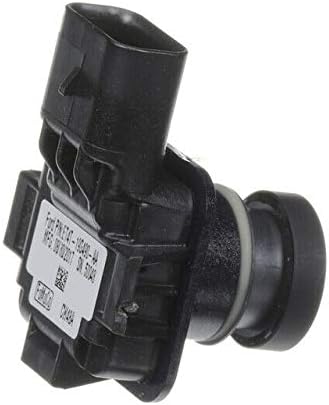
Figure 4.1 : Côté view of the camera assembly, highlighting the connector.
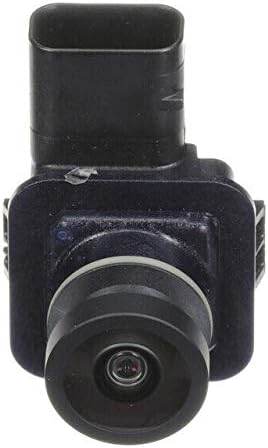
Figure 4.2 : Face avant view de l'objectif de la caméra.

Figure 4.3 : Arrière view of the camera assembly with identification label.
- Connecter le câblage : Connect the vehicle's wiring harness to the camera's RCA connector. Ensure the connection is firm.
- Fonctionnalité de test : Before reassembling all trim, reconnect the vehicle's battery. Turn the ignition to the 'ON' position (without starting the engine) and shift the transmission into 'REVERSE'. Verify that the camera image appears correctly on your vehicle's display monitor.
- Remontage: Once functionality is confirmed, reassemble all removed trim panels and components.
5. Mode d'emploi
The Ford ET4Z-19G490-A Rear View Camera Assembly operates automatically in conjunction with your vehicle's transmission system.
- When the vehicle's transmission is shifted into 'REVERSE', the camera will activate.
- The live video feed from the camera will be displayed on your vehicle's compatible monitor.
- Depending on your vehicle's configuration, dynamic or static guidance lines may appear on the display to assist with parking and maneuvering.
- The camera will deactivate when the transmission is shifted out of 'REVERSE'.
6. Entretien
To ensure optimal performance and longevity of your rear view camera, follow these simple maintenance guidelines:
- Nettoyage des lentilles : Nettoyez régulièrement l'objectif de l'appareil photo avec un chiffon doux et sec.amp cloth to remove dirt, dust, and debris. Avoid abrasive cleaners or materials that could scratch the lens.
- Vérification de la connexion : If accessible, occasionally check the electrical connections to ensure they remain secure and free from corrosion.
- Facteurs environnementaux : Extreme temperatures, heavy rain, or snow can temporarily affect camera performance. Ensure the lens is clear of ice or snow before use.
7. Dépannage
If you experience issues with your Ford ET4Z-19G490-A Rear View Camera, refer to the following troubleshooting guide:
| Problème | Cause possible | Solution |
|---|---|---|
| Aucune image ne s'affiche en mode marche arrière. | Connexion électrique desserrée. Fusible grillé. Unité de caméra défectueuse. | Check all electrical connections to the camera and display. Inspect vehicle's fuse box for a blown fuse related to the camera or display. If connections and fuses are good, the camera may require replacement. |
| L'image est floue ou déformée. | Objectif de l'appareil photo sale. Humidité à l'intérieur de la lentille. Damaged camera unit. | Nettoyez l'objectif de l'appareil photo avec un chiffon doux et sec.amp tissu. Allow time for any condensation to dissipate. If persistent, the seal may be compromised. If cleaning does not resolve the issue, the camera may be damaged. |
| Image is upside down or incorrect orientation. | Incorrect camera model for vehicle. Mauvaise installation. | Verify that the ET4Z-19G490-A is the correct part number for your specific vehicle model and year. Ensure the camera is installed with the correct orientation as per vehicle service manual. |
If troubleshooting steps do not resolve the issue, it is recommended to consult a qualified automotive technician or contact Ford customer support.
8. Spécifications
| Fonctionnalité | Détail |
|---|---|
| Numéro de modèle | ET4Z-19G490-A |
| Fabricant | Gué |
| Nom du type d'élément | CAMERA ASY |
| Appareils compatibles | Moniteur |
| Type d'installation | Montage en surface |
| Technologie de capteur optique | CMOS |
| Type de lentille | Grand angle, fixe |
| Type de connecteur | RCA |
| Format de capture vidéo | MP4 |
| Résolution de capture vidéo | 720p |
| Poids de l'article | 16 onces (environ 0.45 kg) |
9. Garantie et assistance
This Genuine Ford Part is covered by a limited warranty. For specific details regarding the warranty period, coverage, and claims process, please refer to the warranty documentation provided with your vehicle or contact an authorized Ford dealership or Ford customer service.
For technical support, installation assistance, or warranty inquiries, please contact your local authorized Ford dealership or visit the official Ford webSite de ressources pour le support client.


