1. Informations importantes sur la sécurité
Before using the FITFIU Fitness BEST-100 Static Bicycle, please read and understand all instructions in this manual. Keep this manual for future reference.
- Consultez un médecin avant de commencer tout programme d'exercice.
- Ensure the bicycle is placed on a flat, stable surface.
- Gardez les enfants et les animaux domestiques éloignés de l'équipement pendant son utilisation.
- The maximum recommended user weight is 100 kg.
- The maximum recommended user height is 1.65 m.
- Portez des vêtements et des chaussures de sport appropriés.
- Arrêtez immédiatement l'exercice si vous vous sentez faible, étourdi ou si vous ressentez une douleur.
- Regularly inspect the bicycle for wear and tear, especially moving parts and connections.
2. Produit terminéview
The FITFIU Fitness BEST-100 is an ultra-compact static bicycle designed for moderate exercise at home or for rehabilitation purposes. It features a 5 kg inertia disc and 8 levels of adjustable magnetic resistance.
The integrated LCD display provides essential workout data, including speed, time, distance, and calories burned. The pedals are equipped with adjustable straps for secure foot placement.

Image 2.1 : Terminéview of the FITFIU Fitness BEST-100 Static Bicycle.
3. Contenu de la boîte
Déballez soigneusement tous les composants et assurez-vous de disposer des éléments suivants :
- 1x BEST-100 Static Bicycle (Grey)
- 1x Manuel d'instructions (ce document)
- 1x Assembly Kit (includes necessary tools and fasteners)
Si des pièces sont manquantes ou endommagées, n'effectuez pas le montage. Contactez le service client pour obtenir de l'aide.
4. Instructions de montage
Assembly of the BEST-100 static bicycle requires careful attention to the provided diagrams and instructions. It is recommended to have a second person assist with certain steps.
- Stabilisateurs de base : Attach the front and rear stabilizer bars to the main frame using the provided bolts and nuts. Ensure they are securely tightened.
- pédales: Identify the left (L) and right (R) pedals. Thread the left pedal counter-clockwise and the right pedal clockwise into their respective crank arms. Tighten firmly. Attach the foot straps to the pedals.
- Seat Post and Seat: Insert the seat post into the main frame. Adjust the height to your preference using the adjustment knob and secure it. Attach the seat to the seat post.
- Handlebar Post and Handlebars: Connect the handlebar post to the main frame. Attach the handlebars to the handlebar post. Ensure all connections are secure.
- Console/Display: Connect the sensor cables from the main frame to the LCD display unit. Mount the display unit onto the handlebar assembly.
- Vérification finale : Before first use, verify that all bolts, nuts, and connections are securely tightened. Ensure the bicycle is stable and does not wobble.

Image 4.1: Seat height adjustment mechanism. Adjust to ensure comfortable and effective pedaling.

Image 4.2: Pedals with adjustable straps for secure foot placement during exercise.
5. Mode d'emploi
5.1 Réglage de la résistance
The BEST-100 features 8 levels of magnetic resistance. To adjust the resistance, turn the knob located on the main frame below the handlebars. Turn clockwise to increase resistance for a more challenging workout, and counter-clockwise to decrease resistance for an easier workout.

Image 5.1: Resistance adjustment knob. Turn to select one of 8 resistance levels.
5.2 Utilisation de l'écran LCD
The LCD display tracks your workout progress. It typically shows the following metrics:
- VITESSE: Vitesse de cyclisme actuelle.
- TEMPS: Durée de votre entraînement.
- DISTANCE: Distance totale parcourue pendant l'entraînement.
- CALORIES : Estimation des calories brûlées.
The display is battery-powered. If the display becomes dim or unresponsive, replace the batteries (type usually AAA, refer to the battery compartment for specifics).

Image 5.2: LCD display showing workout metrics and handlebars for support.
6. Entretien
Regular maintenance ensures the longevity and safe operation of your static bicycle.
- Nettoyage: Wipe down the bicycle with a damp Essuyez-vous avec un chiffon après chaque utilisation pour enlever la transpiration et la poussière. Évitez les nettoyants abrasifs et les solvants.
- Inspection: Vérifiez régulièrement le serrage de tous les boulons, écrous et pièces mobiles. Resserrer les fixations desserrées.
- Lubrification: The magnetic resistance system is generally maintenance-free. Do not attempt to lubricate internal components unless specifically instructed by the manufacturer.
- Stockage: Store the bicycle in a dry, cool place away from direct sunlight and extreme temperatures.
7. Dépannage
If you encounter issues with your BEST-100 static bicycle, refer to the following common problems and solutions:
| Problème | Cause possible | Solution |
|---|---|---|
| Bicycle is unstable or wobbles. | Boulons de montage desserrés ; sol inégal. | Check and tighten all assembly bolts. Ensure the bicycle is on a level surface. |
| Pedaling movement is not smooth or makes noise. | Composants desserrés ; frottements internes. | Verify all connections are tight. If noise persists, contact customer support. |
| LCD display is not working or shows incorrect data. | Piles déchargées ; connexion du capteur desserrée. | Replace the batteries in the display unit. Check that the sensor cable is securely connected. |
| Resistance adjustment is not effective. | Problème de mécanisme interne. | Vérifiez que le bouton de résistance tourne librement. Si le problème persiste, contactez le service client. |
If the problem is not listed or persists after attempting the solutions, contact FITFIU Fitness customer support.
8. Spécifications
| Fonctionnalité | Spécification |
|---|---|
| Numéro de modèle | 1100005 |
| Dimensions (L x l x H) | 60 x 40 x 85 cm |
| Poids du produit | 9 kg |
| Poids maximum de l'utilisateur | 100 kg |
| Inertia Disc Weight | 5 kg |
| Niveaux de résistance | 8 (réglable) |
| Mécanisme de résistance | Magnétique |
| Matériel | Acier allié |
| Type d'affichage | Écran LCD |
| Fonctions d'affichage | Vitesse, Temps, Distance, Calories |
| Couleur | Gris |
| Source d'alimentation (écran) | Fonctionne sur batterie |
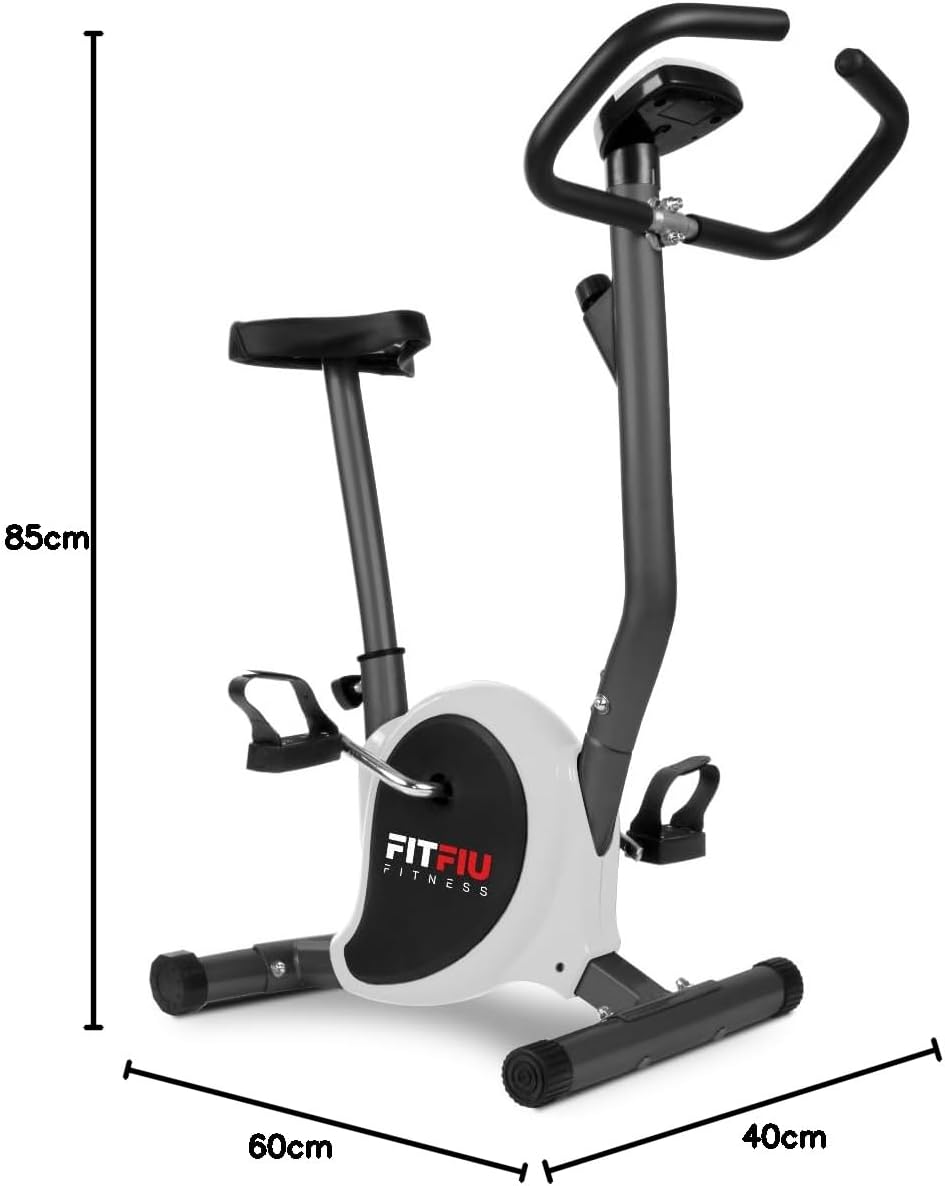
Image 8.1: Diagram showing the dimensions of the static bicycle.
9. Garantie et assistance
For warranty information, product support, or to purchase replacement parts, please contact FITFIU Fitness customer service. Refer to your purchase documentation for specific warranty terms and contact details.
You can typically find support information on the official FITFIU Fitness websur le site ou auprès du détaillant où vous avez acheté le produit.