
Introduction
This manual provides essential instructions for setting up, operating, and maintaining your Coolpad Note 3 smartphone. Please read this guide thoroughly to ensure proper use and to maximize the features of your device.
Consignes de sécurité
Avertissement : Tenir hors de portée des enfants.
Always handle your device with care. Avoid exposure to extreme temperatures, direct sunlight, and liquids. Do not attempt to disassemble or repair the device yourself, as this will void the warranty and may cause damage or injury.
Contenu du colis
Vérifiez que votre colis contient les éléments suivants :
- Coolpad Note 3 Handset
- Casque d'écoute
- Chargeur
- Câble USB
- Film protecteur
- Manuel de l'utilisateur (ce document)
- Carte de garantie
Installation
1. Insertion des cartes SIM et de la carte MicroSD
The Coolpad Note 3 supports dual SIM cards (4G+2G) and a MicroSD card for expandable storage up to 64GB. Ensure the device is powered off before inserting or removing cards.
- Repérez le tiroir pour carte SIM/MicroSD sur le côté de l'appareil.
- Utilisez l'outil d'éjection de carte SIM fourni pour ouvrir le tiroir.
- Place your SIM cards into the designated slots. Ensure the gold contacts face downwards.
- Insert your MicroSD card into its slot. For 64GB cards, ensure it is formatted to FAT32 for compatibility.
- Repoussez délicatement le plateau dans l'appareil jusqu'à ce qu'il s'enclenche.
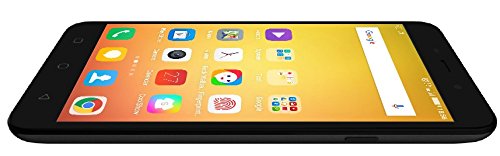
Image : Côté view of the Coolpad Note 3, illustrating the location of the SIM/MicroSD card tray and physical buttons.
2. Assistant de mise sous tension et de configuration initiale
- Press and hold the Power button until the Coolpad logo appears.
- Suivez les instructions à l'écran pour sélectionner votre langue, vous connecter au Wi-Fi et configurer votre compte Google.
3. Configuration du capteur d'empreintes digitales
The Coolpad Note 3 features a fingerprint sensor for enhanced security and quick access.
- Accéder à Paramètres > Sécurité > Empreinte digitale.
- Follow the prompts to register your fingerprints. You can register multiple fingers.
- Optionally, customize fingerprints to launch specific applications directly.
Mode d'emploi
1. Navigation de base
Your Coolpad Note 3 runs on Android v5.1 Lollipop with the COOLUI 6.0 interface. Use the touchscreen for navigation, tapping icons to open apps, swiping to scroll, and pinching to zoom.

Image : Avant view of the Coolpad Note 3, showing the vibrant home screen with various application icons.
2. Utilisation de l'appareil photo
L'appareil est doté d'une caméra arrière de 13 MP et d'une caméra frontale de 5 MP.
- Ouvrir le Caméra application.
- Touchez l'écran pour faire la mise au point.
- Appuyez sur le déclencheur pour prendre une photo ou démarrer/arrêter l'enregistrement vidéo.
- Basculez entre les caméras avant et arrière à l'aide de l'icône de basculement de la caméra.
- Explore various shooting modes available in the camera app.
3. Fingerprint Sensor for Unlocking
To unlock your phone, simply place your registered finger on the fingerprint sensor. The device unlocks in approximately 0.5 seconds. The sensor is designed to detect both dry and wet fingers accurately.
4. Connectivité
- Wifi: Aller à Paramètres > Wifi se connecter aux réseaux disponibles.
- Données mobiles: Assurez-vous que votre carte SIM est active et que les données mobiles sont activées. Paramètres > Utilisation des données.
- Bluetooth : Associer à d'autres appareils via Paramètres > Bluetooth.
- USB OTG : The Micro USB port supports On-The-Go (OTG) functionality for connecting external USB devices (e.g., flash drives) with an adapter.
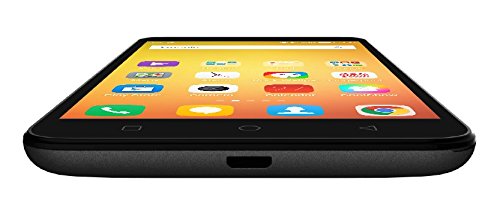
Image : Bas view of the Coolpad Note 3, highlighting the Micro USB port for charging and data transfer.
Entretien
1. Chargement de la batterie
Use the provided charger and USB cable to charge your Coolpad Note 3. Connect the USB cable to the phone's Micro USB port and the charger to a power outlet. A full charge typically takes approximately 2 hours.
2. Mises à jour logicielles
Regularly check for software updates to ensure optimal performance and access to the latest features and security patches. Go to Paramètres > À propos du téléphone > Mises à jour du système.
3. Nettoyage de votre appareil
Utilisez un chiffon doux non pelucheux pour nettoyer l'écran et le boîtier de votre téléphone. Évitez d'utiliser des produits chimiques agressifs ou des matériaux abrasifs.
4. Protection d'écran
While the device features a durable display, it is recommended to use a tempered glass screen protector and a protective case to prevent scratches and damage from accidental drops.
Dépannage
- Device is heating: It is normal for smartphones to generate some heat during intensive use (e.g., gaming, prolonged video playback). If excessive heating occurs, close background applications and allow the device to cool. Software updates often address heating optimizations.
- Mauvaise qualité de la caméra : Ensure good lighting conditions. For potentially improved results, consider using third-party camera applications available on the Google Play Store.
- Network connectivity issues (international travel): The Coolpad Note 3's 3G/4G bands may not be compatible with all international carriers. Verify network compatibility with your service provider before traveling.
- Performances lentes/latence : Close unused applications, clear cache, and restart the device. Ensure sufficient free storage space.
Caractéristiques
| Marque | Coolpad |
| Modèle | Note 3 |
| Système opérateur | Android v5.1 Lollipop |
| Processeur | 1.3GHz Cortex-A53 MT6753 Mediatek Octacore |
| BÉLIER | 3 Go |
| Stockage interne | 16GB (expandable up to 64GB via MicroSD) |
| Taille de l'écran | 5.5 pouces (13.97 cm) |
| Résolution d'affichage | 1280 x 720 pixels (HD) |
| Caméra arrière | 13 MP |
| Caméra frontale | 5 MP |
| Capacité de la batterie | 3000mAh Lithium-Ion |
| Temps de conversation | Jusqu'à 15 XNUMX heures |
| Temps de veille | Jusqu'à 400 XNUMX heures |
| Prise en charge SIM | Dual SIM (4G+2G) |
| Sécurité biométrique | Reconnaissance des empreintes digitales |
| Capteurs | G sensor, Proximity sensor, Light sensor, Gyro sensor, eCompass, Fingerprint sensor |
| Dimensions (L x l x H) | 15.2 x 7.7 x 0.9 cm |
| Poids | 150 gramme |
Informations sur la garantie
Your Coolpad Note 3 comes with a manufacturer's warranty:
- Appareil: Garantie constructeur d'un an à compter de la date d'achat.
- Accessoires inclus dans la boîte : Garantie constructeur de 6 mois pour les accessoires, y compris les piles, à compter de la date d'achat.
Veuillez conserver votre reçu d'achat et votre carte de garantie pour référence ultérieure.
Soutien
For further assistance, technical support, or service inquiries, please refer to the official Coolpad support channels. Coolpad has partnered with HCL for service in some regions.
Visit the official Coolpad website contenant les dernières informations d'assistance et les coordonnées.