
1. Introduction
Merci pour votre achatasing the Gotech GTV-7-TFT 7-inch Portable Color TFT LCD TV. This manual provides essential information for the safe and efficient operation of your device. Please read it thoroughly before use and retain it for future reference.
2. Consignes de sécurité importantes
- Ne pas exposer l'appareil à la pluie ou à l'humidité afin d'éviter tout risque d'incendie ou d'électrocution.
- N'ouvrez pas le casing. Confiez toutes les interventions de maintenance à un personnel qualifié.
- Évitez de placer l’appareil à proximité de sources de chaleur ou en plein soleil.
- Assurer une ventilation adéquate autour de l’unité.
- Utilisez uniquement l'adaptateur secteur spécifié.
- Gardez l'appareil à l'écart des champs magnétiques puissants.
- Nettoyez l'appareil avec un chiffon doux et sec. N'utilisez pas de nettoyants liquides.
3. Contenu du colis
Vérifiez que tous les éléments sont présents dans le colis :
- Gotech GTV-7-TFT Portable TV Unit
- Télécommande
- Adaptateur secteur AC/DC
- Car Cord (Car Holder not explicitly listed as included, but mentioned as a feature)
- Prise d'antenne
- Câble AV
- Support détachable

Image 3.1: The retail box for the Gotech GTV-7-TFT Portable TV, showing the product, remote control, and included accessories.
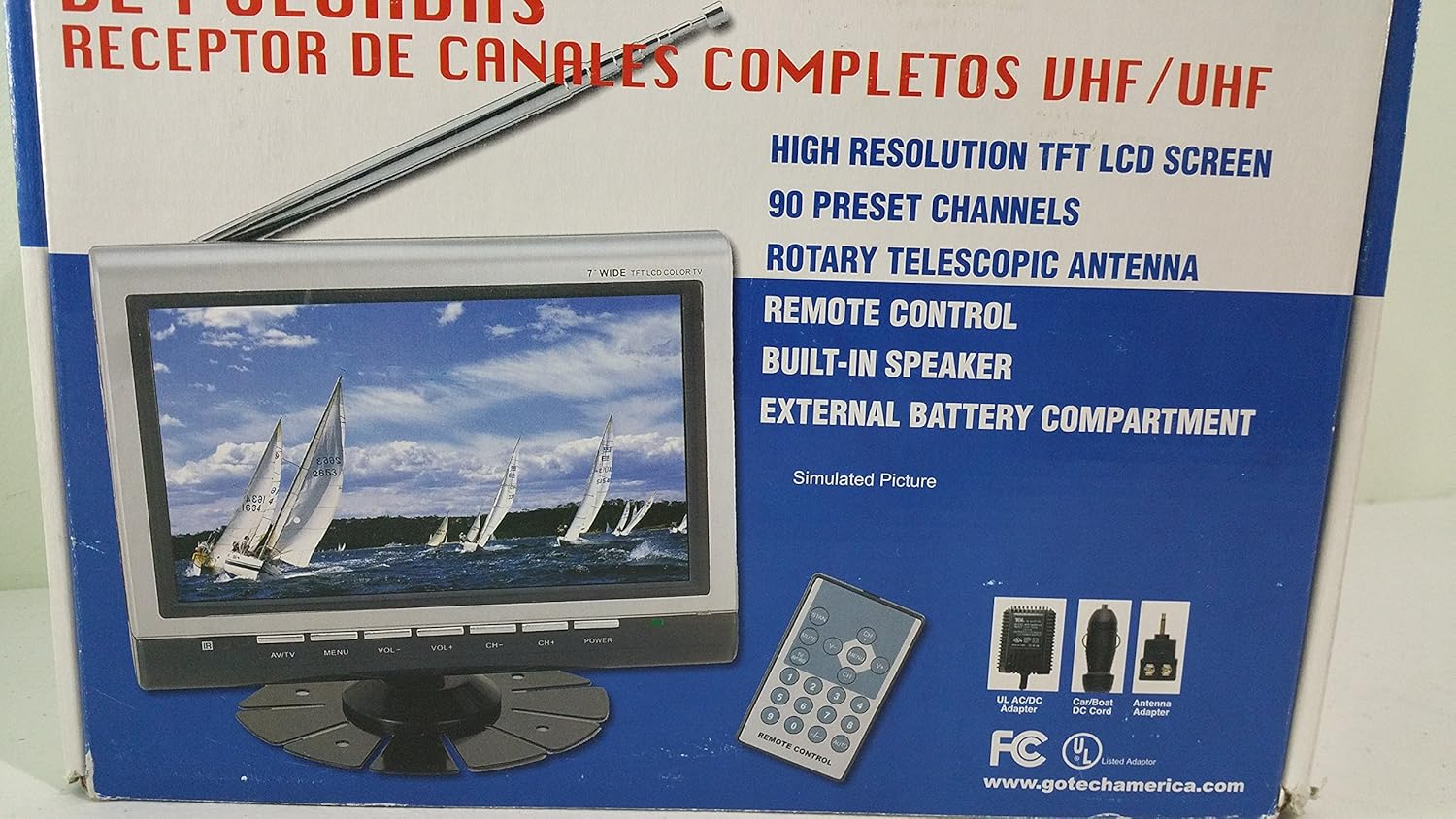
Image 3.2 : Un gros plan view of the Gotech GTV-7-TFT TV screen and the remote control, as depicted on the product packaging.
4. Produit terminéview
4.1 Principales caractéristiques
- 7-inch High Resolution TFT LCD Screen
- Full Channel VHF/UHF Receiver
- 90 canaux prédéfinis
- Digital Up/Down Tuning
- Auto Channel Programming
- Antenne télescopique rotative
- On-Screen Display (OSD) for Picture and Volume Adjustment
- Haut-parleur intégré
- External Battery Compartment (requires 10x AA batteries, not included)
- Remote Control with Button Cell
- New Detachable Stand with Battery

Image 4.1: Side panel of the Gotech GTV-7-TFT packaging, detailing the product's main features.
5. Installation
5.1 Powering the TV
The GTV-7-TFT can be powered in several ways:
- Adaptateur AC / DC: Connect the provided AC/DC adapter to the TV's power input and then to a standard wall outlet.
- Car Cord: For in-vehicle use, connect the car cord to the TV's power input and then to your vehicle's 12V power outlet.
- Batteries externes : Open the external battery compartment and insert 10x AA size batteries (UM3) according to the polarity indicators. Ensure the batteries are fresh and correctly oriented.
5.2 Connexion de l'antenne
Extend the rotary telescopic antenna for optimal signal reception. For improved reception, you may connect an external antenna to the antenna jack using the provided antenna jack adapter.
5.3 Connecting External Devices (AV Input)
To connect external devices such as a DVD player or gaming console, use the provided AV cable. Connect one end to the TV's AV input port and the other end to the AV output ports of your external device. Select the AV input source on the TV to view contenu de l’appareil connecté.
6. Fonctionnement
6.1 Mise sous/hors tension
Appuyez sur le POUVOIR button on the TV unit or the remote control to turn the TV on or off.
Réglage des canaux 6.2
- Auto Channel Programming: It is recommended to perform an auto channel scan upon first use or when moving to a new location. Access the menu, navigate to the channel setup, and select 'Auto Scan' or 'Auto Program'. The TV will search and store available channels.
- Digital Up/Down Tuning: Utilisez le CH+ et CH- buttons on the TV or remote control to navigate through the preset channels.
6.3 Volume and Picture Adjustment
Utilisez le VOL+ et vol- buttons on the TV or remote control to adjust the volume. Picture settings (brightness, contrast, color) can be adjusted via the on-screen display (OSD) menu. Press the MENU button to access these options.
Télécommande 6.4
The remote control allows convenient operation from a distance. Ensure the button cell battery is correctly inserted. Point the remote control directly at the TV's infrared sensor.
7. Entretien
7.1 Nettoyage
Wipe the TV screen and casing with a soft, dry, lint-free cloth. Do not use abrasive cleaners, waxes, or solvents as they may damage the finish or screen.
7.2 Stockage
If the TV will not be used for an extended period, remove the external batteries to prevent leakage. Store the unit in a cool, dry place away from direct sunlight and extreme temperatures.
8. Dépannage
| Problème | Cause possible | Solution |
|---|---|---|
| Pas de courant | Adaptateur secteur non connecté ; piles déchargées ou mal insérées. | Check power connections; Replace or correctly insert batteries. |
| Pas d'image/son | Incorrect input source; Antenna not connected or extended; No channels scanned. | Select correct input (TV/AV); Extend antenna or connect external one; Perform auto channel scan. |
| Mauvaise réception | Weak signal; Antenna position. | Adjust antenna position; Try an external antenna; Check for local signal strength. |
| La télécommande ne fonctionne pas | Battery depleted; Obstruction between remote and TV. | Replace remote control battery; Remove any obstructions. |
9. Spécifications
| Fonctionnalité | Détail |
|---|---|
| Numéro de modèle | gtv-7-tft |
| Taille de l'écran | 7 pouces (17.8 cm) |
| Type d'affichage | Écran couleur TFT LCD |
| Type de syntoniseur | Full Channel VHF/UHF Receiver |
| Canaux prédéfinis | 90 |
| Type de sortie audio | Haut-parleur intégré |
| Méthode de contrôle | Télécommande |
| Appareils compatibles | Télévision, Haut-parleur |
| Source d'énergie | AC/DC Adapter, Car Cord, External Battery Compartment (10x AA batteries, not included) |
10. Garantie et assistance
Specific warranty information and customer support details are not provided within this manual. Please refer to the product packaging or contact your retailer for warranty claims and technical assistance.