
Introduction
This manual provides detailed instructions for the proper use and maintenance of your SIRUI TY-70A Quick Release Plate. Designed for compatibility with Arca Swiss quick release systems and specifically the SIRUI VA-5 Fluid Head, this plate offers a secure and efficient way to mount your camera equipment.
Produit terminéview et fonctionnalités
The SIRUI TY-70A Quick Release Plate is engineered for durability and stability, ensuring reliable performance for your photographic and videographic needs.
- Matériel: Constructed from anodized aluminum using an advanced CNC forging process, providing durability and corrosion resistance.
- Stabilité supérieure : Features a rubber anti-skid insert and covering mats for enhanced stability. A security pin is included to prevent accidental sliding of mounted equipment.
- Large compatibilité: Fully compatible with all Arca Swiss quick release systems. Equipped with both 1/4" and 3/8" screws, it can connect to various devices including video cameras, DSLR cameras, digital cameras, SLR cameras, movie cameras, and bird watching equipment. It is an ideal match for the SIRUI VA-5 fluid head.
- Integrated Video Pin: Includes a video pin for additional stability and alignment with compatible video heads.

Image : Haut view of the SIRUI TY-70A Quick Release Plate, showing the two mounting screws and the video pin.
Configuration et installation
Follow these steps to properly attach the quick release plate to your camera or device.
- Identify Mounting Screws: The TY-70A plate comes with both 1/4" and 3/8" thread screws. Select the appropriate screw for your camera or device. The unused screw can be stored by removing it via the rubber plug on the plate.
- Attach to Camera/Device: Align the chosen screw with the tripod mount thread on your camera or device. Use a coin or screwdriver to securely tighten the screw. Ensure the plate is firmly attached to prevent rotation.
- Position Video Pin (if applicable): If your camera or video head utilizes a video pin for anti-twist functionality, ensure the video pin on the TY-70A plate is aligned with the corresponding slot on your equipment.

Image : Gros plan view of the SIRUI TY-70A Quick Release Plate showing the 1/4" and 3/8" mounting screws.
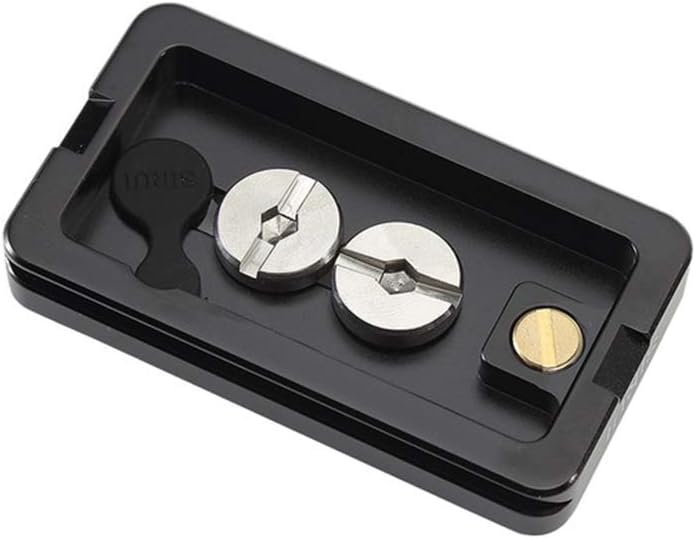
Image: The SIRUI TY-70A Quick Release Plate with the rubber plug, indicating where the unused screw can be stored.
Mode d'emploi
Once the quick release plate is attached to your camera, you can mount it onto any Arca Swiss compatible tripod head.
- Open Tripod Head Clamp: Assurez-vous que le système de dégagement rapideamp on your tripod head is fully open.
- Insert Quick Release Plate: Slide the SIRUI TY-70A plate, with your camera attached, into the open clamp of the tripod head. Ensure it is seated correctly and the security pin (if present on your head) engages.
- Sécurisez le Clamp: Tighten the locking knob or lever on your tripod head's clamp until the quick release plate is firmly secured. Gently test the connection to ensure there is no movement.
- Removing the Plate: To remove, loosen the tripod head's clamp and press any release buttons or levers as required by your specific tripod head, then slide the plate out.

Image : Bas view of the SIRUI TY-70A Quick Release Plate, showing the anti-skid rubber pads and the mounting channel.
Entretien
To ensure the longevity and optimal performance of your SIRUI TY-70A Quick Release Plate, follow these maintenance guidelines:
- Nettoyage: Wipe the plate with a soft, dry cloth after each use to remove dust, dirt, or moisture. For stubborn grime, a slightly damp Un chiffon peut être utilisé, suivi d'un séchage immédiat. Évitez les produits chimiques agressifs et les matériaux abrasifs.
- Inspection: Periodically check the mounting screws and the rubber pads for any signs of wear or damage. Ensure the screws are not loose.
- Stockage: Store the quick release plate in a clean, dry environment away from extreme temperatures and humidity when not in use.
Dépannage
If you encounter issues with your SIRUI TY-70A Quick Release Plate, consider the following:
- Tight Fit with SIRUI VA-5 Fluid Head: Some users have reported a very tight fit when using the TY-70A with the SIRUI VA-5 fluid head. If this occurs, ensure both release buttons/levers on the VA-5 head are fully depressed/released. Carefully align the plate and apply gentle, even pressure. Avoid forcing the plate, which could cause damage. If the issue persists, verify the plate is correctly oriented.
- Plate Tolerance Variations: In rare cases, there might be slight tolerance variations between different TY-70A plates, even if they are the same model. If you experience difficulty securing or releasing the plate, adjust the quick release lever or knob on your tripod head to accommodate the specific plate. Ensure the locking mechanism is fully engaged before use.
- Camera/Device Wobble: If your camera or device wobbles on the plate, ensure the mounting screw (1/4" or 3/8") is fully tightened. Also, check that the rubber anti-skid pads on the plate are intact and providing sufficient grip.
Caractéristiques
| Fonctionnalité | Détail |
|---|---|
| Nom du modèle | TY-70A |
| Marque | Sirui |
| Matériel | Aluminium |
| Couleur | Noir |
| Appareils compatibles | Arca-Swiss compatible systems, SIRUI VA-5 Fluid Head |
| Type de montage | Screw Mount (1/4" and 3/8" threads) |
| Item Dimensions (BxTxH) | 39 mm x 70 mm x 10.8 mm (1.54 x 2.76 x 0.43 pouces) |
| Poids de l'article | 55.9 g (0.05 kilogrammes) |
| Fonctionnalités supplémentaires | Video Pin, Rubber Anti-Skid Pads, Security Pin |
| Niveau de résistance à l'eau | Non résistant à l'eau |
Informations sur la garantie
SIRUI offers a 6-year warranty on most gear and a 1-year warranty for mobile/lens accessories. This warranty applies to purchases made from U.S. authorized dealers only. Please retain your proof of purchase for warranty claims.
Soutien
For technical assistance, troubleshooting, or warranty inquiries, please contact SIRUI customer support. Refer to the official SIRUI website pour les informations de contact les plus récentes.