
Introduction
This manual provides detailed instructions for the Inateck Bluetooth 4.1 Sport Headset, Model P20 (BH1001). Please read this guide thoroughly before using the product to ensure proper operation and to maximize your listening experience. This headset is designed for active lifestyles, offering wireless audio with a secure fit and integrated microphone.
1. Installation
1.1 Contenu du paquet
Vérifiez que tous les éléments sont présents dans le colis :
- Inateck Bluetooth Sport Headset (P20 / BH1001)
- Câble de chargement USB
- Multiple pairs of silicone ear tips (various sizes)
- Pochette de transport
- Manuel de l'utilisateur (ce document)
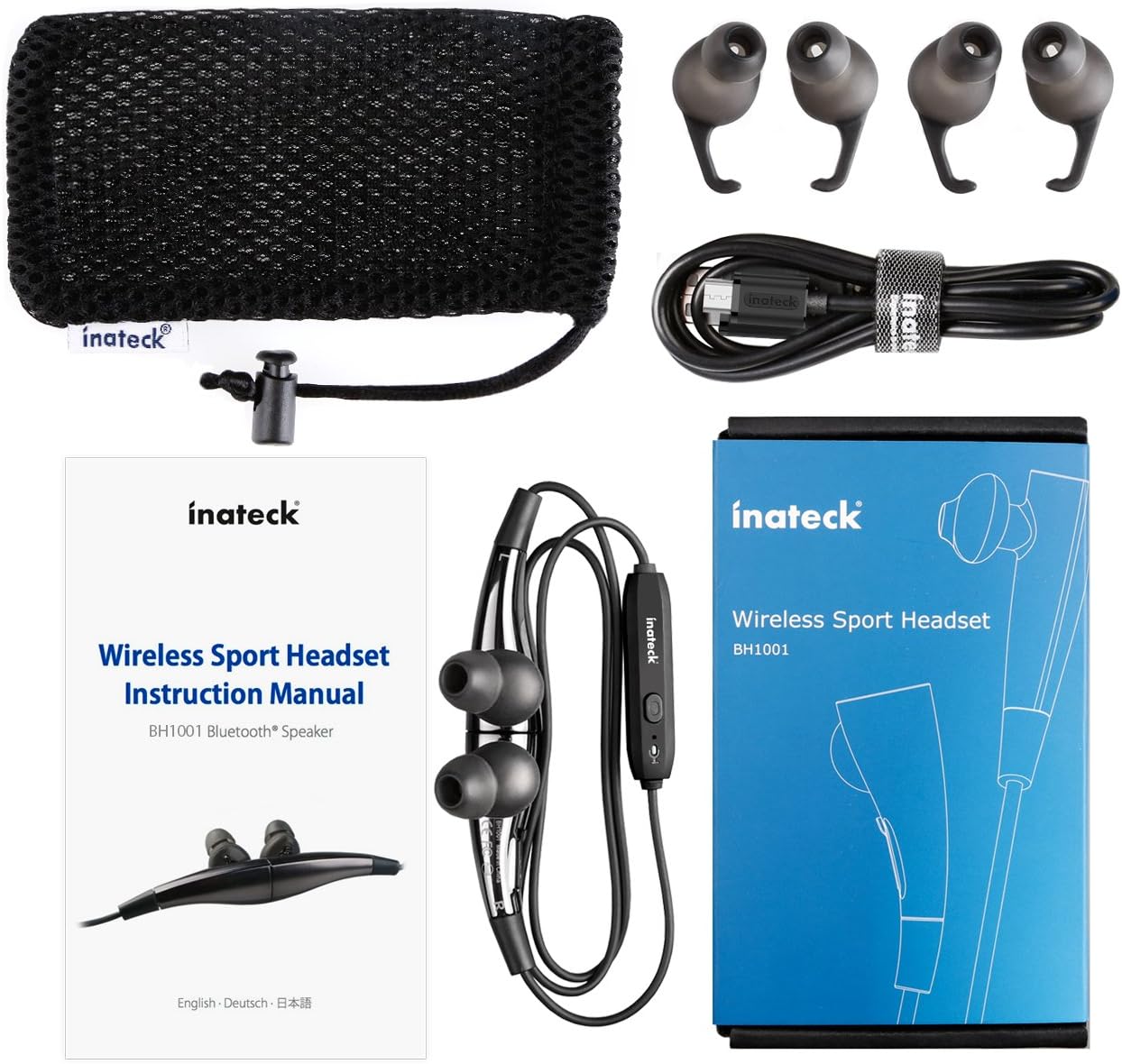
Figure 1.1 : Contents of the Inateck Bluetooth Sport Headset package.
1.2 Chargement du casque
Before first use, fully charge the headset. A full charge takes approximately 3 hours and provides at least 8 hours of music playback.
- Repérez le port de chargement Micro USB sur le casque.
- Connect the small end of the provided USB charging cable to the headset's Micro USB port.
- Connectez l'extrémité la plus large du câble USB à une source d'alimentation USB (par exemple, un port USB d'ordinateur, un adaptateur secteur USB).
- The status indicator light will illuminate during charging. It will change color or turn off once charging is complete.

Figure 1.2 : Charging the Inateck Bluetooth Sport Headset via Micro USB.
1.3 Appairage avec un appareil Bluetooth
To connect your headset to a smartphone or other Bluetooth-enabled device:
- Assurez-vous que le casque est éteint.
- Press and hold the Multifunction Key (MFB) on the inline control unit for approximately 5-7 seconds until the status indicator light flashes red and blue alternately. This indicates pairing mode.
- Sur votre appareil Bluetooth, activez le Bluetooth et recherchez de nouveaux appareils.
- Select "Inateck BH1001" or "Inateck P20" from the list of available devices.
- Once paired, the status indicator light on the headset will flash blue slowly, and you may hear an audible confirmation.
- The headset will automatically attempt to reconnect to the last paired device when turned on.

Figure 1.3 : Inateck Headset paired with a mobile device for music playback.
2. Mode d'emploi
2.1 Commandes du casque
The inline control unit provides easy access to various functions:

Figure 2.1 : Surview of the Inateck Headset control unit.
- Multifunction Key (MFB):
- Maintenir enfoncé (5 à 7 s) : Marche/Arrêt, Entrée en mode appairage
- Appui court : Lecture/Pause de la musique, Répondre/Raccrocher
- Long press (during incoming call): Reject call
- Augmenter le volume (+) / Piste suivante :
- Appui court : augmenter le volume
- Appui long : Passer à la piste suivante
- Baisser le volume (-) / Piste précédente :
- Appui court : Diminuer le volume
- Long press: Go to previous track
- Port micro-USB : Pour charger le casque.
- Indicateur d'état : Affiche l'état de la batterie, de l'appairage et de la charge.
- Microphone: Pour les appels mains libres.
2.2 Port du casque
Select the ear tips that provide the most comfortable and secure fit for your ears. The headset is designed to be worn with the cable behind your neck, ensuring stability during physical activity.

Figure 2.2 : Proper wearing of the Inateck Sport Headset for active use.
2.3 Magnetic Earbuds Feature
The earbuds feature integrated magnets. When not in use, you can connect the two earbuds together, forming a necklace around your neck. This action automatically pauses music playback and prevents the headset from falling off.

Figure 2.3 : Magnetic earbuds feature for secure wearing around the neck.

Figure 2.4 : Headset worn as a necklace using the magnetic feature.
3. Entretien
- Nettoyage: Essuyez le casque avec un chiffon doux et sec. N’utilisez pas de nettoyants abrasifs ni de solvants.
- Conseils auriculaires : Retirez et nettoyez régulièrement les embouts en silicone avec de l'eau et du savon doux. Assurez-vous qu'ils soient parfaitement secs avant de les remettre en place.
- Stockage: When not in use, store the headset in the provided carrying pouch to protect it from dust and damage. Avoid extreme temperatures.
- Résistance à l'eau : The headset is designed to be water-resistant for sports and exercise (e.g., sweat, light rain). Do not submerge it in water or expose it to heavy rain.
4. Dépannage
4.1 Impossible de mettre sous tension
Ensure the headset is fully charged. Connect it to a power source using the USB cable and allow it to charge for at least 30 minutes before attempting to power on again.
4.2 Impossible de jumeler avec l'appareil
- Ensure the headset is in pairing mode (status indicator flashing red and blue alternately).
- Assurez-vous que le Bluetooth est activé sur votre appareil et qu'il se trouve à portée (généralement 10 mètres ou 33 pieds).
- Turn off and on the Bluetooth function on your device.
- If previously paired, try "forgetting" or "unpairing" the headset from your device's Bluetooth settings and then re-pair.
- Assurez-vous qu'aucun autre appareil Bluetooth n'interfère avec la connexion.
4.3 Absence de son ou mauvaise qualité sonore
- Vérifiez le niveau du volume sur le casque et sur votre appareil connecté.
- Assurez-vous que le casque est correctement apparié et connecté à votre appareil.
- Move closer to your device to reduce potential interference or range issues.
- Ensure the ear tips are correctly seated in your ears for optimal sound delivery.
- Reboot both the headset and your connected device.
4.4 Connexion intermittente
- Assurez-vous qu'aucun obstacle physique ne se trouve entre le casque et votre appareil.
- Avoid placing your device in areas where the signal might be blocked (e.g., deep pockets, behind thick walls).
- Minimisez les interférences provenant d'autres appareils sans fil (routeurs Wi-Fi, autres appareils Bluetooth).
- Keep the headset and your device within the recommended Bluetooth range.
5. Spécifications
| Marque | Inateck |
| Nom du modèle | P20 |
| Numéro de modèle | BH1001 |
| Technologie de connectivité | Bluetooth 4.1 |
| Facteur de forme | Écouteurs intra-auriculaires |
| Placement des oreilles | Intra-aural |
| Prise casque | USB (pour le chargement) |
| Niveau de résistance à l'eau | Waterproof (suitable for sweat/light rain) |
| Caractéristiques spéciales | Sports and exercise, integrated microphone, magnetic earbuds |
| Poids de l'article | 78 gramme |
| Type de contrôle | Volume Control, Multifunction Button |
| Matériel | Plastique |
6. Informations sur la garantie
Inateck products typically come with a limited warranty. For specific warranty terms and conditions applicable to your Inateck Bluetooth Sport Headset, please refer to the warranty card included in your product packaging or visit the official Inateck webConsultez le site. Conservez votre preuve d'achat pour toute réclamation au titre de la garantie.
7. Assistance clientèle
If you encounter any issues not covered in this manual or require further assistance, please contact Inateck customer support. You can usually find contact information, FAQs, and additional resources on the official Inateck website:
Website: www.inatec.com
Please have your product model (P20 / BH1001) and purchase details ready when contacting support.