
1. Introduction
The Edifier P180 is a stereo earbud headset designed for clear audio and convenient communication. Featuring an inline microphone and control, it offers a comfortable listening experience for various devices.

Figure 1: Edifier P180 Wired Earbud Headset
2. Contenu de la boîte
- Edifier P180 Earbud Headset
- Câble
3. Principales caractéristiques
- Classic Comfort: Ergonomic design for comfortable wear without irritating the ear canal.
- Superbe qualité sonore : Equipped with 16mm neodymium magnetic monomers for high-fidelity audio playback.
- Integrated Microphone and Control: 3.5mm stereo earphones with a built-in microphone and remote button for mobile phone communication.
- Fonctionnalité: Single button control for picking up/hanging up calls and skipping songs (device dependent for iOS/Android).
- Conception durable : Constructed with quality materials for longevity.

Figure 2: Ergonomic design for comfortable fit.
4. Installation
- Déballer: Carefully remove the Edifier P180 headset from its packaging.
- Inspecter: Check the earbuds and cable for any visible damage.
- Connecter: Insert the 3.5mm audio jack into the headphone port of your compatible device (smartphone, tablet, computer, etc.). Ensure the jack is fully inserted for proper audio and microphone function.
- Position: Place the earbuds comfortably in your ears. The ergonomic design is intended to rest well without causing irritation.
5. Mode d'emploi
The Edifier P180 features an inline control button for easy management of calls and music playback.
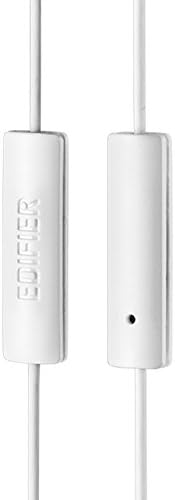
Figure 3: Inline microphone and control button.
- Répondre / terminer les appels: Press the control button once to answer an incoming call. Press it again to end an active call.
- Lecture/Pause de la musique : Press the control button once to play or pause audio playback.
- Sauter des pistes : Double-press the control button to skip to the next track. Triple-press to go to the previous track (functionality may vary by device and operating system).
- Assistant vocal: Long-press the control button to activate your device's voice assistant (e.g., Siri, Google Assistant).
Vidéo 1 : Présentation officielle du produitview of the Edifier P180 Classic Earbud Headsets, demonstrating features and usage.
6. Entretien
- Nettoyage: Essuyez délicatement les écouteurs et le câble avec un chiffon doux et sec. Évitez d'utiliser des produits chimiques agressifs ou des matériaux abrasifs.
- Stockage: When not in use, store the headset in a clean, dry place, away from extreme temperatures and direct sunlight. Avoid tangling the cable.
- Éviter l’humidité : Do not expose the headset to water or excessive moisture, as this can damage the internal components.
7. Dépannage
- Pas de son :
- Assurez-vous que la prise jack 3.5 mm est complètement insérée dans le port audio de votre appareil.
- Vérifiez les paramètres de volume de votre appareil.
- Testez les écouteurs avec un autre appareil pour exclure un problème lié à l'appareil lui-même.
- Le microphone ne fonctionne pas :
- Assurez-vous que la prise jack 3.5 mm est complètement insérée.
- Vérifiez les paramètres d'entrée du microphone de votre appareil.
- Testez le microphone avec un autre appareil ou une autre application.
- Audio intermittent :
- Check the cable for any kinks or damage.
- Assurez-vous que la prise audio est propre et exempte de débris.
8. Spécifications
| Fonctionnalité | Spécification |
|---|---|
| Numéro de modèle | P180 |
| Réponse en fréquence | 20 Hz - 20,000 XNUMX Hz |
| Prise pour casque | 3.5 mm Jack |
| Technologie de connectivité | Câblé |
| Poids de l'article | 1.76 once (50 grammes) |
| Dimensions du produit | 2.01 x 5.59 x 0.91 pouces |
| Matériel | Néodyme |
| Type de contrôle | Inline Control Button |
| Impédance | 32 Ohms |
| Contrôle du bruit | Isolation acoustique |
9. Garantie et assistance
The Edifier P180 headset is backed by a Garantie de 1 ans. For any support inquiries or warranty claims, please refer to the contact information provided with your purchase or visit the official Edifier website.