
1. Introduction
The McKesson LUMEON Electronic Thermometer, Model 3074, is designed for accurate and rapid temperature measurement via oral or axillary (underarm) methods. This device provides reliable readings with an intuitive interface and a flexible probe for user comfort and accuracy. Please read this manual thoroughly before use to ensure proper operation and to maintain the device's longevity.
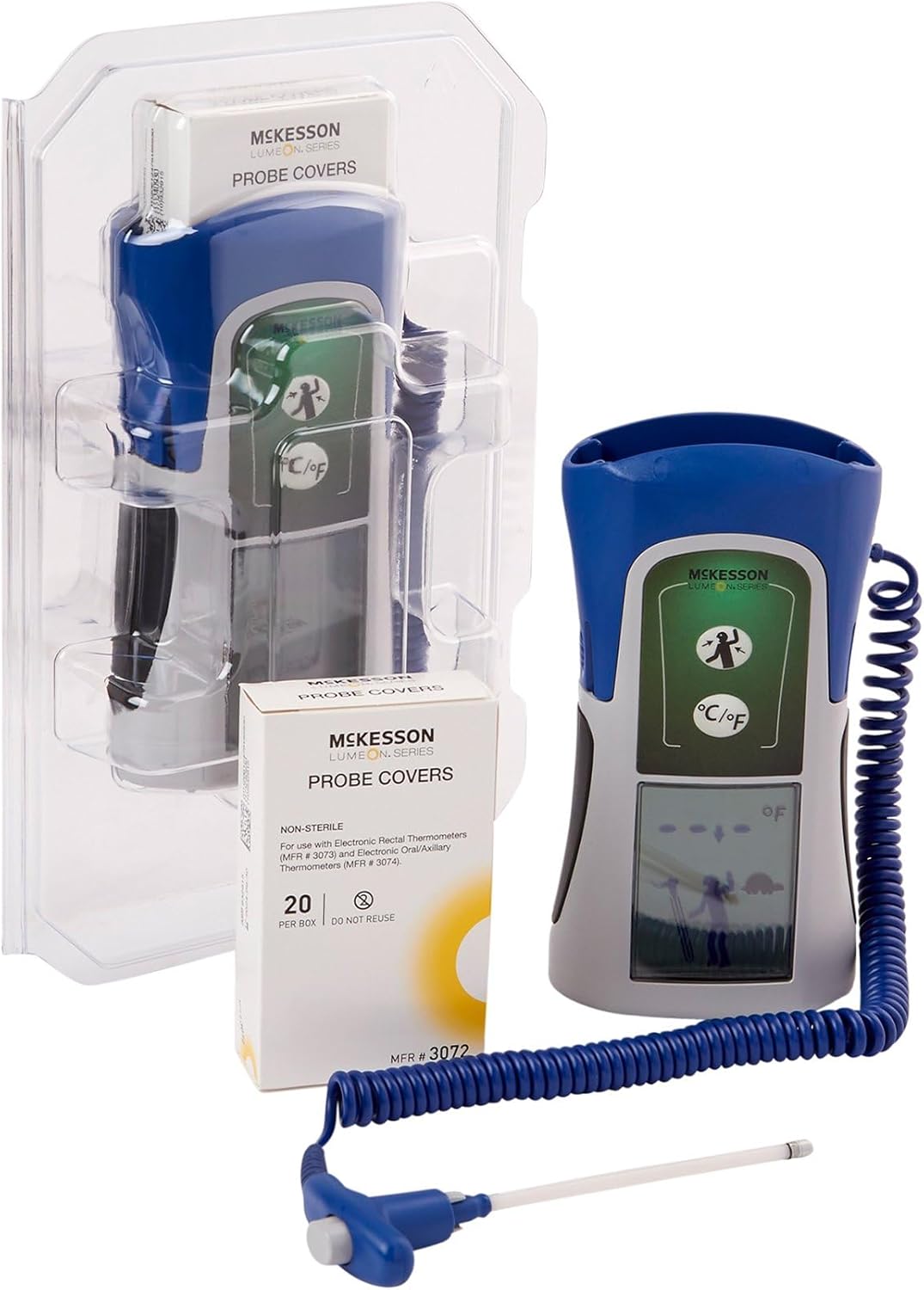
The McKesson LUMEON Electronic Thermometer, shown with its flexible probe and a box of probe covers, packaged in clear plastic.
2. Consignes de sécurité
- This thermometer is intended for oral and axillary use only. Do not use for rectal temperature measurement.
- Always use a new, disposable probe cover for each measurement to prevent cross-contamination.
- Tenir hors de portée des enfants. Les petites pièces peuvent présenter un risque d'étouffement.
- Ne mordez pas la sonde.
- Avoid exposing the thermometer to direct sunlight, extreme temperatures, or moisture.
- Do not attempt to disassemble or repair the device. Contact customer support if service is required.
- Les déclarations concernant les compléments alimentaires n’ont pas été évaluées par la FDA et ne sont pas destinées à diagnostiquer, traiter, guérir ou prévenir une maladie ou un problème de santé.
3. caractéristiques du produit
- Provides quick, accurate readings in approximately 4 seconds.
- Features a dual measuring scale with Fahrenheit (°F) and Celsius (°C) capabilities.
- Intuitive, icon-based interface for simple operation and reliable readings.
- Flexible probe enhances durability and helps minimize technique-related errors.
- Equipped with an easy-to-read LCD screen with backlight.
- Extended battery life supports up to 6,000 readings.
4. Contenu du colis
- McKesson LUMEON Electronic Thermometer (Model 3074)
- Probe Covers (20 per box, MFR #3072)
- Manuel d'utilisation

Close-up of the McKesson LUMEON Probe Covers packaging, showing the barcode (01206124791958551120081321A2053479) and manufacturing details.
5. Installation
5.1 Installation de la batterie
The thermometer requires 4 AA batteries for operation. To install or replace batteries:
- Repérez le couvercle du compartiment à piles à l'arrière de l'appareil.
- Ouvrir le couvercle.
- Insérez 4 piles AA en respectant la polarité (+/-).
- Fermez soigneusement le couvercle du compartiment à piles.
5.2 Unit Selection (°F / °C)
The thermometer can display temperatures in Fahrenheit (°F) or Celsius (°C). To switch between units:
- With the thermometer off, press and hold the power button for approximately 3 seconds until the unit changes on the display.
- Release the button when the desired unit is shown. The device will remember this setting for future use.
6. Mode d'emploi
Always ensure the thermometer is clean and a new probe cover is attached before each use.

The McKesson LUMEON Electronic Thermometer displaying a temperature reading of 91.1°F, with its flexible probe and a box of probe covers.
6.1 Oral Temperature Measurement
- Attach a new, disposable probe cover to the thermometer tip.
- Appuyez sur le bouton d'alimentation pour allumer le thermomètre.
- Place the covered probe tip under the tongue, as far back as comfortable, and close the mouth.
- Hold the thermometer in place until a stable reading is displayed (approximately 4 seconds). A beep will indicate completion.
- Lire la température sur l'écran LCD.
- Discard the used probe cover and turn off the thermometer.
6.2 Axillary (Underarm) Temperature Measurement
- Attach a new, disposable probe cover to the thermometer tip.
- Appuyez sur le bouton d'alimentation pour allumer le thermomètre.
- Place the covered probe tip in the center of the armpit, ensuring good skin contact.
- Hold the arm firmly against the body to keep the probe in place.
- Wait until a stable reading is displayed (this method may take slightly longer than oral). A beep will indicate completion.
- Lire la température sur l'écran LCD.
- Discard the used probe cover and turn off the thermometer.
7. Reading Interpretation
The thermometer will display the measured temperature on its LCD screen. Normal body temperature varies by individual, age, and measurement site. Consult a healthcare professional for guidance on interpreting temperature readings, especially if you have concerns about fever or hypothermia.

The McKesson LUMEON Electronic Thermometer placed on a desk, demonstrating its compact size and readiness for use.
8. Entretien
8.1 Nettoyage
After each use, and after removing the disposable probe cover, wipe the thermometer probe and body with a soft cloth dampened with isopropyl alcohol or a mild disinfectant. Do not immerse the thermometer in water or any cleaning solution. Allow the device to air dry completely before storage.
8.2 Stockage
Store the thermometer in its protective case in a cool, dry place, away from direct sunlight and extreme temperatures. Remove batteries if the device will not be used for an extended period.

Côté view of the McKesson LUMEON Electronic Thermometer, highlighting its ergonomic design and flexible probe with a probe cover.
9. Dépannage
| Problème | Cause possible | Solution |
|---|---|---|
| Aucun affichage à la mise sous tension | Piles mortes ou mal installées | Replace batteries with 4 new AA batteries, ensuring correct polarity. |
| Lectures inexactes | Improper placement of probe; used probe cover; environmental factors | Ensure correct probe placement; use a new probe cover; avoid taking temperature immediately after eating, drinking, or exercising. |
| Codes d'erreur affichés | Device malfunction; out of temperature range | Refer to the specific error code in the full product documentation or contact McKesson customer support. Ensure ambient temperature is within operating range. |
10. Spécifications
| Fonctionnalité | Détail |
|---|---|
| Numéro de modèle | 3074 |
| Temps de mesure | Environ 4 secondes |
| Plage de mesure | 90°F à 110°F (32°C à 43.3°C) |
| Afficher | Écran LCD numérique avec rétroéclairage |
| Source d'énergie | 4 piles AA |
| Autonomie de la batterie | Jusqu'à 6,000 lectures |
| Dimensions du produit | 10.6 x 6.6 x 3.7 pouces |
| Poids | 1.41 livres |
| Matériel | Plastique |
| Conformité | Conforme à la FDA |
11. Garantie et assistance
For warranty information or technical support regarding your McKesson LUMEON Electronic Thermometer, please refer to the warranty card included with your product or contact McKesson customer service directly. Contact details can typically be found on the product packaging or the official McKesson website. Please have your model number (3074) and purchase information available when contacting support.