
Informations importantes sur la sécurité
Read all instructions carefully before installation and operation. Failure to follow these instructions may result in electric shock, fire, or serious injury. This device is intended for indoor use only.
- AVERTISSEMENT: Risque de choc électrique. Coupez l'alimentation au niveau du disjoncteur ou du tableau électrique avant toute installation ou intervention.
- L'installation doit être effectuée par un électricien qualifié ou un personnel formé.
- Assurez-vous que tous les raccordements électriques sont sécurisés et conformes aux normes électriques locales.
- Ne pas dépasser les valeurs électriques maximales admissibles du minuteur.
- Keep children away from the timer and wiring during installation and operation.
Produit terminéview
The Intermatic 610224 is a digital 7-day programmable timer designed to automate the ON/OFF switching of electrical loads such as lights, fans, and other appliances. It features a clear digital display and intuitive controls for setting daily or weekly schedules. This timer operates at 120V AC and can handle loads up to 15 Ampc'est.
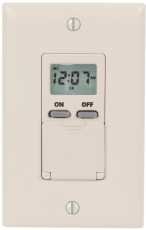
Image: Devant view of the Intermatic 610224 Digital 7-Day Timer. The image displays the timer's ivory-colored faceplate with a digital screen at the top and several control buttons below it. The buttons are arranged for setting time, programming, and manual override functions.
Installation
Follow these steps to properly install your Intermatic 610224 Digital 7-Day Timer.
- Couper l'alimentation : Locate the circuit breaker or fuse that controls the power to the switch you are replacing. Turn off the power completely. Verify power is off using a voltage testeur.
- Supprimer le commutateur existant : Carefully remove the wall plate and unscrew the existing switch from the wall box. Disconnect the wires from the old switch, noting which wire is connected to which terminal (Line, Load, Neutral, Ground).
- Connexions de câblage : The Intermatic 610224 timer requires Line (hot), Load, Neutral, and Ground connections. Connect the wires from the wall box to the corresponding terminals on the timer:
- Connectez le Ligne (chaude) wire (usually black) from the power source to the terminal marked 'LINE'.
- Connectez le Charger wire (usually black, going to the fixture) to the terminal marked 'LOAD'.
- Connectez le Neutre wire (usually white) to the terminal marked 'NEUTRAL'.
- Connectez le Sol wire (usually bare copper or green) to the terminal marked 'GROUND'.
Note: A wiring diagram is typically included with the product packaging. Ensure all connections are tight and secure.
- Montage: Gently push the wired timer into the wall box. Secure it with the provided screws. Attach the new wall plate.
- Restaurer l'alimentation : Turn the power back on at the circuit breaker or fuse box. The timer display should illuminate.
Mode d'emploi
This section details how to set the current time and program ON/OFF events for your timer.
Réglage de l'heure et du jour actuels
- Press the 'CLOCK' button. The time display will flash.
- Use the 'HOUR' and 'MIN' buttons to adjust the current hour and minute.
- Press the 'DAY' button to select the current day of the week.
- Press 'CLOCK' again to save the settings and exit.
Programmation des événements ON/OFF
The timer allows for multiple ON/OFF programs per day. Refer to your specific model's manual for the exact number of programs (typically up to 14 ON and 14 OFF events).
- Press the 'PROG' button. The display will show '1 ON' and the time will flash.
- Use the 'HOUR' and 'MIN' buttons to set the desired ON time for program 1.
- Press the 'DAY' button repeatedly to select the day(s) of the week for this program (e.g., Mon-Sun, Mon-Fri, Sat-Sun, individual days).
- Press 'PROG' again. The display will show '1 OFF' and the time will flash.
- Use the 'HOUR' and 'MIN' buttons to set the desired OFF time for program 1.
- Press the 'DAY' button to select the day(s) for this OFF program, matching the ON program.
- Répétez les étapes 1 à 6 pour les programmes ON/OFF supplémentaires (par exemple, '2 ON', '2 OFF', etc.).
- Après avoir configuré tous les programmes souhaités, appuyez sur le bouton « CLOCK » pour quitter le mode de programmation.
Commande manuelle
Pour remplacer temporairement le programme actuel sans le supprimer :
- Press the 'MANUAL' button. This will cycle the output between ON, OFF, and AUTO modes.
- In 'AUTO' mode, the timer follows the programmed schedule.
- In 'ON' or 'OFF' mode, the timer will remain in that state until the next programmed event or until 'MANUAL' is pressed again to return to 'AUTO'.
Ajustement de l’heure d’été
Some models may have an automatic Daylight Saving Time adjustment feature. If not, manually adjust the time by one hour forward or backward as required using the 'HOUR' button in clock setting mode.
Entretien
The Intermatic 610224 Digital 7-Day Timer requires minimal maintenance.
- Nettoyage: To clean the timer, wipe the surface with a soft, damp Chiffon. N’utilisez pas de nettoyants abrasifs ni de solvants, car ils pourraient endommager la finition ou les composants internes.
- Batterie de secours: This timer typically includes an internal battery backup to retain programmed settings during power outages. The battery is usually non-replaceable by the user and designed to last the life of the product. If the display is blank or programs are lost after a power outage, the battery may be depleted, indicating the unit may need replacement.
Dépannage
If you encounter issues with your timer, refer to the following common problems and solutions.
| Problème | Cause possible | Solution |
|---|---|---|
| L'écran du minuteur est vide. | Le minuteur n'est pas alimenté. | Check circuit breaker or fuse. Ensure wiring connections are secure. |
| La minuterie ne s'allume/ne s'éteint pas aux heures programmées. | Incorrect programming; Timer is in Manual ON/OFF mode. | Review programming steps. Ensure timer is in 'AUTO' mode (press 'MANUAL' button until 'AUTO' is displayed). |
| L'heure est incorrecte après une coupure de courant.tage. | Internal battery backup depleted. | Reset the current time and day. If this occurs frequently, the timer may need replacement. |
| Load (light/appliance) does not turn on. | Load is faulty; Wiring issue; Timer is OFF. | Test the load directly. Check wiring connections. Ensure timer is programmed to ON or manually set to ON. |
Caractéristiques
- Modèle: 610224
- Voltage: 120V AC, 60Hz
- Évaluation actuelle : 15A Resistive, 10A Tungsten, 1/2 HP
- Program Cycles: 7 jours
- Programmes : Up to 28 ON/OFF events (14 ON, 14 OFF)
- Température de fonctionnement : 0°C à 50°C (32°F à 122°F)
- Enceinte: Ivory, Wall Mount
Garantie et assistance
Intermatic products are manufactured to high-quality standards and are backed by a manufacturer's warranty. For specific warranty details, please refer to the warranty card included with your product or visit the official Intermatic website.
For technical support, troubleshooting assistance, or to inquire about replacement parts, please contact Intermatic customer service. Contact information can typically be found on the product packaging or the manufacturer's website.