
1. Introduction
This manual provides detailed instructions for the installation, operation, and maintenance of your ASUS X99-DELUXE motherboard. The ASUS X99-DELUXE is an ATX motherboard designed for high-performance computing, supporting Intel LGA 2011-3 processors and DDR4 memory.

Figure 1 : Vue de dessus view of the ASUS X99-DELUXE Motherboard, showing the CPU socket, RAM slots, and heatsinks.
2. Principales caractéristiques
- ASUS OC Socket: Designed to enhance 8-core CPU and DDR4 performance beyond standard X99 expectations.
- Prise en charge de la mémoire DDR4 : Features a special memory overclocking design, supporting DDR4 memory speeds up to 3200MHz (O.C.).
- Dual M.2 X4 Support: Provides two M.2 slots with PCIe 3.0 x4 interface, enabling data transfer speeds up to 32Gb/s for compatible NVMe SSDs.
- Fan Extension Card: Includes an extension card for advanced PC cooling management.
- Optimisation en 5 points : Utilizes Dual Intelligent Processors 5 for system optimization, including performance tuning, power saving, digital power control, and fan control.
- BIOS UEFI : Features a media-acclaimed Unified Extensible Firmware Interface (UEFI) BIOS for intuitive system configuration.
- SATA Express: Supports SATA Express for storage speeds up to 10Gb/s.
3. Configuration et installation
Avant de commencer l'installation, assurez-vous que votre système est éteint et débranché de la source d'alimentation. Manipulez la carte mère par ses bords pour éviter les décharges électrostatiques.
3.1. CPU Installation (LGA 2011-3 Socket)
- Ouvrez avec précaution le mécanisme de fixation du socket du processeur.
- Alignez le repère triangulaire sur le processeur avec le repère correspondant sur le socket.
- Insérez délicatement le processeur dans le socket sans forcer.
- Close the retention mechanism to secure the CPU. Ensure no pins are bent during this process.

Figure 2 : Angulaire view of the ASUS X99-DELUXE Motherboard, highlighting the LGA 2011-3 CPU socket.
3.2. Installation de la mémoire (DDR4)
The motherboard supports DDR4 memory modules. Refer to the motherboard manual for specific memory configurations and supported speeds.
- Ouvrez les clips situés aux deux extrémités de l'emplacement DIMM.
- Alignez l'encoche du module de mémoire DDR4 avec le loquet de l'emplacement DIMM.
- Insérez fermement le module dans la fente jusqu'à ce que les clips s'enclenchent.
3.3. Storage Device Installation (M.2, SATA)
Install M.2 SSDs into the dedicated M.2 slots and SATA drives to the SATA ports. The motherboard supports SATA 3 (6Gb/s) and SATA Express.
3.4. Connexion de périphériques
Connect your display, keyboard, mouse, and other peripherals to the rear I/O panel. The motherboard provides various USB ports, Ethernet ports, and audio jacks.
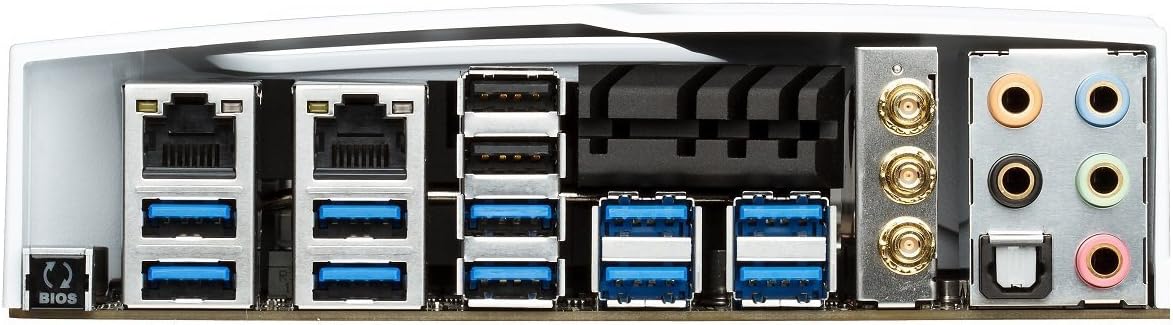
Figure 3: Rear I/O panel of the ASUS X99-DELUXE Motherboard, showing USB ports, Ethernet, and audio jacks.
4. Mode d'emploi
4.1. UEFI BIOS Configuration
The UEFI BIOS allows you to configure system settings, boot options, and hardware parameters. To enter the BIOS, press the DEL clé lors du démarrage du système.
- Mode EZ : Provides a simplified interface for basic settings.
- Mode avancé: Offers comprehensive control over all motherboard features, including overclocking and fan control.
4.2. Installation du pilote
After installing your operating system (e.g., Windows XP, as listed in specifications, and newer OS versions), install the necessary drivers for the motherboard chipset, audio, network, and other integrated components. These are typically provided on a support DVD or available for download from the ASUS website.
4.3. 5-Way Optimization
The 5-Way Optimization feature, accessible through ASUS software, automatically tunes your system for optimal performance, power efficiency, digital power delivery, and fan acoustics based on your usage. It is recommended to manage overclocking and fan settings directly within the BIOS for more precise control.
5. Entretien
Un entretien régulier contribue à assurer la longévité et le fonctionnement stable de votre carte mère.
- Élimination de la poussière : Nettoyez régulièrement la poussière accumulée sur la carte mère et les composants de refroidissement à l'aide d'air comprimé. Assurez-vous que le système est éteint et débranché avant tout nettoyage.
- Vérifications de connexion : Verify that all cables and components are securely seated.
- Mises à jour du BIOS : Consultez le support ASUS website for the latest BIOS updates to improve compatibility and performance. Follow update instructions carefully.
6. Dépannage
If you encounter issues with your ASUS X99-DELUXE motherboard, consider the following troubleshooting steps:
- Pas d'alimentation/Pas de démarrage :
- Assurez-vous que tous les câbles d'alimentation (ATX 24 broches, CPU 8 broches) sont correctement connectés.
- Verify the power supply unit (PSU) is functioning correctly.
- Vérifiez la connexion de l'interrupteur d'alimentation du panneau avant à la carte mère.
- Pas d'affichage :
- Confirm the graphics card is properly seated in its PCIe slot and has adequate power.
- Assurez-vous que le câble du moniteur est correctement connecté à la carte graphique.
- Si possible, effectuez un test avec un autre câble d'affichage ou un autre moniteur.
- Instabilité/Pannes du système :
- Vérifiez que les modules de RAM sont correctement insérés ; essayez de les réinsérer ou de les tester un par un.
- Ensure CPU cooler is correctly installed and making good contact with the CPU. Monitor CPU temperatures.
- Réinitialiser les paramètres du BIOS par défaut.
- Bent CPU Socket Pins:
Bent pins in the CPU socket can cause severe system malfunctions or prevent booting. This type of damage is typically not covered under warranty. Exercise extreme caution during CPU installation to avoid bending pins.
7. Spécifications
| Catégorie | Spécification |
|---|---|
| Marque | ASUS |
| Nom du modèle | X99-DELUXE |
| Prise de processeur | LGA 2011-3 |
| Processeurs compatibles | Intel Core i7 (LGA 2011-3) |
| Type de chipset | Intel X99 |
| Technologie de mémoire RAM | DDR4 |
| Vitesse d'horloge de la mémoire | Up to 3200 MHz (O.C.) |
| Emplacements de mémoire disponibles | 8 |
| Taille maximale de la mémoire RAM | 64 Go |
| Interface de la carte graphique | PCI Express |
| Total PCIe Ports | 5 |
| Nombre total de ports SATA | 8 |
| System Bus Standard Supported | SATA 3 |
| Ports USB 2.0 | 2 (internal headers, total ports may vary) |
| Nombre total de ports USB | Various (including USB 3.0 on rear I/O) |
| Nombre de ports Ethernet | 1 (Dual Gigabit LAN) |
| Type de connecteur d'alimentation principale | Connecteur ATX 24 broches |
| Appareils compatibles | Ordinateur personnel |
| Plate-forme | Windows XP (and newer OS versions) |
| Poids de l'article | 4.44 livre (environ 2.01 kg) |
8. Garantie et assistance
Pour obtenir des informations sur la garantie et l'assistance technique, veuillez consulter le site officiel d'ASUS. webConsultez le site web ou contactez le service client d'ASUS. Conservez votre preuve d'achat pour toute réclamation au titre de la garantie.
Assistance ASUS Website: https://www.asus.com/support/
Note: Damage resulting from improper installation, misuse, or unauthorized modifications may void your product warranty.