
1. User Guide & Product Overview
The Valcom VC-V-400 is an omni-directional dynamic desktop microphone designed for clear audio capture in various applications. It features a low impedance design and includes a push-to-talk switch with a locking bar for convenient operation. This manual provides essential information for setting up, operating, and maintaining your Valcom VC-V-400 microphone.
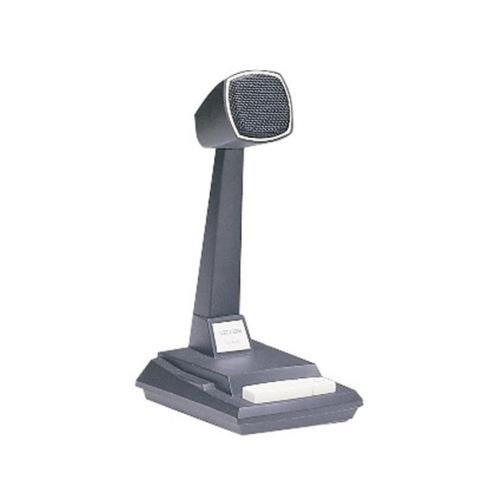
Figure 1: Valcom VC-V-400 Dynamic Desktop Microphone. An image showing the Valcom VC-V-400 Dynamic Desktop Microphone, featuring a dark grey base with a white push-to-talk bar, and a tall stand supporting the microphone head with a metallic grille.
2. Instructions de configuration
To ensure proper functionality, the Valcom VC-V-400 microphone requires the Valcom V-9939B Microphone Adapter (sold separately) for connection to your system.
2.1 Déballage
- Retirez délicatement le microphone de son emballage.
- Verify that all components are present: Valcom VC-V-400 Microphone.
2.2 Connexion
- Ensure your audio system or device is powered off before making connections.
- Connect the XLR connector of the Valcom VC-V-400 microphone to the appropriate input on the Valcom V-9939B Microphone Adapter.
- Connect the Valcom V-9939B Microphone Adapter to your audio system or PC as per the adapter's instructions.
- Once all connections are secure, you may power on your audio system.
3. Mode d'emploi
The Valcom VC-V-400 microphone is designed for ease of use with its integrated push-to-talk functionality.
3.1 Fonctionnement Push-to-Talk (PTT)
- To activate the microphone for speaking, press and hold the white push-to-talk bar located on the base of the microphone.
- Release the bar to mute the microphone.
3.2 Locking Bar Feature
- For continuous microphone activation, push the white push-to-talk bar down and slide the locking bar (if present and functional on your model) to hold it in the depressed position.
- To disengage, slide the locking bar back and allow the push-to-talk bar to return to its original position.
3.3 Placement du microphone
As an omni-directional microphone, the VC-V-400 picks up sound equally from all directions. Position the microphone centrally within the desired speaking area for optimal audio capture.
4. Entretien
Proper care and maintenance will extend the life of your Valcom VC-V-400 microphone.
- Nettoyage: Use a soft, dry cloth to wipe the exterior of the microphone. Do not use liquid cleaners or abrasive materials.
- Stockage: Lorsqu'il n'est pas utilisé, rangez le microphone dans un endroit propre et sec, à l'abri des températures et de l'humidité extrêmes.
- Manutention: Évitez de laisser tomber le microphone ou de le soumettre à des chocs violents, car cela pourrait endommager ses composants internes.
5. Dépannage
If you encounter issues with your Valcom VC-V-400 microphone, refer to the following common problems and solutions:
| Problème | Cause possible | Solution |
|---|---|---|
| Pas de sortie audio |
|
|
| Poor audio quality (e.g., static, low volume) |
|
|
6. Spécifications
| Fonctionnalité | Détail |
|---|---|
| Marque | Valcom |
| Nom du modèle | VC-V-400 |
| Facteur de forme du microphone | Tableau |
| Diagramme polaire | Omnidirectionnel |
| Technologie de connectivité | XLR |
| Type de connecteur | XLR |
| Dossier spécial | Push-to-talk with locking bar, Lift-to-talk mode |
| Appareils compatibles | Personal Computer (requires V-9939B adapter) |
| Couleur | White (microphone base) |
| Composants inclus | Microphone |
| Poids de l'article | 3.4 livre (environ 1.54 kg) |
| Source d'énergie | Corded Electric (via adapter) |
| Signal-to-Noise Ratio | 60 dB |
| Nombre de canaux | 1 |
| Réponse en fréquence | 15 kHz |
| Fabricant | VALCOM |
| Code UPC | 809390045079 807035655225 |
| Date de première disponibilité | 11 juin 2014 |
7. Informations sur la garantie
Specific warranty details for the Valcom VC-V-400 Dynamic Desktop Microphone are not provided in this document. Please refer to the product packaging or contact Valcom directly for comprehensive warranty information.
8. Assistance
For technical assistance, product inquiries, or further support regarding your Valcom VC-V-400 microphone, please contact Valcom customer service. Contact information can typically be found on the manufacturer's official website ou emballage du produit.