1. Introduction
The D-Link DGS-1500-28 SmartPro 24-Port Gigabit Switch is a high-performance Layer 3 managed switch designed for small to medium-sized businesses. It offers 24 Gigabit Ethernet ports and 4 SFP+ expansion slots, providing flexible connectivity and advanced management features. This manual provides essential information for the proper installation, configuration, operation, and maintenance of your DGS-1500-28 switch.
2. Contenu du colis
Verify the following items are present in your DGS-1500-28 package. If any item is missing or damaged, please contact your local D-Link reseller for assistance.
- DGS-1500-28 SmartPro 24-Port Gigabit Switch
- Cordon d'alimentation
- Rack Mount Kit (two brackets and screws)
- Pieds en caoutchouc (pour installation sur bureau)
- Console Cable (RJ-45 to RS-232)
- Guide d'installation rapide
- CD-ROM (contenant la documentation du produit)
3. Description physique
3.1 Panneau avant
The front panel of the DGS-1500-28 switch features the Gigabit Ethernet ports, SFP+ slots, and LED indicators for monitoring the switch's status and activity.
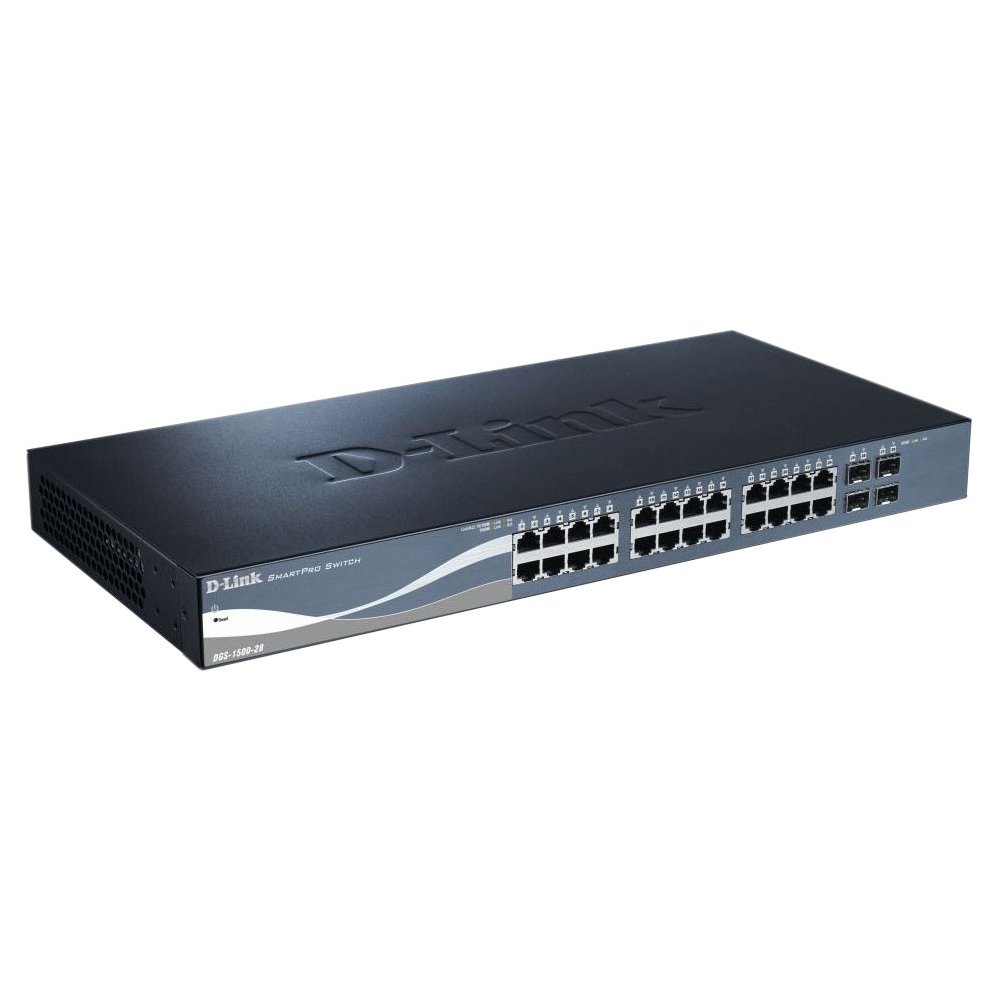
This image displays the front panel of the D-Link DGS-1500-28 switch, featuring 24 RJ-45 Gigabit Ethernet ports and LED indicators for status and activity.
- RJ-45 Ports (1-24): 10/100/1000 Mbps Gigabit Ethernet ports for connecting network devices.
- SFP+ Slots (25-28): 10 Gigabit Ethernet SFP+ ports for fiber optic connections or stacking.
- Indicateurs LED :
- Voyant d'alimentation : Indique l'état de l'alimentation.
- Voyant LED Link/Act (par port) : Indicates network link and data activity.
- Voyant de vitesse (par port) : Indicates connection speed (e.g., green for Gigabit, amber for 10/100 Mbps).
3.2 Panneau arrière
The rear panel typically includes the power connector, grounding screw, and a console port for out-of-band management.
- Prise d'alimentation CA : Connects to the provided AC power cord.
- Vis de mise à la terre : Provides an optional connection for grounding the switch.
- Port de console : RJ-45 port for connecting a console cable to a computer for command-line interface (CLI) management.
4. Installation
4.1 Installation sur le bureau
- Attach the four rubber feet to the recessed areas on the bottom of the switch.
- Place the switch on a sturdy, level surface that can support its weight.
- Assurez une ventilation adéquate autour de l'interrupteur.
4.2 Installation du bâti
- Attach the two rack-mounting brackets to the sides of the switch using the provided screws.
- Fixez le commutateur dans un rack d'équipement standard de 19 pouces à l'aide de vis de rack appropriées (non incluses).
- Ensure proper airflow and avoid placing the switch near heat sources.
4.3 Mise sous tension du commutateur
- Connect the AC power cord to the power receptacle on the rear panel of the switch.
- Branchez l'autre extrémité du cordon d'alimentation dans une prise de courant appropriée.
- La LED d'alimentation située sur le panneau avant s'allumera, indiquant que l'interrupteur est alimenté.
5. Configuration initiale
Le commutateur DGS-1500-28 peut être géré via un web-interface utilisateur graphique (GUI) ou interface en ligne de commande (CLI) via le port console.
5.1 Accéder au WebInterface de gestion basée sur
- Connect a computer to any of the switch's RJ-45 ports using an Ethernet cable.
- Configure your computer's IP address to be in the same subnet as the switch's default IP address (e.g., if the switch is 10.90.90.90, set your computer to 10.90.90.100).
- Ouvrir un web browser and enter the switch's default IP address (e.g., http://10.90.90.90) dans la barre d'adresse.
- Saisissez le nom d'utilisateur et le mot de passe par défaut (reportez-vous au Guide d'installation rapide pour connaître les informations d'identification par défaut).
- Une fois la connexion réussie, vous aurez accès aux web interface de gestion.
Note: It is highly recommended to change the default password immediately after initial login for security purposes.
6. Utilisation de l'interrupteur
Once configured, the DGS-1500-28 operates as a network switch, forwarding data between connected devices. The LED indicators provide visual feedback on the operational status of the switch and its ports.
6.1 Port Functionality
- Ports RJ-45 : Automatically detect the speed and duplex mode of connected devices (10/100/1000 Mbps).
- SFP+ Slots: Support 10 Gigabit Ethernet transceivers for high-speed uplinks or stacking. Ensure compatible SFP+ modules are used.
6.2 fonctionnalités avancées
The DGS-1500-28 series integrates advanced features to enhance network performance and management:
- Virtual Stacking: Allows up to 32 DGS-1500 series devices to be managed as a single unit with one IP address, simplifying network administration and scalability.
- Layer 3 Static Routing: Enables the switch to forward IP packets between different IP subnets based on static routes configured by the administrator. This feature is crucial for inter-VLAN routing and basic network segmentation.
7. Entretien
Regular maintenance ensures optimal performance and longevity of your DGS-1500-28 switch.
- Mises à jour du micrologiciel : Vérifiez régulièrement le support D-Link webSite web proposant les dernières versions du firmware. La mise à jour du firmware peut apporter de nouvelles fonctionnalités, des améliorations de performances et des correctifs de sécurité.
- Conditions environnementales : Assurez-vous que l'interrupteur fonctionne dans les plages de température et d'humidité recommandées. Veillez à ce que les ouvertures de ventilation ne soient pas obstruées.
- Nettoyage: Utilisez un chiffon doux et sec pour nettoyer l'extérieur de l'interrupteur. N'utilisez pas de nettoyants liquides ni en aérosol.
- Sauvegarde de la configuration : Regularly back up your switch configuration to an external device. This allows for quick restoration in case of a factory reset or device replacement.
8. Dépannage
This section provides solutions to common issues you might encounter with your DGS-1500-28 switch.
8.1 Le voyant d'alimentation est éteint
- Assurez-vous que le cordon d'alimentation est bien branché à la fois à l'interrupteur et à une prise de courant fonctionnelle.
- Vérifiez le bon fonctionnement de la prise de courant en y branchant un autre appareil.
8.2 Aucun lien/activité sur un port
- Vérifiez la connexion du câble Ethernet aux deux extrémités. Essayez un autre câble.
- Vérifiez que l'appareil connecté est allumé et fonctionne correctement.
- Verify the port status in the switch's web interface de gestion.
- Pour les ports SFP+, assurez-vous que le module SFP+ est correctement inséré et compatible.
8.3 Impossible d'accéder Web Interface de gestion
- Confirm your computer's IP address is in the same subnet as the switch's IP address.
- Verify the switch's IP address. If unknown, you may need to reset the switch to factory defaults (refer to the Quick Installation Guide for reset procedures).
- Assurez-vous qu'il n'y a pas de conflits d'adresses IP sur le réseau.
- Essayez d'accéder à l'interface depuis un autre web navigateur ou ordinateur.
9. Spécifications
| Fonctionnalité | Description |
|---|---|
| Marque | Lien D |
| Numéro de modèle | DGS150028 |
| Ports | 24 x 10/100/1000 Mbps RJ-45 Gigabit Ports, 4 x 10 Gigabit SFP+ Expansion Slots |
| Type d'interface | RJ45, SFP+ |
| Capacité de commutation | Up to 128 Gbps (non-blocking) |
| Prise en charge des calques | Layer 3 (Static Routing) |
| Gestion | Web-based GUI, CLI, SNMP |
| Appareils compatibles | Desktop, Rack-mount devices |
| Poids de l'article | 0.01 Ounces (Note: This value may be a placeholder or incorrect. Refer to product packaging for accurate weight.) |
| Code UPC | 790069362927 |
| ASIN | B007TL1DHM |
10. Garantie et assistance
D-Link products are backed by a limited warranty. The specific terms and conditions of the warranty may vary by region and product. Please refer to the warranty information included with your product or visit the official D-Link website for detailed warranty statements.
For technical support, product documentation, firmware updates, and FAQs, please visit the D-Link support website: www.dlink.com/support
You may also contact D-Link technical support directly through the contact information provided on their website pour votre région spécifique.