
Introduction
This manual provides detailed instructions for the operation and maintenance of your Garmin GPSMAP 78sc 2.6-Inch Waterproof Marine GPS and Chartplotter. The GPSMAP 78sc series is designed for recreational navigation, featuring a bright 2.6-inch LCD color display, built-in basemap, and a high-sensitivity GPS receiver. All models are waterproof to IPX7 standards and float in water, making them suitable for boating and watersports. Key features include a built-in microSD card slot for additional maps and a dedicated Man Over Board (MOB) button.
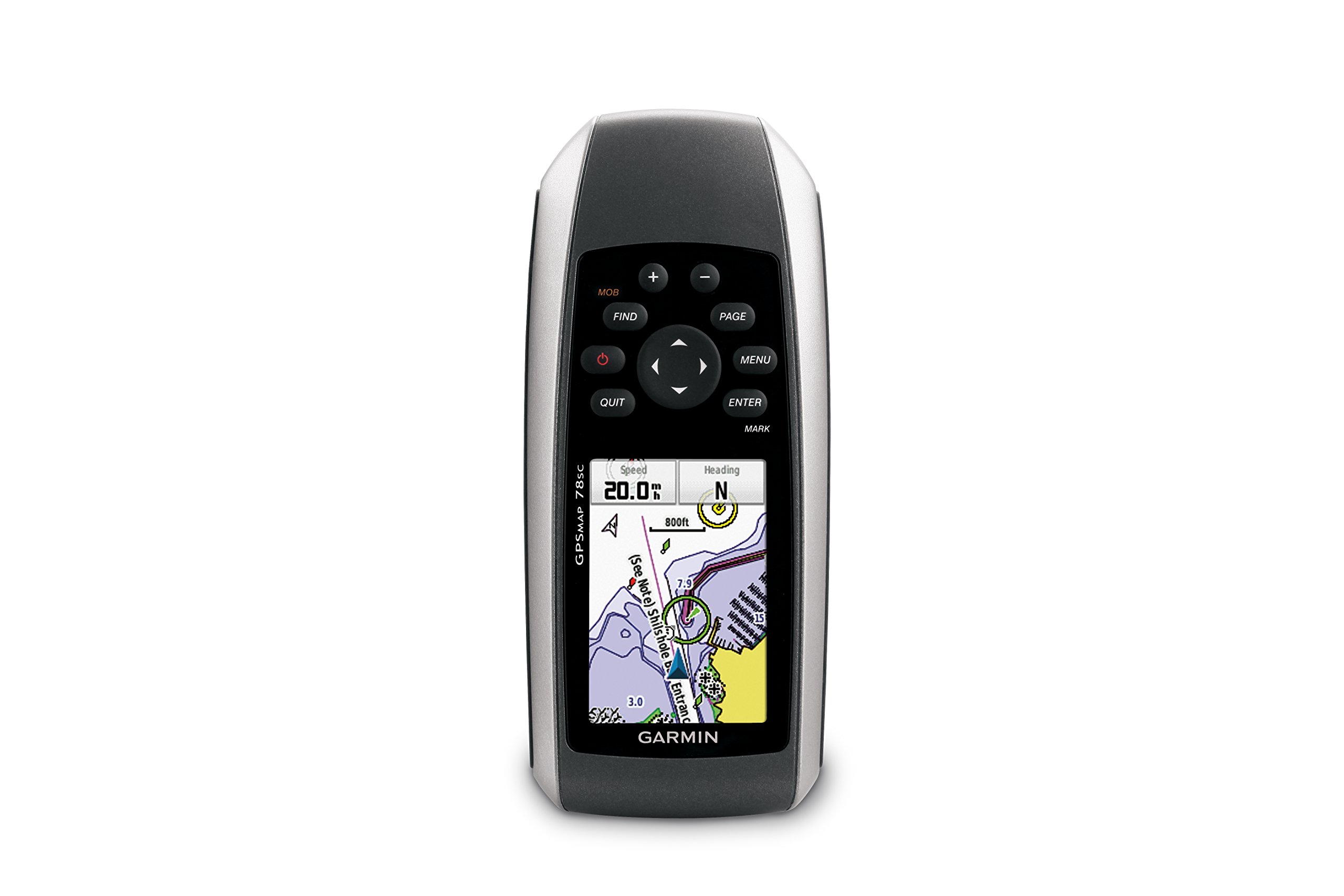
Figure 1 : Face avant view of the Garmin GPSMAP 78sc handheld marine GPS and chartplotter.
Produit terminéview
Caractéristiques principales :
- Marine-friendly handheld with high-sensitivity GPS receiver and 2.6-inch color TFT display.
- Waterproof to IPX7 standards; floats in water.
- Built-in BlueChart g2 U.S./Bahamas coastal charts with shorelines, depth contours, navaids, harbors, marinas, and more.
- Built-in 3-axis tilt-compensated electronic compass and barometric altimeter for heading, altitude, and weather information.
- Wireless sharing of waypoints, tracks, routes, and geocaches with other compatible devices.
Contenu de la boîte :
- GPSMAP 78sc device
- Dragonne
- Câble USB
- Manuel

Figure 2 : Angulaire view of the Garmin GPSMAP 78sc, highlighting its button interface.
Vidéos de produits :
Garmin GPSmap 78 handheld GPS Overview
Cette vidéo offre un aperçu généralview of the Garmin GPSMAP 78 handheld GPS, demonstrating its features and design.
Produit terminéview Vidéo
A concise product overview video from the seller, highlighting key aspects of the device.
Installation
1. Installation des piles :
The GPSMAP 78sc operates on two AA batteries (not included). To install:
- Repérez le couvercle du compartiment à piles à l'arrière de l'appareil.
- Twist the D-ring counter-clockwise to unlock and remove the cover.
- Insérez deux piles AA en respectant la polarité (+ et -).
- Remettez le couvercle en place et tournez l'anneau en D dans le sens des aiguilles d'une montre pour le fixer.

Figure 3 : Retour view of the Garmin GPSMAP 78sc, illustrating the battery compartment.
2. Mise sous/hors tension :
Appuyez et maintenez enfoncé le Pouvoir button (located on the left side) to turn the device on or off. A short press will adjust the backlight.
3. Paramètres initiaux :
Upon first use, the device may prompt you to set language, time zone, and other preferences. Follow the on-screen instructions using the directional pad and ENTRER bouton.
Opérationnel
Navigation Basics:
- Menu principal: Appuyez sur le MENU button twice to access the main menu.
- Bouton Page : Presse PAGE to cycle through the main pages (Map, Compass, Trip Computer, etc.).
- Pavé directionnel : Use the directional pad to scroll through menus, pan the map, or adjust settings.
- Bouton ENTRÉE : Presse ENTRER to select an item or confirm an action.
- Bouton QUITTER : Presse QUITTER to return to the previous page or cancel an action.
Création de points de passage :
To mark your current location as a waypoint:
- Appuyez sur le MARQUE bouton.
- Edit the waypoint name, symbol, and coordinates if desired.
- Sélectionner Fait or Sauvegarder to store the waypoint.
Man Over Board (MOB) Function:
En cas d'urgence, appuyez sur la touche FOULE button to immediately mark the current location and initiate navigation back to that point. This feature is critical for safety in marine environments.
Entretien
Nettoyage de l'appareil :
Essuyez l'appareil avec un chiffon dampened with a mild detergent solution. Dry thoroughly. Avoid using abrasive cleaners or solvents that could damage the device's finish or screen.
Entretien de la batterie:
Always use fresh, high-quality AA batteries. If the device will not be used for an extended period, remove the batteries to prevent leakage and corrosion.
Mises à jour logicielles :
Vérifiez régulièrement votre Garmin website for software updates to ensure optimal performance and access to the latest features. Updates can typically be installed by connecting the device to a computer via the USB cable.
Dépannage
L'appareil ne s'allume pas :
- Assurez-vous que les batteries sont correctement installées et complètement chargées.
- Essayez des piles neuves.
- Vérifiez que les contacts de la batterie ne présentent pas de corrosion.
Signal GPS faible :
- Assurez-vous que l'appareil dispose d'un view du ciel.
- Avoid areas with tall buildings, dense foliage, or other obstructions.
- Allow sufficient time for the device to acquire satellites, especially after being off for a long period.
L'écran ne répond pas :
- Effectuez une réinitialisation logicielle en retirant puis en réinsérant les piles.
- Assurez-vous que l'écran est propre et exempt de débris.
Caractéristiques
| Fonctionnalité | Détail |
|---|---|
| Marque | Garmin |
| Nom du modèle | carte gps |
| Numéro de modèle | 010-00864-02 |
| Taille de l'écran | 2.6 pouces |
| Type d'affichage | Écran LCD |
| Résolution | 160 x 240 pixels |
| Indice d'étanchéité | IPX7 (floats) |
| Autonomie de la batterie | 20 Hours (typical) |
| Type de batterie | 2 piles AA (non incluses) |
| Capacité de stockage de la mémoire | 1 Go |
| Type de mémoire flash compatible | microSD |
| Système de navigation par satellite pris en charge | GPS |
| Caractéristiques spéciales | Rugged case, Barometric altimeter, Garmin Connect compatible, Electromagnetic compass, Garmin HotFix, Custom POIs, Automatic routing, Hunt/fish calendar, Geocaching, Photo navigation |
| Dimensions de l'article L x l x H | 2.6"L x 1.2"l x 6"H |
| Poids de l'article | 7.7 onces |
Garantie et assistance
The Garmin GPSMAP 78sc comes with a 1 Year Limited Warranty. For detailed warranty information, product support, or service inquiries, please refer to the official Garmin website or contact Garmin customer service directly. The included manual also contains contact information and further support resources.