
1. Plus deview
The Casio SL-300SV is a compact, standard function desktop calculator designed for everyday calculations. It features a large 8-digit display and operates using a dual power source, combining solar power with battery backup for reliable use in various lighting conditions. Its durable hard cover provides protection, making it suitable for both home and office environments.
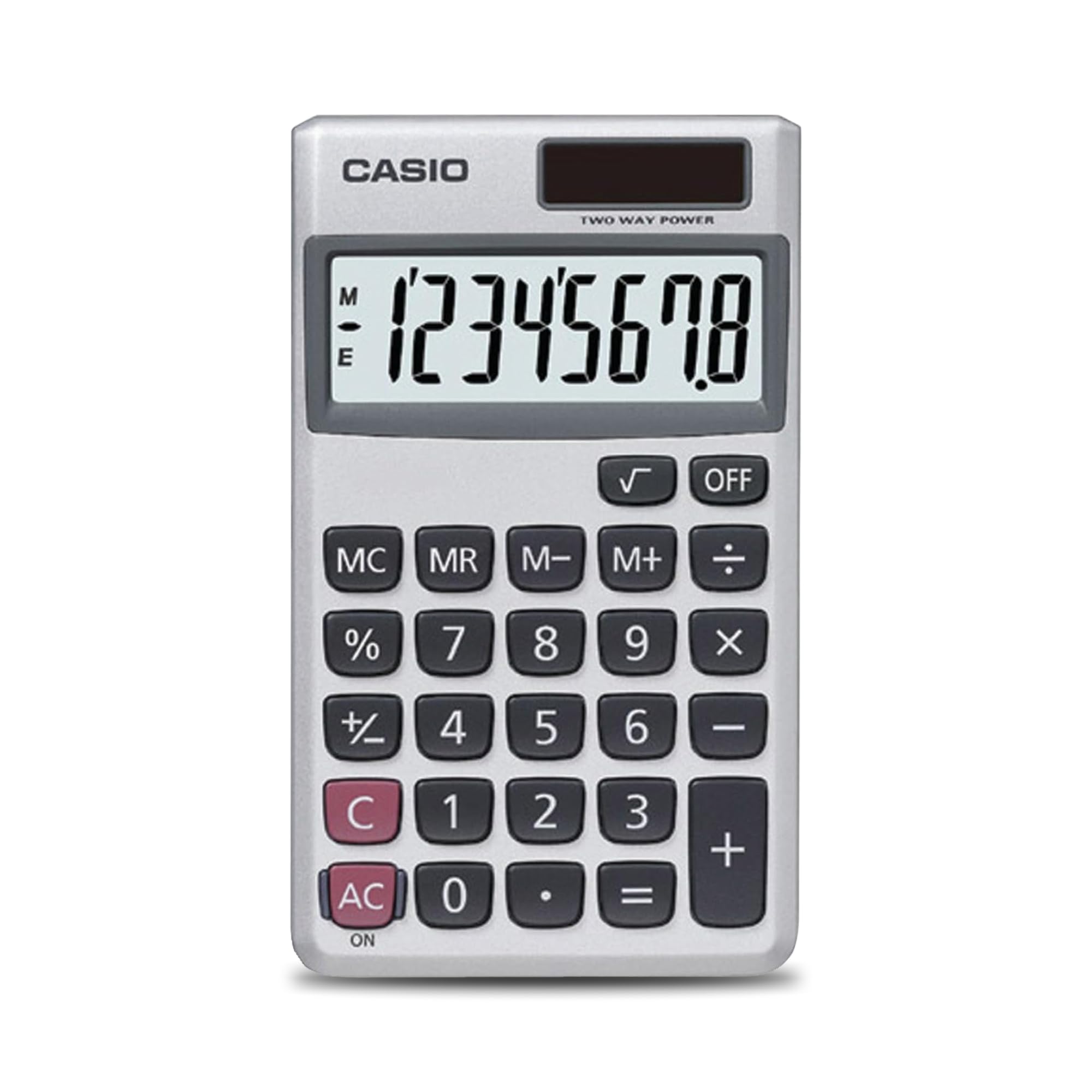
Illustration 1.1 : Avant view of the Casio SL-300SV calculator, highlighting its 8-digit display and key layout.
Caractéristiques principales :
- Conception compacte et portable : Space-saving design that fits easily on any desk or in a briefcase.
- Grand écran à 8 chiffres : Clear and easy-to-read display for accurate results.
- Objectif général : Ideal for basic math, business, and personal use.
- Double source d'alimentation : Operates on solar power with battery backup.
- Durable Hard Cover: Built-in protective case shields the calculator from scratches and wear.
2. Installation
2.1 Déballage et inspection initiale
Carefully remove the calculator from its packaging. Inspect the device for any visible damage. Ensure all components, including the calculator and its protective hard cover, are present.

Image 2.1: The Casio SL-300SV calculator shown with its retail packaging.
2.2 Source d'alimentation
The Casio SL-300SV calculator utilizes a dual power system: solar power and battery backup. Under sufficient light, the calculator will operate using its solar panel. In low-light conditions or when solar power is insufficient, the battery backup will automatically engage.
- Panneau solaire : Located above the display. Ensure it is exposed to light for optimal performance.
- Batterie: The calculator requires 2 product-specific batteries. These are typically pre-installed. If the display is dim or unresponsive in adequate light, battery replacement may be necessary.

Image 2.2 : Gros plan view of the solar panel on the Casio SL-300SV, which provides power in well-lit conditions.
2.3 Attaching the Hard Cover
The calculator comes with a durable hard cover for protection. This cover can be attached to the calculator to shield it from scratches, drops, and everyday wear when not in use or during transport.
Vidéo 2.1 : Un overview demonstrating the physical features and handling of the Casio SL-300SV calculator, including its protective cover.
3. Fonctionnement
This section details the basic functions and operations of your Casio SL-300SV calculator.
3.1 Opérations arithmétiques de base
Perform addition, subtraction, multiplication, and division using the dedicated keys.
- Ajout (+): Saisissez le premier chiffre, appuyez sur +, saisissez le deuxième numéro, puis appuyez sur =.
- Soustraction (-): Saisissez le premier chiffre, appuyez sur -, saisissez le deuxième numéro, puis appuyez sur =.
- Multiplication (×) : Saisissez le premier chiffre, appuyez sur ×, saisissez le deuxième numéro, puis appuyez sur =.
- Division (÷) : Saisissez le premier chiffre, appuyez sur ÷, saisissez le deuxième numéro, puis appuyez sur =.
3.2 Fonctions spéciales
- Pourcentagetage (%) : To calculate a percentage, enter the number, press ×, entrez le pourcentagetage value, then press %. Par exempleample, to find 15% of 200, enter 200 × 15 %.
- Racine carrée (√) : Enter the number, then press √.
- Changement de signe (+/-) : Appuyez sur le +/- key to change the sign of the displayed number.
3.3 Fonctions de mémoire
The calculator includes independent memory functions:
- M+ : Ajoute la valeur affichée à la mémoire.
- M- : Soustrait la valeur affichée de la mémoire.
- MR (rappel de mémoire) : Rappelle la valeur stockée en mémoire.
- MC (effacement de la mémoire) : Efface la valeur stockée en mémoire.
3.4 Mise sous/hors tension
- MARCHE/CA : Presse MARCHE/CA to turn on the calculator or clear the current entry and memory.
- OFF: Presse DÉSACTIVÉ to turn off the calculator. The calculator also features an automatic power-off function after approximately 7 minutes and 10 seconds of inactivity to conserve power.

Image 3.1: Visual representation of the Casio SL-300SV calculator's display, calculation, memory, and design features.
4. Entretien
4.1 Nettoyage
To clean the calculator, wipe it with a soft, dry cloth. Do not use abrasive cleaners, solvents, or harsh chemicals, as these can damage the casing ou affichage.
4.2 Stockage
When not in use, store the calculator in a cool, dry place, away from direct sunlight and extreme temperatures. Utilize the provided hard cover to protect the display and keys from dust and physical damage.
4.3 Remplacement de la batterie
The Casio SL-300SV uses 2 product-specific batteries as backup for the solar panel. If the display becomes dim or unresponsive even in bright light, the batteries may need replacement. Refer to the diagram on the back of the calculator or consult the manufacturer's website for specific battery type and replacement instructions. It is recommended to have battery replacement performed by a qualified service technician if you are unsure.
5. Dépannage
If you encounter issues with your Casio SL-300SV calculator, refer to the following common problems and solutions:
| Problème | Solution |
|---|---|
| L'écran est vide ou sombre. | Ensure the solar panel is exposed to sufficient light. If the issue persists, the backup batteries may need replacement. |
| La calculatrice ne s'allume pas. | Appuyez sur le MARCHE/CA button. Verify the solar panel is receiving light. If not, check or replace batteries. |
| Résultats de calcul incorrects. | Presse MARCHE/CA to clear any previous calculations or memory entries. Re-enter the calculation carefully. |
| Les touches ne répondent pas. | Ensure no debris is lodged under the keys. Press MARCHE/CA to reset. If the problem continues, contact customer support. |
6. Spécifications
Detailed technical specifications for the Casio SL-300SV calculator.
- Marque: Casio
- Nom du modèle : SL-300SV
- Type de calculatrice : Fonction standard
- Type d'affichage : LCD, 8 chiffres
- Taille de l'écran : 3.2 pouces
- Source d'alimentation : Solar Powered with Battery Backup (2 product-specific batteries required)
- Couleur: Argent
- Matériau du boîtier : Plastique
- Dimensions de l'article (L x l) : 4.63 po L x 2.75 po l
- Poids de l'article : 0.27 g
- Fabricant: Casio
- Code à barres : 014445147879 (and others)

Image 6.1: The Casio SL-300SV calculator displaying its compact dimensions of 4.7 inches in length and 2.8 inches in width.
7. Garantie et assistance
For warranty information and customer support, please contact the manufacturer directly. Details regarding the warranty period and terms are typically provided with the product packaging or can be found on the official Casio website.
- Description de la garantie : Contacter le fabricant
- Fabricant: Casio


