
1. Introduction
Thank you for choosing the Casio PQ-31-1EF Digital Wake Up Timer. This manual provides detailed instructions for the proper setup, operation, and maintenance of your new digital alarm clock. Please read this manual thoroughly before using the product to ensure correct usage and to prevent damage.
2. Précautions de sécurité
- N’exposez pas l’appareil à des températures extrêmes, à la lumière directe du soleil ou à une forte humidité.
- Évitez de laisser tomber l'appareil ou de le soumettre à des chocs violents.
- Ne tentez pas de démonter ou de modifier l'appareil. Cela annulera la garantie.
- Gardez les piles hors de portée des enfants. En cas d'ingestion, consulter immédiatement un médecin.
- Jetez les piles usagées conformément aux réglementations locales.
3. Contenu du colis
Veuillez vérifier que tous les articles sont présents dans votre colis :
- 1 x Casio PQ-31-1EF Digital Wake Up Timer
- 2 x Lithium Metal batteries (pre-installed or included separately)
- 1 x Manuel d'utilisation (ce document)
4. Produit terminéview
The Casio PQ-31-1EF is a compact digital alarm clock designed for reliability and ease of use. It features a clear digital display, an integrated alarm function, and a light for visibility in low-light conditions. The sturdy case provides impact resistance for daily use.
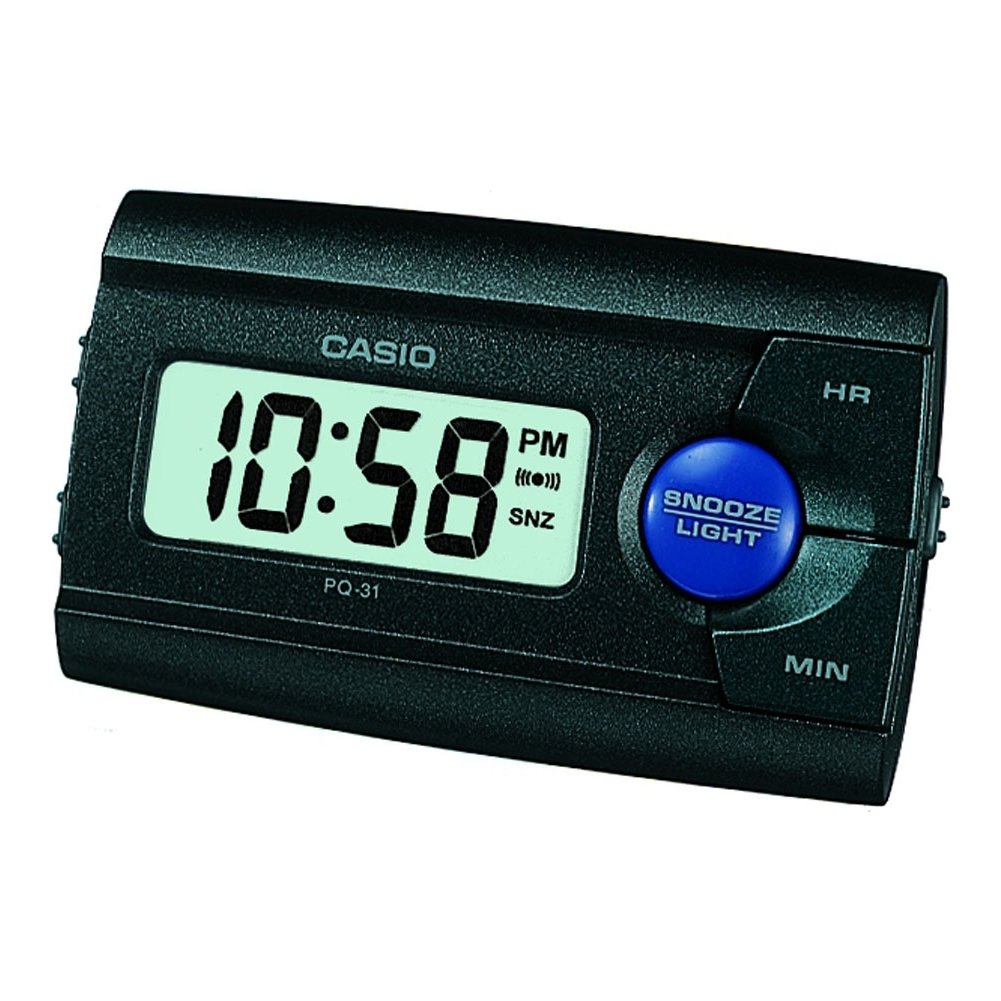
Figure 1 : Face avant view of the Casio PQ-31-1EF Digital Wake Up Timer. Shows the digital display and general shape of the device.
Button Functions (Typical Layout - Refer to actual device for exact labels):
- MODE/SET Button: Used to switch between time, alarm, and timer modes, and to confirm settings.
- ADJUST/+/H Button: Used to increase values (hours) or move forward in settings.
- ADJUST/-/M Button: Used to decrease values (minutes) or move backward in settings.
- Bouton LUMIÈRE : Active le rétroéclairage pendant quelques secondes.
- Interrupteur MARCHE/ARRÊT DE L'ALARME : Active ou désactive la fonction d'alarme.
- Le bouton de la sieste: Temporarily silences the alarm and activates snooze function.
5. Installation
5.1 Installation de la batterie
Your Casio PQ-31-1EF requires 2 Lithium Metal batteries. These are typically included with the product.
- Repérez le couvercle du compartiment à piles à l'arrière ou en dessous de l'appareil.
- Open the cover by sliding it or unscrewing it (if applicable).
- Insert the 2 Lithium Metal batteries, ensuring the positive (+) and negative (-) terminals are aligned correctly according to the diagram inside the compartment.
- Replacez soigneusement le couvercle du compartiment à piles.
The clock display should now activate. If not, check battery orientation or replace with fresh batteries.
5.2 Réglage initial de l'heure
- En mode d'affichage normal de l'heure, maintenez enfoncée la touche MODE SÉLÉCTIONNÉ Appuyez sur le bouton pendant quelques secondes jusqu'à ce que les chiffres des heures commencent à clignoter.
- Utilisez le ADJUST/+ or ADJUST/- buttons to set the correct hour. Pay attention to AM/PM indicators if your clock uses a 12-hour format.
- Appuyez sur le MODE SÉLÉCTIONNÉ Appuyez de nouveau sur le bouton pour passer au réglage des minutes. Les chiffres des minutes clignoteront.
- Utilisez le ADJUST/+ or ADJUST/- boutons pour régler les minutes.
- Appuyez sur le MODE SÉLÉCTIONNÉ button one more time to exit the time setting mode. The time will now be set.
6. Mode d'emploi
6.1 Réglage de l'alarme
The daily alarm reminds you of events that recur every day.
- Depuis l'affichage normal de l'heure, appuyez sur MODE SÉLÉCTIONNÉ button once to enter alarm setting mode. The alarm time will be displayed, and the hour digits may flash.
- Utilisez le ADJUST/+ or ADJUST/- boutons pour régler l'heure de l'alarme souhaitée.
- Appuyez sur le MODE SÉLÉCTIONNÉ Appuyez à nouveau sur le bouton pour passer au réglage des minutes.
- Utilisez le ADJUST/+ or ADJUST/- boutons pour régler la durée de l'alarme (en minutes).
- Appuyez sur le MODE SÉLÉCTIONNÉ button one more time to confirm the alarm setting and return to normal time display.
6.2 Activation/Désactivation de l'alarme
To turn the alarm ON or OFF, locate the ALARME ON / OFF switch (usually on the side or back of the unit) and slide it to the desired position. An alarm icon will typically appear on the display when the alarm is active.
6.3 Utilisation de la fonction Snooze
Lorsque l'alarme sonne, appuyez sur la ROUPILLON button (often a large button on top of the unit). The alarm will temporarily stop and sound again after a few minutes (typically 5-10 minutes, depending on the model).
6.4 Utilisation du rétroéclairage
To illuminate the clock face in dark environments, press the LUMIÈRE button. The light-emitting diode (LED) will illuminate the display for a short period, then automatically turn off.
7. Entretien
7.1 Nettoyage de l'appareil
To clean the Casio PQ-31-1EF, wipe it gently with a soft, dry cloth. Do not use abrasive cleaners, solvents, or chemical sprays, as these can damage the casing et affichage.
7.2 Remplacement de la batterie
When the display becomes dim or the clock functions erratically, it is time to replace the batteries. Follow the steps in Section 5.1 Battery Installation to replace the 2 Lithium Metal batteries. Ensure proper disposal of old batteries.
8. Dépannage
| Problème | Cause possible | Solution |
|---|---|---|
| L'écran est vide ou sombre. | Les piles sont mortes ou mal installées. | Remplacez les piles par des neuves en respectant la polarité. |
| L'alarme ne sonne pas. | Alarm is not activated or volume is too low (if adjustable). | Ensure the ALARM ON/OFF switch is in the ON position. Check alarm settings. |
| L'heure est incorrecte. | L'heure n'était pas correctement réglée ou les piles étaient retirées. | Reset the time following instructions in Section 5.2. |
| Les boutons ne répondent pas. | Problème logiciel temporaire ou batterie faible. | Retirez puis réinsérez les piles pour réinitialiser l'appareil. Remplacez les piles si nécessaire. |
9. Spécifications
| Fonctionnalité | Détail |
|---|---|
| Numéro de modèle | PQ-31-1EF |
| Marque | Casio |
| Type d'affichage | Numérique |
| Couleur | Black (Unit color, display is typically grey/LCD) |
| Source d'énergie | Alimenté par batterie |
| Type de batterie | 2 x Lithium Metal batteries |
| Dimensions du produit (L x H) | 8.6 cm (largeur) x 5 cm (hauteur) |
| Poids de l'article | 45.4 gramme |
| Caractéristiques spéciales | Alarm, Backlight (LED), Impact Resistance |
| Type de montage | Support de table |
| Utilisation intérieure/extérieure | Intérieur |
10. Garantie et assistance
Casio products are manufactured to high-quality standards and are backed by a manufacturer's warranty. For specific warranty terms and conditions, please refer to the warranty card included with your purchase or visit the official Casio website de votre région.
If you encounter any issues or require technical assistance, please contact Casio customer support through their official website or the contact information provided in your product packaging. Please have your model number (PQ-31-1EF) and proof of purchase ready when contacting support.
Remarque : Les conditions de garantie peuvent varier selon la région.