
Introduction
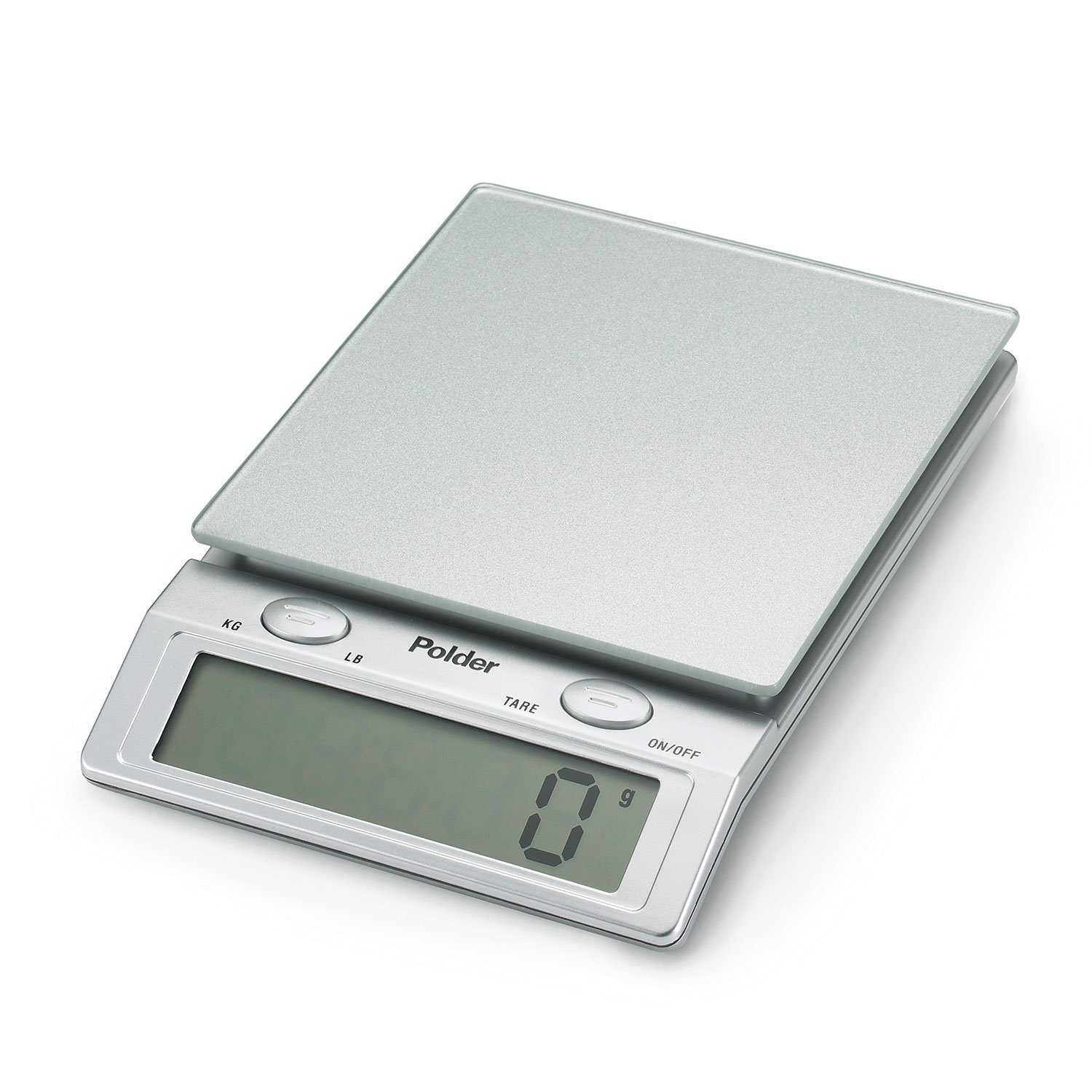
This manual provides essential information for the safe and efficient operation of your Polder Easy-Read Digital Glass Top Scale, Model KSC-310-28. Designed for precision and ease of use, this kitchen scale features an easy-to-clean glass top and a large digital display. It is suitable for various kitchen tasks, from baking to portion control.
Contenu du colis
- Polder Easy-Read Digital Glass Top Scale
- 4 piles AAA
- Manuel d'instructions (ce document)
Installation
Installation de la batterie
- Localisez le compartiment à piles sous la balance.
- Ouvrez le couvercle du compartiment à piles.
- Insérez les 4 piles AAA en veillant à respecter la polarité (+/-) indiquée à l'intérieur du compartiment.
- Fermez soigneusement le couvercle du compartiment à piles.
Placement initial
Place the scale on a hard, flat, and stable surface to ensure accurate measurements. Avoid placing it on soft or uneven surfaces.
Mode d'emploi
Marche/Arrêt
- Pour inverser la balance ON, appuyez sur le MARCHE/ARRÊT button. The display will show '0' when ready.
- Pour inverser la balance DÉSACTIVÉ, appuyez et maintenez la touche MARCHE/ARRÊT button for a few seconds. The scale also features an automatic shut-off function after a period of inactivity to conserve battery life.
Pesage de base
- Ensure the scale is on a flat surface and powered on, displaying '0'.
- Place the item to be weighed directly onto the glass platform.
- Read the weight displayed on the large digital screen. The scale measures up to 11 lbs. (5 kg.) in 0.1 oz. or 1 gram increments.

Tare Function (Add and Weigh)
The Tare function allows you to weigh multiple ingredients consecutively in the same container without removing previous items. This is useful for recipes requiring precise measurements of several components.
- Placez un récipient vide sur la balance. L'écran affichera son poids.
- Appuyez sur le FORT bouton. L'affichage se réinitialisera à « 0 ».
- Ajoutez votre premier ingrédient dans le récipient. L'écran affichera le poids de cet ingrédient uniquement.
- Pour ajouter un autre ingrédient, appuyez sur FORT button again to reset the display to '0'.
- Ajoutez l'ingrédient suivant. Répétez cette opération pour tous les ingrédients suivants.
Conversion d'unités
To switch between measurement units (pounds/ounces and kilograms/grams), press the KG / LB button located on the scale. The display will cycle through the available units.
Entretien
Nettoyage
- To clean the glass top, wipe it with a damp chiffon avec de l’eau et du savon doux.
- Avoid abrasive cleaners or harsh chemicals, as these may damage the surface.
- Ne pas immerger la balance dans l'eau ni la placer sous l'eau courante.
- S'assurer que la balance est parfaitement sèche avant de la ranger ou de l'utiliser à nouveau.
Dépannage
- Lectures inexactes : Ensure the scale is placed on a hard, flat, and stable surface. Uneven surfaces can affect accuracy. Avoid placing the scale near strong electromagnetic fields.
- L'écran ne s'allume/ne s'éteint pas : Check if the batteries are correctly installed and have sufficient charge. Replace all four AAA batteries if necessary.
- Erratic Display/Fluctuating Readings: This can sometimes be caused by low batteries or corrosion on battery contacts. Replace batteries and clean contacts if visible corrosion is present. Ensure no objects are touching the scale platform or buttons during weighing.
- Display Showing 'E' or 'Err': This typically indicates an overload. Remove items from the scale immediately to prevent damage. The maximum capacity is 11 lbs (5 kg).
Caractéristiques
| Fonctionnalité | Détail |
|---|---|
| Modèle | KSC-310-28 |
| Marque | polder |
| Capacité de poids maximale | 11 livres (5 kg) |
| Précision de lecture | +/- 1 gram (0.1 oz) |
| Type d'affichage | Écran LCD |
| Type de matériau | Verre |
| Source d'énergie | 4 piles AAA (incluses) |
| Dossier spécial | Auto Shut Off, Tare Function |
| Code UPC | 047188310002 |
Garantie et assistance
This Polder product is covered by a manufacturer's warranty. For specific warranty details, claims, or technical support, please contact Polder Products, LLC directly. Keep your purchase receipt as proof of purchase.
Manufacturer: Polder Products, LLC
For further assistance, please visit the official Polder website ou consultez les informations de contact fournies avec l'emballage de votre produit.