
1. Introduction
This manual provides instructions for the setup, operation, and maintenance of your Bose MediaMate Computer Speakers. These speakers are designed to enhance the audio experience for your computer, whether for music, movies, or gaming. The compact design and upward-angled sound projection optimize audio delivery for desktop use, occupying minimal desk space.
2. Consignes de sécurité
Please read and follow all safety instructions before using this product to prevent electric shock, fire, or injury. Keep this manual for future reference.
- Do not expose the speakers to water or moisture.
- Ne placez pas les haut-parleurs à proximité de sources de chaleur telles que des radiateurs, des bouches de chauffage, des poêles ou d'autres appareils (y compris amp(échangeurs thermiques) qui produisent de la chaleur.
- Utilisez uniquement les accessoires spécifiés par le fabricant.
- Débranchez cet appareil en cas d’orage ou lorsqu’il n’est pas utilisé pendant de longues périodes.
- Confiez toute réparation à un technicien qualifié. Une réparation est nécessaire lorsque l'appareil a été endommagé de quelque façon que ce soit, par exemple si le cordon d'alimentation ou la prise sont endommagés, si du liquide a été renversé ou si des objets sont tombés à l'intérieur de l'appareil, si l'appareil a été exposé à la pluie ou à l'humidité, s'il ne fonctionne pas normalement ou s'il est tombé.
3. Contenu du colis
Vérifiez que tous les éléments sont présents dans votre colis :
- Bose MediaMate Computer Speakers (2 units)
- Adaptateur secteur
- Audio Cable (3.5mm stereo jack)
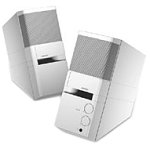
Image: The Bose MediaMate Computer Speakers in Gray. The image shows two compact speakers, one with visible volume and mix controls, and a headphone jack.
4. Installation
Follow these steps to set up your Bose MediaMate Computer Speakers:
- Placement: Place the speakers on a flat, stable surface on either side of your computer monitor. Ensure they are angled slightly upward towards your listening position for optimal sound.
- Connectez le câble audio : Connect the 3.5mm audio cable from the back of the primary speaker (the one with controls) to the audio output jack on your computer.
- Connecter l'alimentation : Plug the power adapter into the power input on the primary speaker, then plug the adapter into a wall outlet.
- Mise sous tension : Turn on the speakers using the volume knob. The power indicator light should illuminate.
5. Mode d'emploi
Once set up, operating your MediaMate speakers is straightforward:
- Contrôle du volume : Use the large knob labeled "VOLUME" on the front of the primary speaker to adjust the overall sound level.
- Contrôle du mixage : The "MIX" knob allows you to blend audio from two different sources if you have a second device connected to the auxiliary input.
- Prise casque: For private listening, plug your headphones into the headphone jack located on the front of the primary speaker. This will mute the speakers.
- Doubles entrées : The speakers feature dual inputs, allowing you to connect and mix two audio sources simultaneously. For example, you can connect your computer and a portable music player.
6. Entretien
Pour garantir la longévité et les performances optimales de vos haut-parleurs :
- Nettoyage: Use a soft, dry cloth to clean the exterior surfaces of the speakers. Do not use liquid cleaners or aerosols.
- Poussière: Dépoussiérez régulièrement les grilles des haut-parleurs pour éviter toute accumulation de poussière susceptible d'affecter la qualité sonore.
- Stockage: Si vous devez entreposer les haut-parleurs pendant une période prolongée, débranchez-les de l'alimentation et rangez-les dans un endroit frais et sec.
7. Dépannage
If you encounter issues with your Bose MediaMate speakers, refer to the following common problems and solutions:
| Problème | Cause possible | Solution |
|---|---|---|
| Pas de son |
|
|
| Son déformé |
|
|
| Un seul haut-parleur fonctionne |
|
|
8. Spécifications
- Marque: Bose
- Modèle: MediaMate
- Connectivité : 3.5mm Audio Input, AC Power
- Sortie audio : Stéréo
- Type de haut-parleur : Multimédia
- Matériel: Métal
- Taille du haut-parleur : 6 Centimeters (Audio Driver)
- Poids de l'article : 3 livres
- Couleur: Gris
9. Garantie et assistance
Bose MediaMate Computer Speakers come with a limited warranty. For specific warranty details and duration, please refer to the warranty card included with your product or visit the official Bose website.
For technical support, product registration, or service inquiries, please contact Bose customer service:
- Téléphone: 800-444-2673
- Website: www.bose.com
Please have your product model number (MediaMate) and purchase date available when contacting support.